
FullBright
This modification adds FullBright - you'll forget about darkness forever!
Screenshots
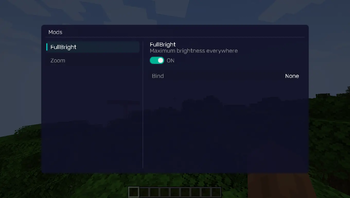
About this Mod
REQUIREMENTS
NightVisuals GUI
EN:
NightVisuals FullBright is a modification that removes all darkness from the game, making every block fully illuminated regardless of light level. The mod is designed for players who want maximum visibility in caves, at night, and in dark areas without placing torches.
Core Features
Instant Full Brightness: All blocks are rendered at maximum light level. Caves, the Nether, the End, and nighttime are fully visible without any light sources.
Toggle On/Off: Easily enable or disable FullBright through the NightVisuals in-game GUI menu. No need to restart the game or edit config files.
Zero Performance Impact: The mod works by overriding the lightmap framebuffer — no additional rendering passes, no FPS drops.
No Torch Spam: Explore freely without wasting inventory space on torches or other light sources.
Configuration
FullBright has no additional settings — it's either on or off. Toggle it through the NightVisuals GUI (default key: RShift).
Installation
- Install a compatible version of the mod loader (Fabric API).
- Install NightVisuals GUI (required dependency).
- Place the downloaded FullBright mod file into the mods folder.
- Launch the game.
RU:
NightVisuals FullBright — это модификация, полностью убирающая темноту из игры. Все блоки отображаются с максимальным уровнем освещения вне зависимости от реального уровня света. Мод создан для игроков, которым нужна максимальная видимость в пещерах, ночью и в тёмных зонах без необходимости расставлять факелы.
Основной функционал
Мгновенная полная яркость: Все блоки рендерятся на максимальном уровне освещения. Пещеры, Незер, Энд и ночное время полностью видимы без каких-либо источников света.
Включение/Выключение: Легко включайте и отключайте FullBright через внутриигровое меню NightVisuals GUI. Не нужно перезапускать игру или редактировать конфиги.
Нулевое влияние на производительность: Мод работает через перезапись lightmap framebuffer — никаких дополнительных проходов рендеринга, никаких просадок FPS.
Без спама факелами: Исследуйте свободно, не тратя место в инвентаре на факелы и другие источники света.
Настройка
FullBright не имеет дополнительных настроек — он либо включён, либо выключен. Переключается через NightVisuals GUI (клавиша по умолчанию: RShift).
Установка
- Установите совместимую версию загрузчика модов (Fabric API).
- Установите NightVisuals GUI (обязательная зависимость).
- Поместите скачанный файл мода FullBright в папку mods.
- Запустите игру.
Available Versions
How to Install FullBright on Your Server
Order Server
Order a Minecraft Java server with at least 3 GB RAM (4 GB recommended).
Set fabric Loader
In the panel under "Egg", select the fabric loader and matching Minecraft version (1.21.4).
Install Mod
Open the mod browser in the dashboard and search for "FullBright". Click "Install" – done! Alternatively, upload the .jar via SFTP to the /mods folder.
Compatibility
Mod Loaders
Minecraft Versions
1.21.4
Server-side
✗ UnsupportedRecommended RAM
4 GB(min. 3 GB)Frequently Asked Questions
FullBright server crashes on startup – what to do?
Most common cause: wrong fabric version or insufficient RAM. Check the server log (latest.log) for "OutOfMemoryError" or "Mixin" errors. With Mado Hosting: ensure at least 3 GB RAM is allocated and the loader matches the mod version (1.21.4). You can switch loaders with one click in the panel.
Is FullBright compatible with fabric?
FullBright officially supports fabric for Minecraft 1.21.4. The Mado dashboard automatically detects incompatible loader combinations.
Server lagging with FullBright – how to optimize performance?
Recommended RAM: 4 GB (per 8 players). Use /spark profiler to check if FullBright consumes the most tick time. Common fixes: reduce server view-distance to 8-10, install "performant" or "starlight" as supplementary mods on Forge. With Mado Hosting, your server runs on NVMe SSDs with dedicated CPU cores for minimal latency.
Similar Mods




![[ETF] Entity Texture Features](https://cdn.modrinth.com/data/BVzZfTc1/af683d206d50b05258d865b0d6e4aa2f2cee12f2_96.webp)
![[EMF] Entity Model Features](https://cdn.modrinth.com/data/4I1XuqiY/6e5bbd0d06b1741bfdab6c0cfab6de8fdaf0064c_96.webp)
Rent Modded Server
Install FullBright with just one click on your server.