
Zoom
The modification includes a convenient Zoom.
Screenshots
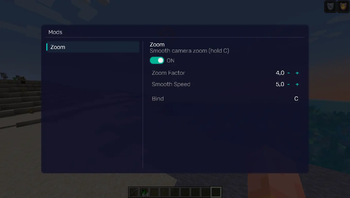
About this Mod
REQUIREMENTS
NightVisuals GUI
EN:
NightVisuals Zoom is a modification that adds a customizable zoom feature to the game. The mod is optimized for improved viewing convenience and offers flexible configuration options tailored to individual player preferences.
Core Features
Hold-to-Activate: Zoom only works while the assigned key is held down. Upon releasing the button, the camera instantly returns to its default state.
Keybinding: Full integration with the game's standard controls menu. You can assign any convenient key or mouse button to activate the zoom.
Zoom Factor (Magnification Level): A slider to adjust the zoom strength. Allows you to set anything from a slight magnification for better overview to a strong zoom for detailed inspection of distant objects.
Zoom Speed: Transition dynamics adjustment. Change the animation time for zooming in and out — from an instant snap to a smooth transition.
Configuration
All parameters can be changed through the configuration file or the in-game settings menu:
Key Assignment: Go to control settings, find the NightVisuals category, and assign your key.
Zoom Factor: Set the magnification coefficient (e.g., from 2.0 to 10.0).
Zoom Speed: Adjust the smoothness value to achieve a comfortable visual effect.
Installation
- Install a compatible version of the mod loader (Fabric API).
- Place the downloaded mod file into the mods folder.
- Launch the game.
RU:
NightVisuals Zoom — это модификация, добавляющая в игру настраиваемую функцию масштабирования (зума). Мод оптимизирован для повышения удобства обзора и предлагает гибкие параметры конфигурации под индивидуальные предпочтения игрока.
Основной функционал
Активация по зажатию: Масштабирование работает исключительно во время удержания назначенной клавиши. При отпускании кнопки камера мгновенно возвращается в исходное состояние.
Привязка клавиш: Полная интеграция в стандартное меню управления игры. Вы можете назначить любую удобную клавишу или кнопку мыши для активации зума.
Zoom Factor (Кратность приближения): Ползунок регулировки силы масштабирования. Позволяет настроить как незначительное приближение для улучшения обзора, так и сильное увеличение для детального осмотра удаленных объектов.
Скорость зума: Настройка динамики перехода. Доступно изменение времени анимации приближения и отдаления — от мгновенной смены кадра до плавного перехода.
Настройка
Все параметры изменяются через конфигурационный файл или внутриигровое меню настроек:
Назначение кнопки: Перейдите в настройки управления, найдите категорию NightVisuals и укажите клавишу.
Zoom Factor: Установите коэффициент кратности (например, от 2.0 до 10.0).
Скорость зума: Отрегулируйте значение плавности для достижения комфортного визуального эффекта.
Установка
- Установите совместимую версию загрузчика модов (Fabric API).
- Поместите скачанный файл модификации в папку mods.
- Запустите игру.
Available Versions
How to Install Zoom on Your Server
Order Server
Order a Minecraft Java server with at least 3 GB RAM (4 GB recommended).
Set fabric Loader
In the panel under "Egg", select the fabric loader and matching Minecraft version (1.21.4).
Install Mod
Open the mod browser in the dashboard and search for "Zoom". Click "Install" – done! Alternatively, upload the .jar via SFTP to the /mods folder.
Compatibility
Mod Loaders
Minecraft Versions
1.21.4
Server-side
✗ UnsupportedRecommended RAM
4 GB(min. 3 GB)Frequently Asked Questions
Zoom server crashes on startup – what to do?
Most common cause: wrong fabric version or insufficient RAM. Check the server log (latest.log) for "OutOfMemoryError" or "Mixin" errors. With Mado Hosting: ensure at least 3 GB RAM is allocated and the loader matches the mod version (1.21.4). You can switch loaders with one click in the panel.
Is Zoom compatible with fabric?
Zoom officially supports fabric for Minecraft 1.21.4. The Mado dashboard automatically detects incompatible loader combinations.
Server lagging with Zoom – how to optimize performance?
Recommended RAM: 4 GB (per 8 players). Use /spark profiler to check if Zoom consumes the most tick time. Common fixes: reduce server view-distance to 8-10, install "performant" or "starlight" as supplementary mods on Forge. With Mado Hosting, your server runs on NVMe SSDs with dedicated CPU cores for minimal latency.
Similar Mods




![[ETF] Entity Texture Features](https://cdn.modrinth.com/data/BVzZfTc1/af683d206d50b05258d865b0d6e4aa2f2cee12f2_96.webp)
![[EMF] Entity Model Features](https://cdn.modrinth.com/data/4I1XuqiY/6e5bbd0d06b1741bfdab6c0cfab6de8fdaf0064c_96.webp)
Rent Modded Server
Install Zoom with just one click on your server.