
Nylon
Library for creating serverside content using Animated-Java for custom models and animations.
Screenshots
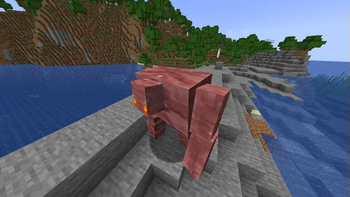
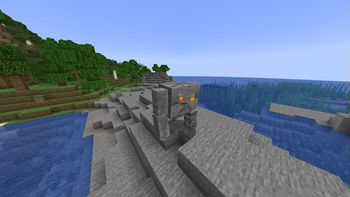
About this Mod
Nylon
It's a library for creating serverside content using custom models and animations, without requiring client mods.\
Nylon is a bridge between models created with Animated Java and serverside
content (like entities and blocks) written using Polymer, allowing you to combine
fancy custom models, textures and animations made in Blockbench with completely custom
block / mob logic.
Setup
repositories {
    maven { url "https://api.modrinth.com/maven" }
}

dependencies {
    modImplementation "maven.modrinth:nylon:[TAG]"
}
Features
Smooth and accurate animations, using mounted display entities with configurable rotation interpolation instead of
armor stands to ensure smooth rotations and that all the model pieces positions are in sync.Minimal impact on server performance. Nylon is highly optimized and models are updated asynchronously. Nylon also
makes full use of vanilla's packet flush suspending to reduce network load and ping spikes.Support for most Animated Java features:
- Variants: Ability to instantly switch between different models and textures.
- Locators: Can be used to listen for pose updates on a specific part of the model. These listeners
can be used to add extra animated objects to the model, such as particles and other entities. - Animation frame effects: Certain effects that can be conditionally applied on a specific frame of an animation.
For example, running a command, playing a sound or changing the variant. - Many others like bone blacklists, animation loop modes, start and loop delays, etc.
- Out of the box support for many vanilla mob features:
- Vanilla accurate hitboxes visible in F3+B, using interactions.
- The ability to ride on top of the mob, without visually lagging behind.
- Working invisibility, glowing, fire animation and most particles (like potion effects, crits and death).
- Correctly rendering leashes, death animations and smooth clientside collisions with players.
- Dynamic hitboxes and dynamic mob scale (an example use case of this is baby mobs).
- The model won't tick if the entity wasn't ticked, reducing server and network load.
- Uses the display entities culling boxes to reduce client lag.
Commands
/nylon model create id|filepath <model>- Spawns a model ingame based on mob identifier or a file path (from
server root folder) to the model json file. These models are not saved and are mostly intended for testing./nylon model <targets> animation|variant|scale <args>- Modifies the model of any entity selected in<targets>
that has a custom model. Allows you to temporarily change the scale of the model, update the variant and play /
pause / stop animations. This is also mostly intended for testing and playing with the models.
Available Versions
How to Install Nylon on Your Server
Order Server
Order a Minecraft Java server with at least 3 GB RAM (4 GB recommended).
Set fabric Loader
In the panel under "Egg", select the fabric loader and matching Minecraft version (26.2).
Install Mod
Open the mod browser in the dashboard and search for "Nylon". Click "Install" – done! Alternatively, upload the .jar via SFTP to the /mods folder.
Compatibility
Mod Loaders
Minecraft Versions
26.2, 26.1.2, 26.1.1 (+16 more)
Server-side
✓ RequiredRecommended RAM
4 GB(min. 3 GB)Frequently Asked Questions
Nylon server crashes on startup – what to do?
Most common cause: wrong fabric version or insufficient RAM. Check the server log (latest.log) for "OutOfMemoryError" or "Mixin" errors. With Mado Hosting: ensure at least 3 GB RAM is allocated and the loader matches the mod version (26.2). You can switch loaders with one click in the panel.
Is Nylon compatible with fabric?
Nylon officially supports fabric for Minecraft 26.2, 26.1.2, 26.1.1. The Mado dashboard automatically detects incompatible loader combinations.
Server lagging with Nylon – how to optimize performance?
Recommended RAM: 4 GB (per 8 players). Use /spark profiler to check if Nylon consumes the most tick time. Common fixes: reduce server view-distance to 8-10, install "performant" or "starlight" as supplementary mods on Forge. With Mado Hosting, your server runs on NVMe SSDs with dedicated CPU cores for minimal latency.
Similar Mods




![[ETF] Entity Texture Features](https://cdn.modrinth.com/data/BVzZfTc1/af683d206d50b05258d865b0d6e4aa2f2cee12f2_96.webp)
![[EMF] Entity Model Features](https://cdn.modrinth.com/data/4I1XuqiY/6e5bbd0d06b1741bfdab6c0cfab6de8fdaf0064c_96.webp)
Rent Modded Server
Install Nylon with just one click on your server.