
OBS Overlay
Hide HUD elements from OBS stream by making them an overlay
Screenshots
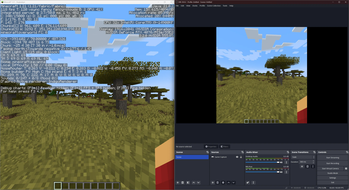
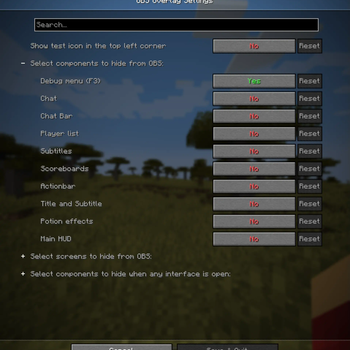
About this Mod

Installation
This mod is client-only.
At the moment only Windows is supported.
Dependencies
- Cloth Config API
- Architectury API
- Fabric API (Fabric only)
- Mod Menu (Optional, Fabric only)
Features
This mod lets you hide any combination of the following components:
- Debug menu (F3)
- Chat (without input bar)
- Chat input bar
- Player list (TAB)
- Subtitles (accessibility)
- Scoreboard
- Title and Subtitle from /title
- Actionbar from /title
- Effect display
- Main HUD (health, hunger, armor, experience, hotbar)
Additionally this mod lets you hide any combination of the following screens:
- Survival inventory
- Creative inventory
- Pause menu
- Command block screen
- Any HandledScreen by it's ID (e.g.
minecraft:anvil,minecraft:furnace) - All ingame screens
By default only Debug menu (F3) is hidden.
Warning!
There is a possibility OBS might capture the HUD if started before game. If you hide any confidential information, make sure to double-check that it's not visible in the stream.
For additional safety you can enable test icon, which is displayed all the time and should not be visible on stream. It should let you check if the mod is working correctly.
I am not responsible for any confidential information accidentally shown on stream.
Usage
Mod settings can be accessed by:
- Clicking
Settings->Video Settings->OBS Overlay settings - Opening mod settings through ModMenu (Fabric only)
- Opening mod settings through Mods menu (Forge only)

API
If you want to add support for your own HUD components you can use API provided by this mod.
Check API documentation for more information.
Available Versions
How to Install OBS Overlay on Your Server
Order Server
Order a Minecraft Java server with at least 3 GB RAM (4 GB recommended).
Set fabric Loader
In the panel under "Egg", select the fabric loader and matching Minecraft version (1.21.4).
Install Mod
Open the mod browser in the dashboard and search for "OBS Overlay". Click "Install" – done! Alternatively, upload the .jar via SFTP to the /mods folder.
Compatibility
Mod Loaders
Minecraft Versions
1.21.4, 1.21, 1.20.6 (+1 more)
Server-side
✗ UnsupportedRecommended RAM
4 GB(min. 3 GB)Frequently Asked Questions
OBS Overlay server crashes on startup – what to do?
Most common cause: wrong fabric version or insufficient RAM. Check the server log (latest.log) for "OutOfMemoryError" or "Mixin" errors. With Mado Hosting: ensure at least 3 GB RAM is allocated and the loader matches the mod version (1.21.4). You can switch loaders with one click in the panel.
Is OBS Overlay compatible with fabric and neoforge?
OBS Overlay officially supports fabric, neoforge for Minecraft 1.21.4, 1.21, 1.20.6. The Mado dashboard automatically detects incompatible loader combinations.
Server lagging with OBS Overlay – how to optimize performance?
Recommended RAM: 4 GB (per 8 players). Use /spark profiler to check if OBS Overlay consumes the most tick time. Common fixes: reduce server view-distance to 8-10, install "performant" or "starlight" as supplementary mods on Forge. With Mado Hosting, your server runs on NVMe SSDs with dedicated CPU cores for minimal latency.
Similar Mods




![[ETF] Entity Texture Features](https://cdn.modrinth.com/data/BVzZfTc1/af683d206d50b05258d865b0d6e4aa2f2cee12f2_96.webp)
![[EMF] Entity Model Features](https://cdn.modrinth.com/data/4I1XuqiY/6e5bbd0d06b1741bfdab6c0cfab6de8fdaf0064c_96.webp)
Rent Modded Server
Install OBS Overlay with just one click on your server.