
OBSCraft
Control OBS using command blocks/datapacks!
Screenshots
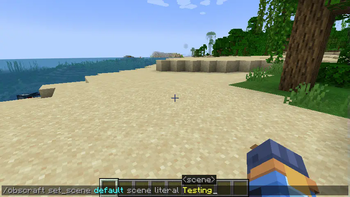
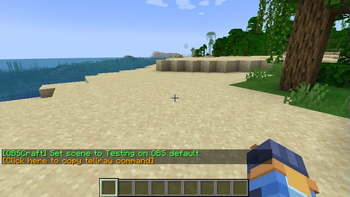
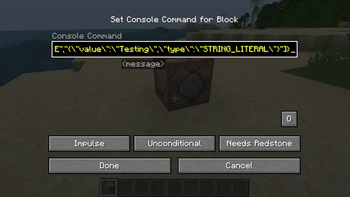
About this Mod
Right now this is in active development and still in alpha, please report any bugs you find!
Connect Minecraft directly to OBS Studio using the OBS WebSocket plugin. Allows using command blocks, datapacks, and plugins to trigger various actions in OBS Studio.
This works by listening for a specially formatted translatable chat message, which is decoded then acted upon. You can generate a tellraw command using the /obscraft command.
Demo Video
Features
- Set the active scene from in-game!
- Update a Text source's text.
- Set a source's visibility in a given scene.
- Set the visible status of a filter on a source. (Also works with plugin filters such as the Move plugin)
Each of these options support both typing literal names as well as looking up names from a scoreboard objective. You can either search for the first player with a specific score or search for the score of a specific player. (Works with both dummy objectives and "real" scoreboards)
NOTE: To have the client "see" a scoreboard objective for use in this mod, the scoreboard must be attached to a display. It can be any display, even if it's not visible to the player, like a different teams's sidebar.
Commands
/obscraft listConnections- List all OBS connections by ID. Gives connection status for each one./obscraft reconnect <id>- Reconnect to an OBS connection by ID.- There are more commands to generate tellraw commands and save actions, but the in-game documentation is setup to show them all as you type.
Setup
OBS Studio
First, we need to make sure the websocket server is enabled.
In OBS go to Tools -> WebSocket Server Settings.
Make sure of the following:
Enable WebSocket Serveris checked.Enable Authentificationis checked.- Note down the
Server PortandServer PasswordPressShow Connect Infoto see it.
Minecraft
Note: The mod required the Architectury API installed to load.
Launch the game once to generate the config file, it should be with other configuration files for you mods.
It should look like this:
{
  "connections": [
    {
      "ID": "default",
      "host": "127.0.0.1",
      "port": 4455,
      "password": "password"
    }
  ],
  "savedActions": {},
  "savedActionKeys": {}
}
IDis a unique identifier for the connection. You can have multiple connections to different OBS instances.hostis the IP address of the computer running OBS. If it's on the same computer, use127.0.0.1portis the port number from the OBS WebSocket settings.passwordis the password from the OBS WebSocket settings.
For a simple setup just make sure port and password match the OBS settings.
After that restart the game and you should be good to go! Make sure everything is connected by running /obscraft listConnections and default should show up under Available Connections.
Available Versions
How to Install OBSCraft on Your Server
Order Server
Order a Minecraft Java server with at least 3 GB RAM (4 GB recommended).
Set fabric Loader
In the panel under "Egg", select the fabric loader and matching Minecraft version (1.21.10).
Install Mod
Open the mod browser in the dashboard and search for "OBSCraft". Click "Install" – done! Alternatively, upload the .jar via SFTP to the /mods folder.
Compatibility
Mod Loaders
Minecraft Versions
1.21.10, 1.21.9, 1.21.8 (+8 more)
Server-side
✗ UnsupportedRecommended RAM
4 GB(min. 3 GB)Frequently Asked Questions
OBSCraft server crashes on startup – what to do?
Most common cause: wrong fabric version or insufficient RAM. Check the server log (latest.log) for "OutOfMemoryError" or "Mixin" errors. With Mado Hosting: ensure at least 3 GB RAM is allocated and the loader matches the mod version (1.21.10). You can switch loaders with one click in the panel.
Is OBSCraft compatible with fabric and neoforge?
OBSCraft officially supports fabric, neoforge for Minecraft 1.21.10, 1.21.9, 1.21.8. The Mado dashboard automatically detects incompatible loader combinations.
Server lagging with OBSCraft – how to optimize performance?
Recommended RAM: 4 GB (per 8 players). Use /spark profiler to check if OBSCraft consumes the most tick time. Common fixes: reduce server view-distance to 8-10, install "performant" or "starlight" as supplementary mods on Forge. With Mado Hosting, your server runs on NVMe SSDs with dedicated CPU cores for minimal latency.
Similar Mods




![[ETF] Entity Texture Features](https://cdn.modrinth.com/data/BVzZfTc1/af683d206d50b05258d865b0d6e4aa2f2cee12f2_96.webp)
![[EMF] Entity Model Features](https://cdn.modrinth.com/data/4I1XuqiY/6e5bbd0d06b1741bfdab6c0cfab6de8fdaf0064c_96.webp)
Rent Modded Server
Install OBSCraft with just one click on your server.