
OFF Client
Better F3, Zoom, armor HUDs, Mouse Tweaks, inventory sorting, numeric ping, HP HUDs, food and effect previews, chat tools, fullbright, auto totem, elytra swap, and configurable hotkeys in one compact neon Fabric client.
Screenshots
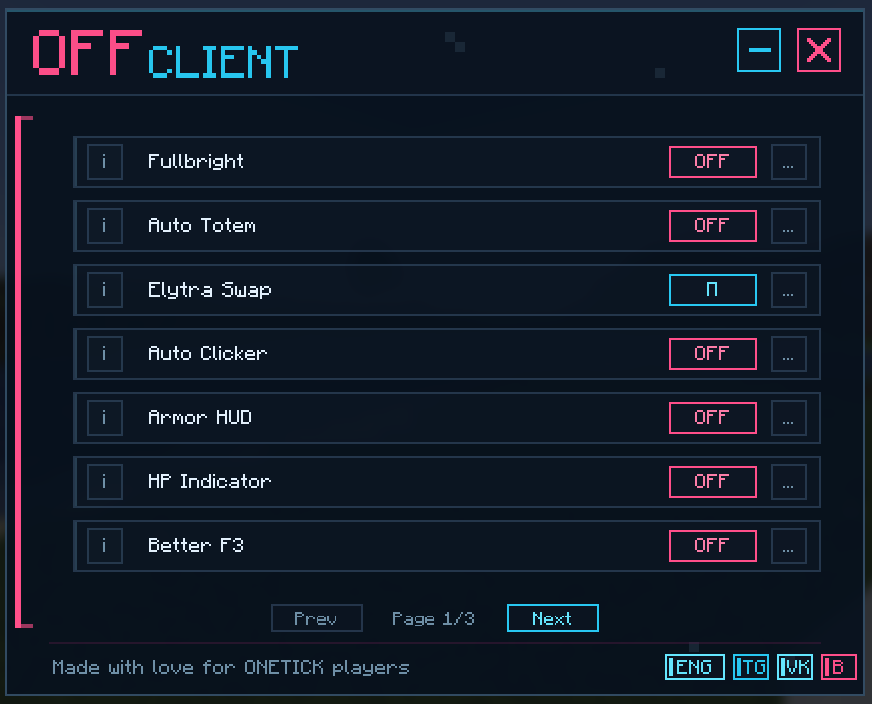
About this Mod
OFF Client
OFF Client is a lightweight client-side Fabric utility mod for Minecraft 1.21.11. It adds a compact neon-styled module panel, configurable keybinds, and practical client-side tools for readability, inventory comfort, HUD information, and quality-of-life gameplay.
The mod is designed to be transparent and easy to understand: every feature is listed below, every module can be configured in-game, and newly added informational modules are disabled by default until the player enables them.
Features
Fullbright
Brightens caves and dark areas on the client side without x-ray, block transparency, or see-through rendering.Auto Totem
Automatically prepares a totem in dangerous situations. This is an automated client-side utility; use it only on servers where this behavior is allowed.Zoom
Smoothly focuses the camera on distant objects with configurable zoom strength, smooth transition, mouse-wheel zoom adjustment, and relative mouse sensitivity while zooming.Elytra Swap
Swaps between an elytra and a chestplate from any inventory slot using a configurable keybind.Auto Clicker
Configurable automatic actions for left click, right click, and jump. Left and right click support Hold and Spam modes, with an optional setting to keep automation active while a screen is open. This is not intended for unfair PvP use; follow the rules of the server you join.Armor HUD
Shows the armor you are wearing near the player HUD.HP Indicator
Shows health above players, mobs, or both. It supports Hearts/Number modes, size, separate player/mob height controls, percentage-based health, number color, poison/wither colors, yellow absorption hearts, regeneration vibration, hardcore-style hearts, and an optional self indicator for third person.Better F3
A compact debug overlay with configurable sections such as coordinates, location, target details, system information, background, shadow, and scale.Mouse Tweaks
Adds inventory mouse gestures: right-button drag to place items, left-button drag to move stacks, Shift-drag quick move, and mouse-wheel transfer between inventories.Inventory Manager
Sorts the currently opened player inventory or storage container by item ID or display name. The hotbar can be protected, and sorting requires an inventory/container screen to be open.Effect Timers
Shows potion effect duration, effect level, warning color before expiration, and an optional blinking frame before an effect ends. When enabled, it hides the vanilla effect display to avoid duplicate HUD elements.Food Info
Shows a visual preview on the vanilla food/health HUD for held food: restored hunger, saturation gain, and estimated regeneration when it is safe to estimate. It does not render in creative mode and does not show fake gain when hunger/health are already full.Chat Tools
Adds optional timestamps to chat messages and click-to-copy behavior for chat text.Numeric Ping
Replaces the player-list ping bars with a numeric latency value. It supports auto-colored ping text, custom HEX colors for each latency range, manual text color, custom text format, and an option to keep the vanilla ping bars visible.Information
Shows compact information for the block or entity under the crosshair. It can show block IDs, position, hit side, distance, state properties, container slot usage, entity health/armor/effects, and horse stats such as speed, jump strength, temper, taming state, variant, markings, and chest state. The panel supports preset positions, manual on-screen placement, and separate visibility switches. Right-click the selected Manual position to edit it again.Keybinds
Each module can be assigned its own key directly from the OFF Client panel. Additional informational modules are unbound by default and can be bound manually.Chat feedback
Short in-game messages in the styleOFF Client | action.
Default controls
- Open panel: Right Shift
- Fullbright: B
- Auto Totem: V
- Elytra Swap: G
- Auto Clicker: C
- Armor HUD: H
- HP Indicator: J
- Sort opened inventory/container: K
Commands
/offopens the panel/off toggletoggles Fullbright/off totemtoggles Auto Totem/off elytraperforms Elytra Swap/off clickertoggles Auto Clicker/off armortoggles Armor HUD/off heartstoggles HP Indicator/off debugtoggles Better F3/off mousetoggles Mouse Tweaks/off inventorytoggles Inventory Manager/off effectstoggles Effect Timers/off foodtoggles Food Info/off chattoggles Chat Tools/off pingtoggles Numeric Ping/off targettoggles Information/off zoomtoggles zoom/off sortsorts the currently opened inventory/container/off messages true|falsechanges Fullbright chat messages/off reloadreloads the config
Server transparency
OFF Client registers the in-game custom payload channel off_client:detector. This channel can be seen by the Minecraft server the player chooses to join and is intended to let compatible servers detect that OFF Client is installed.
The mod does not send telemetry to third-party websites and does not connect to remote servers by itself. It does not include x-ray, aim assist, flight, speed modifications, item duplication, or hiding of third-party mods.
Some modules are automated client-side utilities. Use them only on servers where they are permitted.
License
OFF Client is distributed under the MIT License.
Russian
OFF Client - лёгкий клиентский Fabric-мод для Minecraft 1.21.11. Он добавляет компактную неоновую панель модулей, настраиваемые горячие клавиши и полезные клиентские инструменты для читаемости, инвентаря, HUD-информации и комфортной игры.
Мод описывает свои функции открыто: все модули перечислены ниже, настройки доступны прямо в игре, а новые информационные функции по умолчанию выключены и включаются вручную.
Возможности
Фулбрайт
Осветляет пещеры и тёмные места на клиенте без x-ray, прозрачности блоков и просмотра сквозь стены.Автототем
Автоматически подготавливает тотем в опасных ситуациях. Это автоматическая клиентская утилита; используйте её только там, где это разрешено правилами сервера.Зум
Плавно приближает камеру для просмотра дальних объектов. Есть настройка силы приближения, плавности перехода, изменения зума колёсиком мыши и относительной чувствительности мыши во время приближения.Свап элитр
Меняет элитры и нагрудник из любого слота по назначенной клавише.Автокликер
Настраиваемые автоматические действия для ЛКМ, ПКМ и прыжка. Для ЛКМ и ПКМ есть режимы Hold/Spam, а также настройка работы при открытом меню. Не предназначен для нечестного PvP-использования; соблюдайте правила сервера.HUD брони
Показывает надетую броню рядом с интерфейсом игрока.Индикатор ХП
Показывает здоровье над игроками, мобами или всеми сразу. Есть режимы Сердца/Число, размер, отдельная высота над игроком и мобом, ХП в процентах, цвет цифр, цвета яд/иссушение, жёлтые сердца абсорбции, вибрация при регене, hardcore-стиль и индикатор у себя для третьего лица.Улучшенный F3
Компактный debug-оверлей с координатами, локацией, данными о цели, системной информацией, фоном, тенью текста и масштабом.Улучшенная мышь
Добавляет жесты для инвентаря: перетаскивание ПКМ для раскладки предметов, перетаскивание ЛКМ для переноса стаков, Shift-перетаскивание для быстрого переноса и перенос колёсиком между инвентарями.Менеджер инвентаря
Сортирует открытый инвентарь игрока или хранилище по ID предмета или названию. Хотбар можно защищать от сортировки. Для работы нужно открыть инвентарь или контейнер.Таймер эффектов
Показывает время эффектов, уровень эффекта, предупреждающий цвет перед окончанием и настраиваемое мигание рамки. При включении скрывает ванильный список эффектов, чтобы HUD не дублировался.Информация о еде
Показывает визуальный предпросмотр прямо на ванильной шкале еды/здоровья: восстановление голода, прирост насыщения и примерный реген, когда его можно безопасно оценить. Не рисуется в креативе и не показывает лишний прирост при полном голоде или полном здоровье.Инструменты чата
Добавляют время сообщений и копирование текста нажатием.Числовой пинг
Показывает задержку в миллисекундах вместо стандартных полос в списке игроков. Есть автоцвет, отдельные HEX-цвета для диапазонов пинга, ручной цвет, формат текста и опция оставить ванильные полоски.Информация
Показывает компактную информацию о блоке или сущности под прицелом. Может показывать ID блока, позицию, сторону, дистанцию, свойства состояния, заполненность контейнера, ХП/броню/эффекты сущности и характеристики лошади: скорость, прыжок, нрав, приручение, масть, отметины и наличие сундука. Панель можно поставить в готовую позицию или вручную перетащить по экрану; отдельные строки можно отключать. Чтобы повторно изменить выбранную ручную позицию, нажмите по ней ПКМ.Горячие клавиши
Каждому модулю можно назначить свою клавишу прямо в панели OFF Client. Новые информационные модули по умолчанию не имеют клавиши и настраиваются вручную.Сообщения в чат
Короткие игровые уведомления в стилеOFF Client | действие.
Управление по умолчанию
- Открыть панель: Right Shift
- Фулбрайт: B
- Автототем: V
- Свап элитр: G
- Автокликер: C
- HUD брони: H
- Индикатор ХП: J
- Сортировка открытого инвентаря/контейнера: K
Команды
/offоткрывает панель/off toggleпереключает фулбрайт/off totemпереключает автототем/off elytraвыполняет свап элитр/off clickerпереключает автокликер/off armorпереключает HUD брони/off heartsпереключает индикатор ХП/off debugпереключает улучшенный F3/off mouseпереключает улучшенную мышь/off inventoryпереключает менеджер инвентаря/off effectsпереключает таймер эффектов/off foodпереключает информацию о еде/off chatпереключает инструменты чата/off pingпереключает числовой пинг/off targetпереключает информацию/off zoomпереключает зум/off sortсортирует открытый инвентарь или контейнер/off messages true|falseменяет сообщения фулбрайта в чат/off reloadперезагружает конфиг
Прозрачность для сервера
OFF Client регистрирует игровой канал off_client:detector. Этот канал виден только Minecraft-серверу, к которому подключается игрок, и нужен совместимым серверам для определения установленного OFF Client.
Мод не отправляет телеметрию на сторонние сайты и не подключается к удалённым серверам сам по себе. В моде нет x-ray, aim assist, полёта, изменения скорости, дюпа предметов или скрытия сторонних модификаций.
Некоторые модули являются автоматическими клиентскими утилитами. Используйте их только на серверах, где они разрешены.
Лицензия
OFF Client распространяется по лицензии MIT.
Available Versions
How to Install OFF Client on Your Server
Order Server
Order a Minecraft Java server with at least 3 GB RAM (4 GB recommended).
Set fabric Loader
In the panel under "Egg", select the fabric loader and matching Minecraft version (26.1.2).
Install Mod
Open the mod browser in the dashboard and search for "OFF Client". Click "Install" – done! Alternatively, upload the .jar via SFTP to the /mods folder.
Compatibility
Mod Loaders
Minecraft Versions
26.1.2, 26.1.1, 26.1 (+1 more)
Server-side
✗ UnsupportedRecommended RAM
4 GB(min. 3 GB)Frequently Asked Questions
OFF Client server crashes on startup – what to do?
Most common cause: wrong fabric version or insufficient RAM. Check the server log (latest.log) for "OutOfMemoryError" or "Mixin" errors. With Mado Hosting: ensure at least 3 GB RAM is allocated and the loader matches the mod version (26.1.2). You can switch loaders with one click in the panel.
Is OFF Client compatible with fabric?
OFF Client officially supports fabric for Minecraft 26.1.2, 26.1.1, 26.1. The Mado dashboard automatically detects incompatible loader combinations.
Server lagging with OFF Client – how to optimize performance?
Recommended RAM: 4 GB (per 8 players). Use /spark profiler to check if OFF Client consumes the most tick time. Common fixes: reduce server view-distance to 8-10, install "performant" or "starlight" as supplementary mods on Forge. With Mado Hosting, your server runs on NVMe SSDs with dedicated CPU cores for minimal latency.
Similar Mods

![[ETF] Entity Texture Features](https://cdn.modrinth.com/data/BVzZfTc1/af683d206d50b05258d865b0d6e4aa2f2cee12f2_96.webp)
![[EMF] Entity Model Features](https://cdn.modrinth.com/data/4I1XuqiY/6e5bbd0d06b1741bfdab6c0cfab6de8fdaf0064c_96.webp)



Rent Modded Server
Install OFF Client with just one click on your server.