
Deconstructor - 解体機
日本語の説明があります。Deconstruct crafted items into materials and manage enchantments with books. Deconstructor, Precision Deconstructor, Enchantment Manager for NeoForge 26.x.
Screenshots
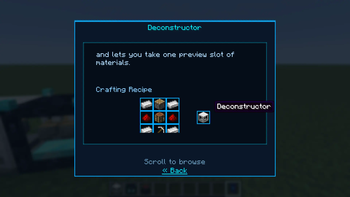
About this Mod
Deconstructor
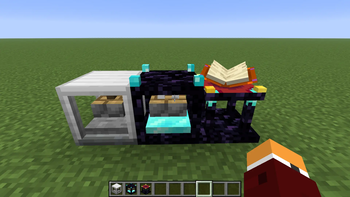
Adds three utility blocks for NeoForge 26.x:
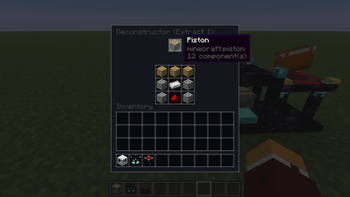
- Deconstructor — reclaim crafting ingredients
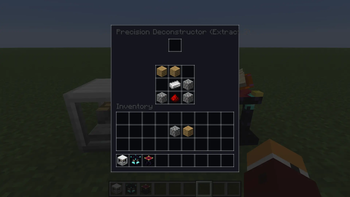
- Precision Deconstructor — choose which output to recover
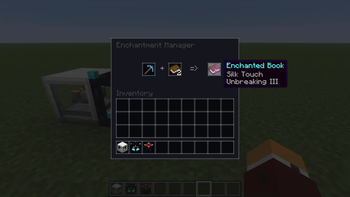
- Enchantment Manager — extract, split, merge, and apply enchantments
Optional Guide Lib integration provides an in-game manual and Codex entry.
Limitations
- Deconstruction supports crafting-table recipes only (not smelting, blasting, etc.)
- If multiple crafting recipes produce the same item, only the first indexed recipe is used
- Configure excluded item IDs in mod config (
excludedItems) to block deconstruction for specific items - Loop Prevention: Recipes where the output item is also required as an input ingredient are automatically filtered out to prevent infinite deconstruction loops/exploits
- Multi-Output Recipes: For recipes that output multiple items (e.g., crafting 4 ladders from sticks), the deconstructor requires and consumes the output quantity (e.g., 4 ladders) of the input item to start the deconstruction process
Credits
This mod was developed with partial assistance from AI (Claude, Gemini, etc.) to improve development efficiency and optimize code. All game balance decisions and playtesting were performed manually by the developer. If you encounter any unexpected issues, please report them via GitHub Issues.
解体機
NeoForge 26.x 向けに 3 つのユーティリティブロックを追加します
- 解体機 — クラフト素材を1個回収できます
- 精密解体機 — クラフト回収素材を3個回収できます
- エンチャント管理機 — アイテムからエンチャントの抽出、分割、結合、適用ができます
オプションのGuide Lib導入により、ゲーム内マニュアルとコーデックス項目が確認できます。
制限事項
- 分解はクラフトテーブルのレシピのみに対応しています(精錬や爆破などは対象外です)
- 複数のクラフトレシピで同じアイテムが生成される場合、最初にインデックス付けされたレシピのみが使用されます
- 特定のアイテムの分解をブロックするには、MOD設定(
excludedItems)で除外するアイテムIDを設定してください - ループ防止:出力アイテムが入力素材としても必要なレシピは、無限の分解ループや不正利用を防ぐために自動的に除外されます
- 複数出力レシピ:複数のアイテムを出力するレシピ(例:棒からはしごを4つクラフト)の場合、分解ツールは分解プロセスを開始するために、入力アイテムの出力数量(例:はしご4つ)を必要とし、それを消費します
クレジット
このMODは、開発効率の向上とコードの最適化を目的として、AI(Claude、Geminiなど)の支援を一部受けながら開発されました。ゲームバランスの決定およびプレイテストはすべて、開発者によって手動で行われました。予期せぬ問題が発生した場合は、GitHub Issues を通じて報告してください。
Available Versions
How to Install Deconstructor - 解体機 on Your Server
Order Server
Order a Minecraft Java server with at least 3 GB RAM (4 GB recommended).
Set neoforge Loader
In the panel under "Egg", select the neoforge loader and matching Minecraft version (26.1.2).
Install Mod
Open the mod browser in the dashboard and search for "Deconstructor - 解体機". Click "Install" – done! Alternatively, upload the .jar via SFTP to the /mods folder.
Compatibility
Mod Loaders
Minecraft Versions
26.1.2
Server-side
✓ RequiredRecommended RAM
4 GB(min. 3 GB)Frequently Asked Questions
Deconstructor - 解体機 server crashes on startup – what to do?
Most common cause: wrong neoforge version or insufficient RAM. Check the server log (latest.log) for "OutOfMemoryError" or "Mixin" errors. With Mado Hosting: ensure at least 3 GB RAM is allocated and the loader matches the mod version (26.1.2). You can switch loaders with one click in the panel.
Is Deconstructor - 解体機 compatible with neoforge?
Deconstructor - 解体機 officially supports neoforge for Minecraft 26.1.2. The Mado dashboard automatically detects incompatible loader combinations.
Server lagging with Deconstructor - 解体機 – how to optimize performance?
Recommended RAM: 4 GB (per 8 players). Use /spark profiler to check if Deconstructor - 解体機 consumes the most tick time. Common fixes: reduce server view-distance to 8-10, install "performant" or "starlight" as supplementary mods on Forge. With Mado Hosting, your server runs on NVMe SSDs with dedicated CPU cores for minimal latency.
Similar Mods




![[ETF] Entity Texture Features](https://cdn.modrinth.com/data/BVzZfTc1/af683d206d50b05258d865b0d6e4aa2f2cee12f2_96.webp)

Rent Modded Server
Install Deconstructor - 解体機 with just one click on your server.