
Omniscience Awakened
Mod that makes hidden game elements visible without changing gameplay. Fork of the original Omniscience by thatDudo.
Screenshots
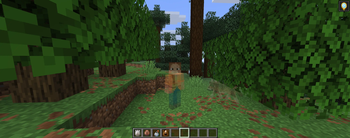
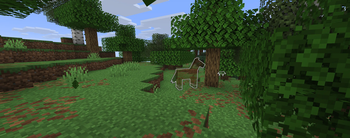
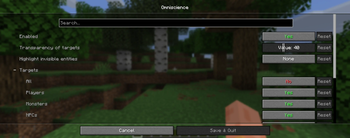
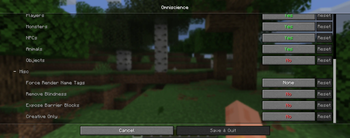
About this Mod
Omniscience Awakened is a maintained and improved fork of the original Omniscience mod. It is designed for players who want better awareness of invisible game elements, while keeping the experience configurable and lightweight.
Features
See invisible entities
- Reveals invisible players, mobs, and other targeted entities
- Works through the mod’s configurable entity targeting groups
- Preserves normal invisibility behavior for untargeted entities
Barrier block exposure
- Shows barrier blocks in survival mode
- No need to hold a barrier item
Configurable alpha and rendering
- Adjustable opacity level for rendered invisible models
- Custom glow support for invisible entities
- Name tag visibility options with forced rendering modes
Selective targeting
Choose which entity groups are affected:
- Players
- Monsters
- Villagers
- Animals
- Objects
Fine-grained control via the in-game config screen
Blindness effect removal
- Optionally disable blindness fog and rendering effects
Use on public servers
This mod is not intended for use on public servers unless you have direct permission from the server owner. If a server owner has not clearly allowed this type of mod, do not use it there.
Although the mod may function on servers, I do not endorse or support its use on public servers without explicit approval. I will not provide help for server-related issues, and any report involving unauthorized server use or server connection crashes will be closed.
If you choose to use this mod on a private server, that is your responsibility. If you use it on a public server without permission and are banned or otherwise penalized, that is entirely on you. No support will be provided for that use case.
Credits
- Original mod developed by digitalshadowhawk
- Fabric port developed by thatDudo
Available Versions
How to Install Omniscience Awakened on Your Server
Order Server
Order a Minecraft Java server with at least 3 GB RAM (4 GB recommended).
Set fabric Loader
In the panel under "Egg", select the fabric loader and matching Minecraft version (26.1.2).
Install Mod
Open the mod browser in the dashboard and search for "Omniscience Awakened". Click "Install" – done! Alternatively, upload the .jar via SFTP to the /mods folder.
Compatibility
Mod Loaders
Minecraft Versions
26.1.2, 26.1.1, 26.1 (+1 more)
Server-side
✗ UnsupportedRecommended RAM
4 GB(min. 3 GB)Frequently Asked Questions
Omniscience Awakened server crashes on startup – what to do?
Most common cause: wrong fabric version or insufficient RAM. Check the server log (latest.log) for "OutOfMemoryError" or "Mixin" errors. With Mado Hosting: ensure at least 3 GB RAM is allocated and the loader matches the mod version (26.1.2). You can switch loaders with one click in the panel.
Is Omniscience Awakened compatible with fabric?
Omniscience Awakened officially supports fabric for Minecraft 26.1.2, 26.1.1, 26.1. The Mado dashboard automatically detects incompatible loader combinations.
Server lagging with Omniscience Awakened – how to optimize performance?
Recommended RAM: 4 GB (per 8 players). Use /spark profiler to check if Omniscience Awakened consumes the most tick time. Common fixes: reduce server view-distance to 8-10, install "performant" or "starlight" as supplementary mods on Forge. With Mado Hosting, your server runs on NVMe SSDs with dedicated CPU cores for minimal latency.
Similar Mods




![[ETF] Entity Texture Features](https://cdn.modrinth.com/data/BVzZfTc1/af683d206d50b05258d865b0d6e4aa2f2cee12f2_96.webp)

Rent Modded Server
Install Omniscience Awakened with just one click on your server.