
Omnisearch
Instantly search the mcmod (the largest Chinese Minecraft wiki) from in-game, say goodbye to alt-tabbing.
Screenshots
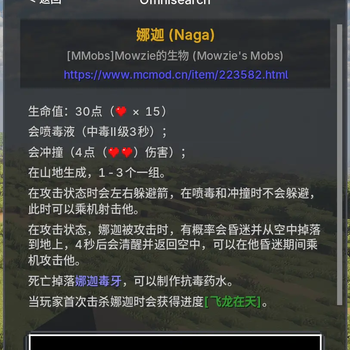
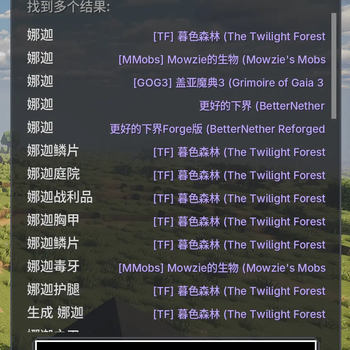
About this Mod
What is OmniSearch?
Playing a large modpack often means having a browser window open right next to your game. Checking a recipe, understanding a new machine, or identifying a mysterious creature constantly forces you to break your immersion by alt-tabbing to an external wiki.
OmniSearch is designed to solve this fundamental problem. It is a lightweight, client-side mod that seamlessly integrates the vast knowledge base of MC百科 (mcmod.cn) directly into the Minecraft client. It allows you to search for and read richly formatted wiki articles without ever leaving your game window, keeping your focus where it belongs: on your adventure.
How to Use
Hover & Long-Press: Hover your cursor over an item and long-press the 'TAB' key to instantly search for it.
Press the Hotkey: You can also press the 'TAB' key (configurable in controls) at any time to open the search screen and manually type in what you're looking for.
Browse & Read: A list of results will appear. Click on any entry to view its detailed wiki page, complete with images, icons, and clickable links. You can use the Back button to navigate, just like in a browser.
Core Features
Directly In-Game: No more leaving the game window. Everything happens right inside Minecraft.
Rich Content: Thanks to a custom-built renderer, you see the wiki pages just as they are, with full formatting.
Smart & Simple: Supports history, multiple results, and is designed to be as intuitive as possible.
Important Notes
[!] Experimental Stage: Please be aware that OmniSearch is a brand new mod. While functional, you may still encounter some bugs or rendering issues.
[!] Feedback is Welcome: If you find any issues, please report them on our GitHub Issues Page. Your feedback is invaluable!
[!] Recommended Font: For the best visual experience, we highly recommend using the ModernUI mod for improved font rendering.
Permissions
You are free to include OmniSearch in any modpack. No need to ask. Please link back to this official page for downloads.
Available Versions
How to Install Omnisearch on Your Server
Order Server
Order a Minecraft Java server with at least 3 GB RAM (4 GB recommended).
Set forge Loader
In the panel under "Egg", select the forge loader and matching Minecraft version (1.21.10).
Install Mod
Open the mod browser in the dashboard and search for "Omnisearch". Click "Install" – done! Alternatively, upload the .jar via SFTP to the /mods folder.
Compatibility
Mod Loaders
Minecraft Versions
1.21.10, 1.21.9, 1.21.8 (+8 more)
Server-side
✗ UnsupportedRecommended RAM
4 GB(min. 3 GB)Frequently Asked Questions
Omnisearch server crashes on startup – what to do?
Most common cause: wrong forge version or insufficient RAM. Check the server log (latest.log) for "OutOfMemoryError" or "Mixin" errors. With Mado Hosting: ensure at least 3 GB RAM is allocated and the loader matches the mod version (1.21.10). You can switch loaders with one click in the panel.
Is Omnisearch compatible with forge and neoforge?
Omnisearch officially supports forge, neoforge for Minecraft 1.21.10, 1.21.9, 1.21.8. The Mado dashboard automatically detects incompatible loader combinations.
Server lagging with Omnisearch – how to optimize performance?
Recommended RAM: 4 GB (per 8 players). Use /spark profiler to check if Omnisearch consumes the most tick time. Common fixes: reduce server view-distance to 8-10, install "performant" or "starlight" as supplementary mods on Forge. With Mado Hosting, your server runs on NVMe SSDs with dedicated CPU cores for minimal latency.
Similar Mods




![[ETF] Entity Texture Features](https://cdn.modrinth.com/data/BVzZfTc1/af683d206d50b05258d865b0d6e4aa2f2cee12f2_96.webp)
![[EMF] Entity Model Features](https://cdn.modrinth.com/data/4I1XuqiY/6e5bbd0d06b1741bfdab6c0cfab6de8fdaf0064c_96.webp)
Rent Modded Server
Install Omnisearch with just one click on your server.