
ONClient
This Mod add Client-Like Features. Like a Custom Menu, little Modules and Capes. This mod does not add hacks/cheats.
Screenshots
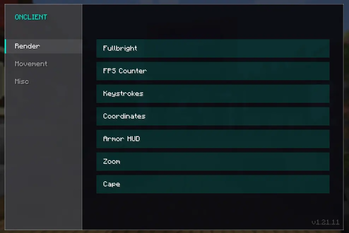
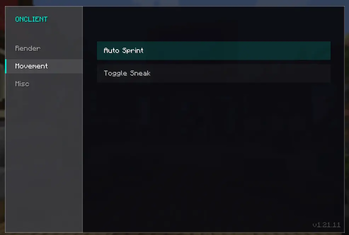

About this Mod
🚀 ONClient – The Ultimate Vanilla+ HUD & Feature Client
ONClient is a sleek, all-in-one modification for Minecraft 1.21.11 designed to enhance your gameplay with essential Quality-of-Life features, wrapped in a beautiful, modern, and minimalist user interface.
Unlike heavy, bloated client launchers that restrict what you can play, ONClient is lightweight and built with maximum compatibility in mind—making it the perfect addition to your existing modpacks or custom mod setups!
⚠️ 100% Fair Play: ONClient is purely a Quality-of-Life utility. It contains no cheats, no hacks, and no unfair advantages. It is fully compliant and safe to use on your favorite multiplayer servers!
🧩 Great Mod Compatibility
ONClient doesn't touch engine rendering or performance internals, meaning it works perfectly alongside other mods. Whether you want to pair it with Sodium, Iris Shaders, or your favorite gameplay mods, ONClient blends right into your setup without causing conflicts.
🔥 Features & Modules
Easily toggle your modules on or off using our clean, built-in GUI menu:
📺 Render & HUD
- FPS Counter: Keep a crisp, real-time eye on your frames per second.
- Keystrokes: Displays your movement and mouse inputs (WASD, Space, LMB, RMB) directly on screen—perfect for PvP or recording content.
- Coordinates Display: A compact HUD element showing your current X/Y/Z position and facing direction.
- Fullbright: No more pitch-black caves. Perfect visibility, anytime, anywhere.
- Armor HUD: Keep track of your armor's durability right in your main view.
- Zoom: Smoothly focus on distant objects with a dedicated zoom function.
- Custom Cape: Show off your exclusive, built-in ONClient cape!
🏃 Movement
- Auto Sprint: Automatically sprint without continuously holding down extra keys.
- Toggle Sneak: Keep sneaking toggled with a single press to save your fingers.
📌 Current Limitations & Future Plans
- Fixed HUD Positions: Please note that HUD elements (like Keystrokes, FPS, and Coordinates) currently have fixed screen positions and cannot be dragged or repositioned yet.
- What's Next: Full HUD customization, element resizing, and draggable modules are planned for an upcoming release!
🛠️ Installation
- Ensure you are running Minecraft 1.21.11.
- Download the
.jarfile and drop it into yourmodsfolder along with any other mods you like. - Boot up the game to experience the beautiful new main menu hub and clean module setup!
Available Versions
How to Install ONClient on Your Server
Order Server
Order a Minecraft Java server with at least 3 GB RAM (4 GB recommended).
Set fabric Loader
In the panel under "Egg", select the fabric loader and matching Minecraft version (1.21.11).
Install Mod
Open the mod browser in the dashboard and search for "ONClient". Click "Install" – done! Alternatively, upload the .jar via SFTP to the /mods folder.
Compatibility
Mod Loaders
Minecraft Versions
1.21.11
Server-side
✗ UnsupportedRecommended RAM
4 GB(min. 3 GB)Frequently Asked Questions
ONClient server crashes on startup – what to do?
Most common cause: wrong fabric version or insufficient RAM. Check the server log (latest.log) for "OutOfMemoryError" or "Mixin" errors. With Mado Hosting: ensure at least 3 GB RAM is allocated and the loader matches the mod version (1.21.11). You can switch loaders with one click in the panel.
Is ONClient compatible with fabric?
ONClient officially supports fabric for Minecraft 1.21.11. The Mado dashboard automatically detects incompatible loader combinations.
Server lagging with ONClient – how to optimize performance?
Recommended RAM: 4 GB (per 8 players). Use /spark profiler to check if ONClient consumes the most tick time. Common fixes: reduce server view-distance to 8-10, install "performant" or "starlight" as supplementary mods on Forge. With Mado Hosting, your server runs on NVMe SSDs with dedicated CPU cores for minimal latency.
Similar Mods




![[ETF] Entity Texture Features](https://cdn.modrinth.com/data/BVzZfTc1/af683d206d50b05258d865b0d6e4aa2f2cee12f2_96.webp)

Rent Modded Server
Install ONClient with just one click on your server.