
One Enough Block
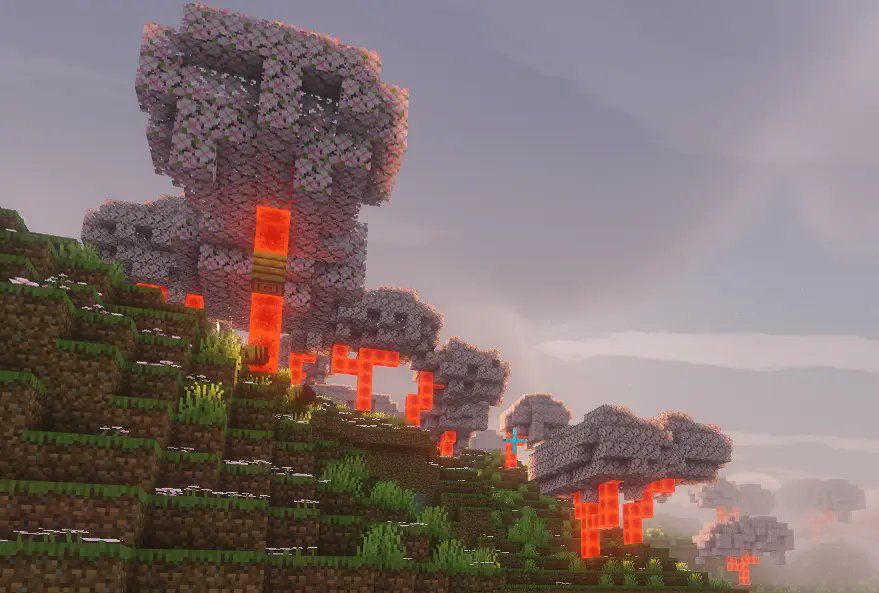
Easily specify replacing one block with another.
About this Mod
One Enough Block
Does your modpack have three kinds of orange trees or four kinds of silver ore?
Or do you just want to wipe out useless naturally generated ores like copper?
With One Enough Block, you can conveniently specify which blocks should be replaced with others — easily, flexibly, and powerfully.
Main Features
Load Method 1: via configuration file.
Reload using the /reload command.
Path: config/OEB/example.json
[
  {
    "match": [
      "manametalmod:ManaTreeLog",
      "#minecraft:logs"
    ],
    "result": "minecraft:redstone_block"
  },
  {
    "match": ["#minecraft:logs"],
    "result": "minecraft:redstone_block"
  }
]
Load Method 2: via datapack (available since v1.1.0).
Requires OEI as a dependency — note that the structure has changed!
Path: data/oeb/replacements/example.json
[
  {
    "matchBlock": ["#minecraft:logs"],
    "resultBlock": "minecraft:redstone_block"
  }
]
Simply list the block IDs you want to replace in the "match" array, and specify the target block under "result".
The replacement will automatically take effect in-game.
Supports tag-based matching, allowing you to replace all blocks under a tag at once.
Even fluids can be replaced!
Note: Since version 1.1.0, an in-game replacement rule editor is built in!
Press CTRL + R by default to open the UI and enjoy a brain-free, zero-code editing experience.(Switch Function -> Page OEB)
Use Cases
Block replacement occurs when creating worlds or loading new chunks, making it ideal for modifying naturally generated blocks such as ores, plants, or structure blocks.
Replacement also applies to any block placement — when a player places a block, it will be immediately replaced if it matches a rule.
Additionally, existing blocks in the world can be replaced retroactively.
This feature is disabled by default, but can be enabled in the config file.
Future Plans
None for now.
Available Versions
How to Install One Enough Block on Your Server
Order Server
Order a Minecraft Java server with at least 4 GB RAM (6 GB recommended).
Set forge Loader
In the panel under "Egg", select the forge loader and matching Minecraft version (1.21.1).
Install Mod
Open the mod browser in the dashboard and search for "One Enough Block". Click "Install" – done! Alternatively, upload the .jar via SFTP to the /mods folder.
Compatibility
Mod Loaders
Minecraft Versions
1.21.1, 1.20.1
Server-side
✓ RequiredRecommended RAM
6 GB(min. 4 GB)Frequently Asked Questions
One Enough Block server crashes on startup – what to do?
Most common cause: wrong forge version or insufficient RAM. Check the server log (latest.log) for "OutOfMemoryError" or "Mixin" errors. With Mado Hosting: ensure at least 4 GB RAM is allocated and the loader matches the mod version (1.21.1). You can switch loaders with one click in the panel.
Is One Enough Block compatible with forge and neoforge?
One Enough Block officially supports forge, neoforge for Minecraft 1.21.1, 1.20.1. The Mado dashboard automatically detects incompatible loader combinations.
Server lagging with One Enough Block – how to optimize performance?
Recommended RAM: 6 GB (per 5 players). Use /spark profiler to check if One Enough Block consumes the most tick time. Common fixes: reduce server view-distance to 8-10, install "performant" or "starlight" as supplementary mods on Forge. With Mado Hosting, your server runs on NVMe SSDs with dedicated CPU cores for minimal latency.
Similar Mods




![[ETF] Entity Texture Features](https://cdn.modrinth.com/data/BVzZfTc1/af683d206d50b05258d865b0d6e4aa2f2cee12f2_96.webp)
![[EMF] Entity Model Features](https://cdn.modrinth.com/data/4I1XuqiY/6e5bbd0d06b1741bfdab6c0cfab6de8fdaf0064c_96.webp)
Rent Modded Server
Install One Enough Block with just one click on your server.