
One shot protection
Server-sided & fully configurable one-shot protection
About this Mod
One Shot Protection
- 100% Server sided, Can be loaded into forge servers with no dependencies or required downloads for players
- Fully configurable & versatile configurations
- Built for players, server owners & modpack developers
About the mod
" One Shot Protection " Is a mod that adds one shot protection, similar to ROR2
The mod was built with modpack developers and server owners in mind, and it can be configured to disregard certain damage sources or do different things for example
Features
OSP
- Taking damage above 90% health that would be fatal will instead leave you at 10% of your maximum health and give you a brief immunity period to where you no longer take damage
- A short soundque and particles will signify when this effect has procced, as well as particles to signify your immunity
- During your immunity period, all damage torwards you will be fully nullified giving you a brief grace period to where you can escape or react appropriately
- Damage sources such as fall damage, void, generic kill, ect will not proc this effect
- Invalid damage sources and every feature within the mod can be configured to your liking, including factoring in modded damage sources. So for example, if you would like OSP to account for fall damage then you can simply configure the mod to do so
Configuration
This section will break down and explain all configurations within the mod, giving you everything you need to personalize the mod to your liking
All configuration options can be found within the " OSP " folder within the game directory's config folder
Editing invalid damagesources
Spoiler
- OSP allows you to define invalid damagesources, meaning that getting killed by a defined damage source will not proc one shot protection
- Within the config folder you should see a "InvalidDamageSources.json"
- Adding a damagesource is as simple as inserting a " \ " with spaces and then writing down the damagesource name. Removing the " \ " structures will cause complications, it is important to keep it all structurally the same
- You shouldn't have to include a modID when defining custom damage sources unless it is specifically within the damagesource name

Adjusting OSP mechanics
Spoiler
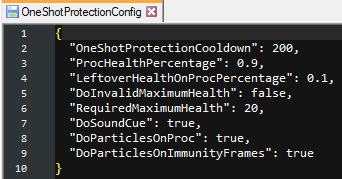
- In order to adjust the mechanics of OSP, you will have to adjust settings found within "OneShotProtectionConfig"
- "OneShotProtectionCooldown" affects the cooldown that one shot protection has, setting this to 0 can allow OSP to continually proc with no cooldowns
- "ProcHealthPercentage" defines what percentage of health is required for OSP to activate. By default this is set to 0.9, meaning that a player has to be at 90% HP for OSP to activate
-"LeftoverHealthOnProcPercentage" defines the percentage of health a player will be set to after OSP procs. By default this is set to 0.1 meaning that a player will be left at 10% of there maximum HP after OSP procs
-"DoInvalidMaximumHealth" is set to false by default and affects the next mechanic
-"DoInvalidMaximumHealth" defines how much total maximum health a player needs in order for OSP to proc, this is only factored once "DoInvalidMaximumHealth" is turned on.
^ Setting this number to 10 means that if a player has less than 10 total maximum health then OSP will not proc on them. - "DoSoundQue" disables the soundque
- "DoParticlesOnProc" disables the particles that appear once OSP procs
- "DoParticlesOnImmunityFrames" disables the particles that appear if you have immunity frames active
Configurating Immunity
Spoiler
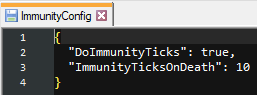
- If you would like to adjust Immunity then it can be found in the "ImmunityConfig.json" file
- "DoImmunityTicks" disables / enables the immunity gained after dying. Disabling this will completely disable the immunity mechanic.
- "ImmunityTicksOnDeath" defines how many ticks of immunity you will have after OSP procs.
Credits / Support / Q&A
Available Versions
How to Install One shot protection on Your Server
Order Server
Order a Minecraft Java server with at least 3 GB RAM (4 GB recommended).
Set forge Loader
In the panel under "Egg", select the forge loader and matching Minecraft version (1.20.1).
Install Mod
Open the mod browser in the dashboard and search for "One shot protection". Click "Install" – done! Alternatively, upload the .jar via SFTP to the /mods folder.
Compatibility
Mod Loaders
Minecraft Versions
1.20.1
Server-side
✓ RequiredRecommended RAM
4 GB(min. 3 GB)Frequently Asked Questions
One shot protection server crashes on startup – what to do?
Most common cause: wrong forge version or insufficient RAM. Check the server log (latest.log) for "OutOfMemoryError" or "Mixin" errors. With Mado Hosting: ensure at least 3 GB RAM is allocated and the loader matches the mod version (1.20.1). You can switch loaders with one click in the panel.
Is One shot protection compatible with forge?
One shot protection officially supports forge for Minecraft 1.20.1. The Mado dashboard automatically detects incompatible loader combinations.
Server lagging with One shot protection – how to optimize performance?
Recommended RAM: 4 GB (per 8 players). Use /spark profiler to check if One shot protection consumes the most tick time. Common fixes: reduce server view-distance to 8-10, install "performant" or "starlight" as supplementary mods on Forge. With Mado Hosting, your server runs on NVMe SSDs with dedicated CPU cores for minimal latency.
Similar Mods




Rent Modded Server
Install One shot protection with just one click on your server.