
OnFire Client
OnFireClient is a utility client for small features.
Screenshots

About this Mod
English
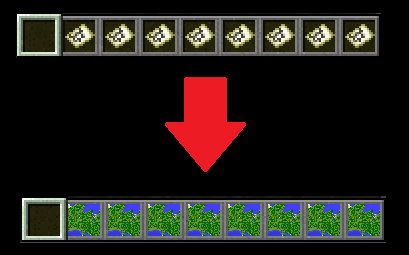
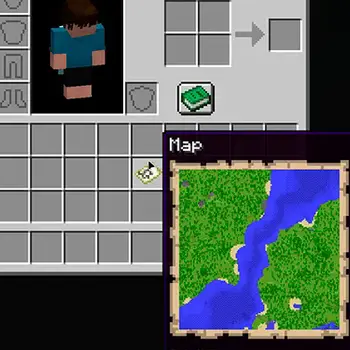
This is a Client side mod that adds: Map in tooltip and Map in the hotbar/Inventory slot, more features are coming to the client soon, see Gallery for more Information.
a little info by now: The mod is Technically Maptip and Map in Slot Combined, the only feature thats new to the mods that i combined is: You can Disable them in the config :D
Why Should I Download it?
Answer: I know that maptip and map in slot exists but you cant disable the mods in a config, this mod allows you to do this you can disable every function in the modmenu-config section.
NOTE: you need Modmenu for the configuration menu.
German
Dies ist eine Client-Seitige mod, die Karte in der Item Beschreibung und die Karte im Inventar/Hotbar Slot anzeigt, mehr Funktionen kommen später. guck in die Gallerie um mehr Informationen zu erhalten.
Warum sollte ich sie Herunterladen?
Antowrt: Ich weiß das mods wie Maptip oder auch Map in slot existiert, aber due kannst sie nicht in einer config deaktivieren, diese mod erlaubt dir dies das einzige was du brauchst ist modmenu.
Note: This mod is inspired by Maptip, Map In Slot
Available Versions
How to Install OnFire Client on Your Server
Order Server
Order a Minecraft Java server with at least 3 GB RAM (4 GB recommended).
Set fabric Loader
In the panel under "Egg", select the fabric loader and matching Minecraft version (1.21.11).
Install Mod
Open the mod browser in the dashboard and search for "OnFire Client". Click "Install" – done! Alternatively, upload the .jar via SFTP to the /mods folder.
Compatibility
Mod Loaders
Minecraft Versions
1.21.11
Server-side
✗ UnsupportedRecommended RAM
4 GB(min. 3 GB)Frequently Asked Questions
OnFire Client server crashes on startup – what to do?
Most common cause: wrong fabric version or insufficient RAM. Check the server log (latest.log) for "OutOfMemoryError" or "Mixin" errors. With Mado Hosting: ensure at least 3 GB RAM is allocated and the loader matches the mod version (1.21.11). You can switch loaders with one click in the panel.
Is OnFire Client compatible with fabric?
OnFire Client officially supports fabric for Minecraft 1.21.11. The Mado dashboard automatically detects incompatible loader combinations.
Server lagging with OnFire Client – how to optimize performance?
Recommended RAM: 4 GB (per 8 players). Use /spark profiler to check if OnFire Client consumes the most tick time. Common fixes: reduce server view-distance to 8-10, install "performant" or "starlight" as supplementary mods on Forge. With Mado Hosting, your server runs on NVMe SSDs with dedicated CPU cores for minimal latency.
Similar Mods




Rent Modded Server
Install OnFire Client with just one click on your server.