
Screenshots
About this Mod
OpenAir - spotify for block game
OpenAir is a vanilla-friendly utility mod for Minecraft that unlocks the game's full soundtrack and adds a comprehensive in-game music player. It brings creative-exclusive tracks, dimension-specific music, and menu themes directly into your survival gameplay, giving you complete control over your auditory experience.
Features
Integrated Music Player
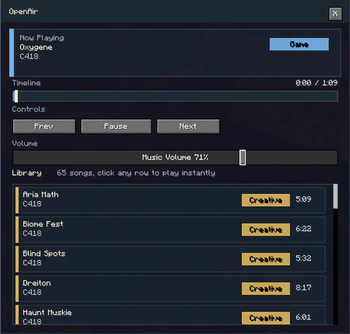
Access a custom-built music player directly from the Game Menu (ESC screen) by clicking the musical note button.
- Full Playback Control: Play, pause, and skip between tracks effortlessly.
- Interactive Seek Bar: Drag the timeline to jump to any part of a song.
- Track Library: A scrollable list of over 60 tracks. Click any song to play it instantly.
- Dynamic Information: View the current track name, artist, and category at a glance.
- Dedicated Volume Slider: Adjust music volume independently within the player interface.
The Complete Soundtrack
OpenAir registers and categorizes Minecraft's diverse music library, making tracks available regardless of your current location or game mode:
- Creative Tracks: Iconic C418 songs like Aria Math and Taswell are now available in survival.
- Dimension Music: Access music from the Nether, the End, and specific biomes like Swamps and Oceans.
- Menu Themes: Listen to main menu tracks while you build or explore.
- Diverse Artists: Includes work by C418, Lena Raine, Kumi Tanioka, Aaron Cherof, and Amos Roddy.
Technical Details
- Version: 1.21.11
- Loader: Fabric
- Requirements: Fabric API
- Environment: Client-side functionality with global track registration.
How to Use
- Press ESC to open the Game Menu.
- Click the small ♪ button in the top right corner.
- Browse the library and click a track to start listening!
Available Versions
How to Install OpenAir on Your Server
Order Server
Order a Minecraft Java server with at least 3 GB RAM (4 GB recommended).
Set fabric Loader
In the panel under "Egg", select the fabric loader and matching Minecraft version (26.1.1).
Install Mod
Open the mod browser in the dashboard and search for "OpenAir". Click "Install" – done! Alternatively, upload the .jar via SFTP to the /mods folder.
Compatibility
Mod Loaders
Minecraft Versions
26.1.1, 26.1, 1.21.11
Server-side
✗ UnsupportedRecommended RAM
4 GB(min. 3 GB)Frequently Asked Questions
OpenAir server crashes on startup – what to do?
Most common cause: wrong fabric version or insufficient RAM. Check the server log (latest.log) for "OutOfMemoryError" or "Mixin" errors. With Mado Hosting: ensure at least 3 GB RAM is allocated and the loader matches the mod version (26.1.1). You can switch loaders with one click in the panel.
Is OpenAir compatible with fabric?
OpenAir officially supports fabric for Minecraft 26.1.1, 26.1, 1.21.11. The Mado dashboard automatically detects incompatible loader combinations.
Server lagging with OpenAir – how to optimize performance?
Recommended RAM: 4 GB (per 8 players). Use /spark profiler to check if OpenAir consumes the most tick time. Common fixes: reduce server view-distance to 8-10, install "performant" or "starlight" as supplementary mods on Forge. With Mado Hosting, your server runs on NVMe SSDs with dedicated CPU cores for minimal latency.
Similar Mods




![[ETF] Entity Texture Features](https://cdn.modrinth.com/data/BVzZfTc1/af683d206d50b05258d865b0d6e4aa2f2cee12f2_96.webp)

Rent Modded Server
Install OpenAir with just one click on your server.