
OptiMix
HUD & utility mod for Minecraft that gives you control of your screen.
Screenshots
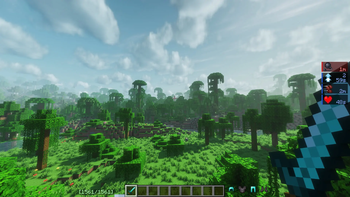
About this Mod
🛡️ OptiMix
HUD & utility mod for Minecraft that gives you control of your screen.
✨ Features
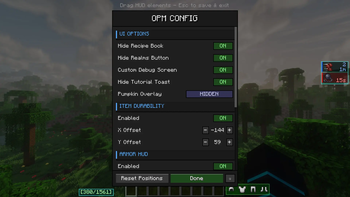
🛡️ Armor HUD
Displays your equipped armor pieces directly on screen.
Configurable side, rotation, and hotbar locking.
🔧 Item Durability Bar
A dedicated durability indicator for the item in your hand.
Fully repositionable with X/Y offset controls.
⚗️ Effects HUD
Replaces the default potion effect overlay with a compact, readable list.
Configurable left or right side positioning.
⚔️ Damage Bar
Visual indicator for incoming and outgoing damage.
Real-time combat feedback with no extra mods required.
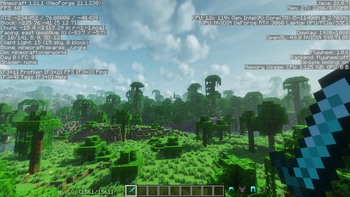
☀️ Full Bright
Toggleable maximum brightness.
No gamma edits or resource packs — see everything in dark areas instantly.
🎃 Pumpkin Overlay Settings
Control the pumpkin helmet overlay — default, fully transparent, or subtle tint.
No more blocked vision.
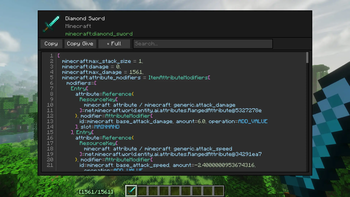
🔍 Item Inspector
Hover over any item to see a full breakdown of NBT data, components, enchantments, and custom attributes.
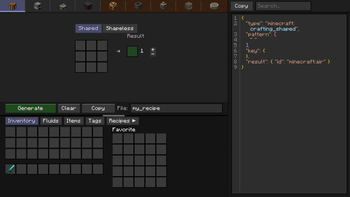
📦 Recipe Creator (Create compat)
In-game crafting recipe builder with native Create mod support.
Design and preview recipes without leaving the game.
🔗 Links
| 🟠 CurseForge | Mod |
| 🟢 Modrinth | Mod |
| 🐛 Bug Report | GitHub Issues |
| 💬 Discord | Server |
📜 License
This mod is licensed under MIT.
Available Versions
How to Install OptiMix on Your Server
Order Server
Order a Minecraft Java server with at least 3 GB RAM (4 GB recommended).
Set neoforge Loader
In the panel under "Egg", select the neoforge loader and matching Minecraft version (1.21.1).
Install Mod
Open the mod browser in the dashboard and search for "OptiMix". Click "Install" – done! Alternatively, upload the .jar via SFTP to the /mods folder.
Compatibility
Mod Loaders
Minecraft Versions
1.21.1
Server-side
✗ UnsupportedRecommended RAM
4 GB(min. 3 GB)Frequently Asked Questions
OptiMix server crashes on startup – what to do?
Most common cause: wrong neoforge version or insufficient RAM. Check the server log (latest.log) for "OutOfMemoryError" or "Mixin" errors. With Mado Hosting: ensure at least 3 GB RAM is allocated and the loader matches the mod version (1.21.1). You can switch loaders with one click in the panel.
Is OptiMix compatible with neoforge?
OptiMix officially supports neoforge for Minecraft 1.21.1. The Mado dashboard automatically detects incompatible loader combinations.
Server lagging with OptiMix – how to optimize performance?
Recommended RAM: 4 GB (per 8 players). Use /spark profiler to check if OptiMix consumes the most tick time. Common fixes: reduce server view-distance to 8-10, install "performant" or "starlight" as supplementary mods on Forge. With Mado Hosting, your server runs on NVMe SSDs with dedicated CPU cores for minimal latency.
Similar Mods




Rent Modded Server
Install OptiMix with just one click on your server.