
Optiscale
Fine-tune your GUI scale in both vanilla and optifine
Screenshots
About this Mod
Requires Forge
Client-side mod
New to version 1.03
Add new config option 'Override List':
Allows you to override specific screens with custom scaling.

E.g., Make chest screens bigger:
net.minecraft.client.gui.screens.inventory.ContainerScreen=500
Above sets Chest screen to use 500% scaling
To help with setting the above, there is a new DEBUG level log that the mod prints whenever you open a new screen with the screen name:
[Optiscale] Detected new screen=net.minecraft.client.gui.screens.inventory.InventoryScreen
Use this to set a custom scale or set this to 0 to blacklist Optiscale from scaling this screen
You can also give the name of the package instead of the screen, e.g., net.minecraft.client.gui.screens.inventory.*=200 to rescale all screens that are in that specific package

1.04:
Add the ability to override screens based on their "menu name" or the title of the screen.
e.g., To enlarge the 'Modern Life' mod Printer screen, you can write Printer=600
Note: Mod is totally resigned for 1.20.1.
Instead of integrating with the video screen, the scaling is now only configurable with a hotkey (default: F7, change in Key Bindings menu).
This is so that it can work even with custom video screen UIs such as Iris/Oculus.
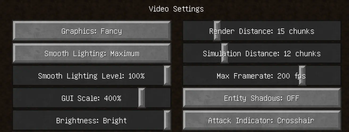
This mod will change your Video Settings "GUI Scale" option into a slider that allows for a wider range of configurations.
Other mods exist with this functionality but this mod is compatible with both vanilla and optifine. This mod also allows a much more fine-grained tuning than others which only give integer values like 0, 1, 2, 3, whereas this offers any value you want like 1.7x for example.
In vanilla the scaling options are [1, 2, 3] but with this mod you can choose between 150% to 450% using a slider.
The vanilla scaling options correspond to the following percentages:
1: 200%
2: 300%
3: 400%
Available Versions
How to Install Optiscale on Your Server
Order Server
Order a Minecraft Java server with at least 3 GB RAM (4 GB recommended).
Set forge Loader
In the panel under "Egg", select the forge loader and matching Minecraft version (1.20.4).
Install Mod
Open the mod browser in the dashboard and search for "Optiscale". Click "Install" – done! Alternatively, upload the .jar via SFTP to the /mods folder.
Compatibility
Mod Loaders
Minecraft Versions
1.20.4, 1.20.3, 1.20.2 (+6 more)
Server-side
✗ UnsupportedRecommended RAM
4 GB(min. 3 GB)Frequently Asked Questions
Optiscale server crashes on startup – what to do?
Most common cause: wrong forge version or insufficient RAM. Check the server log (latest.log) for "OutOfMemoryError" or "Mixin" errors. With Mado Hosting: ensure at least 3 GB RAM is allocated and the loader matches the mod version (1.20.4). You can switch loaders with one click in the panel.
Is Optiscale compatible with forge and neoforge?
Optiscale officially supports forge, neoforge for Minecraft 1.20.4, 1.20.3, 1.20.2. The Mado dashboard automatically detects incompatible loader combinations.
Server lagging with Optiscale – how to optimize performance?
Recommended RAM: 4 GB (per 8 players). Use /spark profiler to check if Optiscale consumes the most tick time. Common fixes: reduce server view-distance to 8-10, install "performant" or "starlight" as supplementary mods on Forge. With Mado Hosting, your server runs on NVMe SSDs with dedicated CPU cores for minimal latency.
Similar Mods




![[ETF] Entity Texture Features](https://cdn.modrinth.com/data/BVzZfTc1/af683d206d50b05258d865b0d6e4aa2f2cee12f2_96.webp)
![[EMF] Entity Model Features](https://cdn.modrinth.com/data/4I1XuqiY/6e5bbd0d06b1741bfdab6c0cfab6de8fdaf0064c_96.webp)
Rent Modded Server
Install Optiscale with just one click on your server.