
Orbis
A modern, multi-platform region protection plugin.
Screenshots

About this Mod

A modern, multi-platform region protection plugin.

Orbis is still in the early stages of development.
There will likely be protection bypasses and other bugs.
Please report any bugs or issues to the GitHub.
If there is a feature you would like to see, please open an issue.
Orbis is a modern region protection plugin for Minecraft, supporting the latest version and most platforms: Paper, Fabric, NeoForge, and Sponge. It is not compatible with Spigot; please use Paper instead.
What makes Orbis different?
These are the key features that makes Orbis stand out against other similar plugins:
- Modern, user-friendly interface/commands.
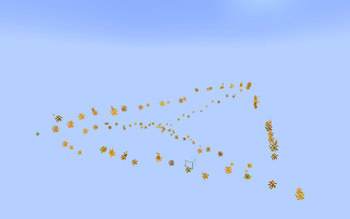
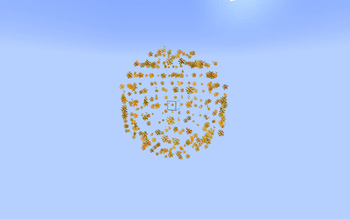
- Support for Cuboids, Polygons, Polyhedrons, and Spherical region area types.
- Region and selection visualisation using particles for all region types.
- Multi-platform support for Paper, Fabric, NeoForge and Sponge.
- Advanced API that lets you perform a set of queries on a world or region.
- No external dependencies.
Migrating from another plugin?
Orbis has an inbuilt migration tool that allows you to migrate your regions from other plugins.
Simply run /orbis migrate <plugin> on a server with Orbis and the other plugin installed, and your regions will be migrated to Orbis (as well as they can be).
For more information, please check the migration wiki page and find the section for the plugin you want to migrate from.
📆 Supported versions
Orbis aims to always support the latest version of Minecraft.
For modded versions, we always target the latest version, which is currently 1.21.10.
For Paper and Sponge we target 1.21.4-1.21.11 (Sponge API 14-18).
Newer or older versions may work, but are not tested.
🚀 Getting Started
- ⬇️ Download the plugin for your platform.
- 📂 Drop the
.jarfile into your server'spluginsormodsfolder. - 🔄 Restart your server. Orbis will generate its config and be ready to use!
Creating a region
See the step-by-step tutorial wiki page.
Setting flags
For a list of all currently available flags, check the wiki page: https://github.com/EmpireWar/Orbis/wiki/Flags.
- Prevent block breaking in a region:
/rg flag set spawn orbis:can_break false
- Permit damaging only zombies and husks:
/rg flag set arena orbis:damageable_entities ["minecraft:zombie","minecraft:husk"]
- Custom entry/exit messages:
/rg flag set plaza orbis:entry_message "<green>Welcome to the Plaza!"/rg flag set plaza orbis:exit_message "<gray>Leaving Plaza..."
- Make players invulnerable in an area:
/rg flag set lobby orbis:invulnerability true
- Lock time to noon:
/rg flag set museum orbis:time 6000
Futher setup
For more information, please take a look at the wiki contents: https://github.com/EmpireWar/Orbis/wiki.
📚 API & Integration
Replace PLATFORM with your server type (e.g., paper, fabric, sponge).
Replace VERSION with the latest Orbis version. For snapshots, use the /snapshots repo and append -SNAPSHOT.
repositories {
    maven("https://repo.empirewar.org/releases")
}

dependencies {
    compileOnly("org.empirewar.orbis:PLATFORM-api:VERSION")
}
Using the API
To find out how to utilise the API, take a look at the wiki page: https://github.com/EmpireWar/Orbis/wiki/API.
Events
Orbis fires events for every platform:
- RegionEnterEvent
- RegionLeaveEvent
📖 Javadocs
Full documentation is available at:
Orbis Javadocs
Available Versions
How to Install Orbis on Your Server
Order Server
Order a Minecraft Java server with at least 3 GB RAM (4 GB recommended).
Set fabric Loader
In the panel under "Egg", select the fabric loader and matching Minecraft version (26.1.2).
Install Mod
Open the mod browser in the dashboard and search for "Orbis". Click "Install" – done! Alternatively, upload the .jar via SFTP to the /mods folder.
Compatibility
Mod Loaders
Minecraft Versions
26.1.2, 26.1.1, 26.1 (+8 more)
Server-side
✗ UnsupportedRecommended RAM
4 GB(min. 3 GB)Frequently Asked Questions
Orbis server crashes on startup – what to do?
Most common cause: wrong fabric version or insufficient RAM. Check the server log (latest.log) for "OutOfMemoryError" or "Mixin" errors. With Mado Hosting: ensure at least 3 GB RAM is allocated and the loader matches the mod version (26.1.2). You can switch loaders with one click in the panel.
Is Orbis compatible with fabric and neoforge and paper and purpur and sponge?
Orbis officially supports fabric, neoforge, paper, purpur, sponge for Minecraft 26.1.2, 26.1.1, 26.1. The Mado dashboard automatically detects incompatible loader combinations.
Server lagging with Orbis – how to optimize performance?
Recommended RAM: 4 GB (per 8 players). Use /spark profiler to check if Orbis consumes the most tick time. Common fixes: reduce server view-distance to 8-10, install "performant" or "starlight" as supplementary mods on Forge. With Mado Hosting, your server runs on NVMe SSDs with dedicated CPU cores for minimal latency.
Similar Mods




Rent Modded Server
Install Orbis with just one click on your server.