
Ore Nodes
A mod that add slow mining nodes in your world.
Screenshots
About this Mod
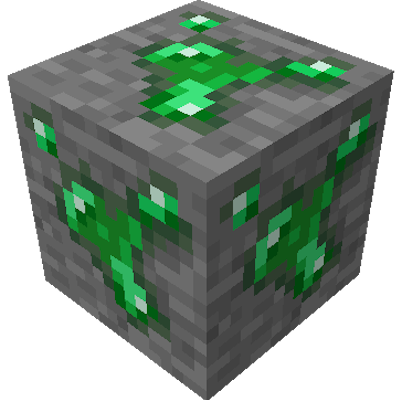
This mod adds nodes to your world that have an infinite amount of resources, in exchange for extremely slow mining.
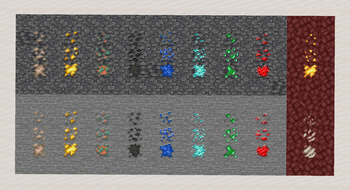
When exploring the world, you can occasionaly stumble upon sealed ores (the ore visually being less exposed than normal ores, compared to ore node, that are more exposed).
By breaking it, you can unveil what under it, either a regular ore block (80% chance), or a node ore (20% chance).
An ore node yeld infinite ressources, but has a numbers of restriction to balance that.
-it's rare.
- it can't be moved by piston.
- it won't drop itseft if struck by explosion.
- and most inportantly, it take 10 time longer to mine.
The idea behind this mod is to give players an alernate way to mine ores, where they can get access to as much ressources as they want, as long as they take the time to find and mine them.
Due to the nodes being painfully slow to mine, it can give an (somewhat) easy access to ores in early game, without disturbing the game balance too much, while easying the mining chore for fully geared players.
Should work with automation mod.
Modded ores arent supported.
Planned features :
-Revamp of some textures, like the lapis one.
-Config files.
-Maybe mod compatibility ? (if possible).
Available Versions
How to Install Ore Nodes on Your Server
Order Server
Order a Minecraft Java server with at least 3 GB RAM (4 GB recommended).
Set forge Loader
In the panel under "Egg", select the forge loader and matching Minecraft version (1.20.1).
Install Mod
Open the mod browser in the dashboard and search for "Ore Nodes". Click "Install" – done! Alternatively, upload the .jar via SFTP to the /mods folder.
Compatibility
Mod Loaders
Minecraft Versions
1.20.1
Server-side
✓ RequiredRecommended RAM
4 GB(min. 3 GB)Frequently Asked Questions
Ore Nodes server crashes on startup – what to do?
Most common cause: wrong forge version or insufficient RAM. Check the server log (latest.log) for "OutOfMemoryError" or "Mixin" errors. With Mado Hosting: ensure at least 3 GB RAM is allocated and the loader matches the mod version (1.20.1). You can switch loaders with one click in the panel.
Is Ore Nodes compatible with forge?
Ore Nodes officially supports forge for Minecraft 1.20.1. The Mado dashboard automatically detects incompatible loader combinations.
Server lagging with Ore Nodes – how to optimize performance?
Recommended RAM: 4 GB (per 8 players). Use /spark profiler to check if Ore Nodes consumes the most tick time. Common fixes: reduce server view-distance to 8-10, install "performant" or "starlight" as supplementary mods on Forge. With Mado Hosting, your server runs on NVMe SSDs with dedicated CPU cores for minimal latency.
Similar Mods




![[ETF] Entity Texture Features](https://cdn.modrinth.com/data/BVzZfTc1/af683d206d50b05258d865b0d6e4aa2f2cee12f2_96.webp)
![[EMF] Entity Model Features](https://cdn.modrinth.com/data/4I1XuqiY/6e5bbd0d06b1741bfdab6c0cfab6de8fdaf0064c_96.webp)
Rent Modded Server
Install Ore Nodes with just one click on your server.