
Ore Tuner
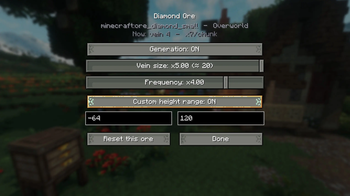
Tune every ore — vanilla and modded — right from the world creation screen: vein size, frequency, height, and on/off, saved per world.
Screenshots


About this Mod
Ore Tuner
Ever wanted diamonds in huge veins, iron everywhere, or a world with no coal at all — without hunting through config files or writing a datapack? Ore Tuner puts ore generation in your hands, right where you make the world.
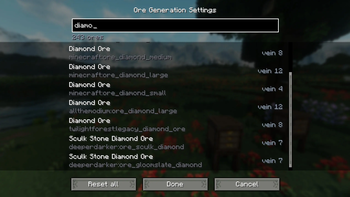
Click the new Ore Generation button on the Create New World screen and you get a searchable list of every ore in your game — vanilla and modded. For each one you can dial in:
🪨 Vein size — how many blocks each vein contains
🎲 Frequency — how many veins generate per chunk
📏 Height range — the min/max Y the ore spawns at
🔀 Enable / disable — turn any ore's generation off entirely Per-world, not global
Your settings are baked into the world you're creating and saved with it. Other worlds are untouched, and your global game files are never modified — so every world can have its own ore balance.
Works with modded ores automatically
Ore Tuner reads the ores from your game's world-generation data, so it picks up ores from other mods on its own — no per-mod patches or compatibility add-ons needed.
How it works
When you finish editing, Ore Tuner writes a small per-world datapack describing your changes and applies it before the world generates, so your tweaks take effect from the very first chunk. Everything is done through the game's own data system — no edits to vanilla generation.
Requirements: Minecraft 1.21.1 · NeoForge
Available Versions
How to Install Ore Tuner on Your Server
Order Server
Order a Minecraft Java server with at least 4 GB RAM (6 GB recommended).
Set neoforge Loader
In the panel under "Egg", select the neoforge loader and matching Minecraft version (1.21.11).
Install Mod
Open the mod browser in the dashboard and search for "Ore Tuner". Click "Install" – done! Alternatively, upload the .jar via SFTP to the /mods folder.
Compatibility
Mod Loaders
Minecraft Versions
1.21.11, 1.21.10, 1.21.9 (+8 more)
Server-side
✗ UnsupportedRecommended RAM
6 GB(min. 4 GB)Frequently Asked Questions
Ore Tuner server crashes on startup – what to do?
Most common cause: wrong neoforge version or insufficient RAM. Check the server log (latest.log) for "OutOfMemoryError" or "Mixin" errors. With Mado Hosting: ensure at least 4 GB RAM is allocated and the loader matches the mod version (1.21.11). You can switch loaders with one click in the panel.
Is Ore Tuner compatible with neoforge?
Ore Tuner officially supports neoforge for Minecraft 1.21.11, 1.21.10, 1.21.9. The Mado dashboard automatically detects incompatible loader combinations.
Server lagging with Ore Tuner – how to optimize performance?
Recommended RAM: 6 GB (per 5 players). Use /spark profiler to check if Ore Tuner consumes the most tick time. Common fixes: reduce server view-distance to 8-10, install "performant" or "starlight" as supplementary mods on Forge. With Mado Hosting, your server runs on NVMe SSDs with dedicated CPU cores for minimal latency.
Similar Mods



Rent Modded Server
Install Ore Tuner with just one click on your server.