
OSU Touch Grass
Actual osu! lazer running inside the CoreCLR embedded in the Minecraft JVM, sharing a GL texture with it. With multiplayer
Screenshots
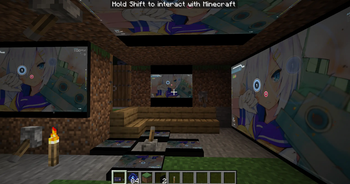
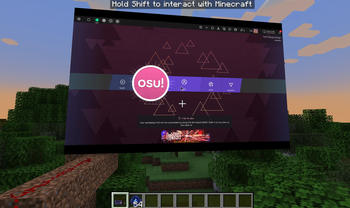
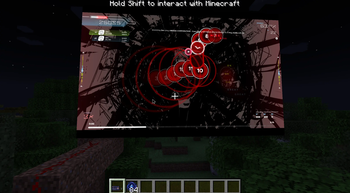
About this Mod
Osu Touch Grass
Not a meme, its actually playable, surprizingly smooth
Features
- Actual osu!lazer running inside Minecraft (osu 2026.505.0 / osu-framework 2026.428.0, built from source, embedded in the JVM via CoreCLR) (I'm not that crazy to actually rewrite Osu in java)
- Running on arbitary-sized monitor block rectangle (need redstone signal to launch)
- Multiple independent screens coexist (but who needs that?)
- Crafted items: osu! Pen, Mouse, Keyboard, combined items (hold in hand to control Osu input). Hold Shift to interact with Minecraft while playing Osu
- Full network transport layer re-implementation over Minecraft packets:
- Per-world leaderboards with weighted pp rankings
- Score submission + pp earned as a stackable item in your inventory (what?)
- Friends, profile pages, presence, chat
- Spectator mode (replay-frame relay between players)
- Multiplayer rooms (HeadToHead only for now) with beatmap downloading
Custom maps
Drop .osz files into <minecraft>/osutouchgrass-maps/ to import them.
How it works
First boot extracts ~370 MB of bundled CoreCLR + osu! binaries to <minecraft>/osutouchgrass-cache/. Game data (beatmaps, scores, settings) are stored at <minecraft>/osutouchgrass/, isolated per Minecraft instance.
Dependencies
- Minecraft 1.21.1
- NeoForge 21.1.72+
- Architectury API 13.0.8+
- Windows x64 only. Linux / macOS support is not implemented yet.
Credits
- osu! by ppy — MIT (code) + CC BY-NC 4.0 (game resources)
- .NET / CoreCLR by the .NET Foundation — MIT
- BASS audio library by Un4seen Developments — free for non-commercial use
But why?
Available Versions
How to Install OSU Touch Grass on Your Server
Order Server
Order a Minecraft Java server with at least 3 GB RAM (4 GB recommended).
Set neoforge Loader
In the panel under "Egg", select the neoforge loader and matching Minecraft version (1.21.1).
Install Mod
Open the mod browser in the dashboard and search for "OSU Touch Grass". Click "Install" – done! Alternatively, upload the .jar via SFTP to the /mods folder.
Compatibility
Mod Loaders
Minecraft Versions
1.21.1
Server-side
✓ RequiredRecommended RAM
4 GB(min. 3 GB)Frequently Asked Questions
OSU Touch Grass server crashes on startup – what to do?
Most common cause: wrong neoforge version or insufficient RAM. Check the server log (latest.log) for "OutOfMemoryError" or "Mixin" errors. With Mado Hosting: ensure at least 3 GB RAM is allocated and the loader matches the mod version (1.21.1). You can switch loaders with one click in the panel.
Is OSU Touch Grass compatible with neoforge?
OSU Touch Grass officially supports neoforge for Minecraft 1.21.1. The Mado dashboard automatically detects incompatible loader combinations.
Server lagging with OSU Touch Grass – how to optimize performance?
Recommended RAM: 4 GB (per 8 players). Use /spark profiler to check if OSU Touch Grass consumes the most tick time. Common fixes: reduce server view-distance to 8-10, install "performant" or "starlight" as supplementary mods on Forge. With Mado Hosting, your server runs on NVMe SSDs with dedicated CPU cores for minimal latency.
Similar Mods




Rent Modded Server
Install OSU Touch Grass with just one click on your server.