
oSzoukaua's: Glow-co
Datapack that allows you to set/randomise player team colours!
Screenshots
About this Mod
Description:
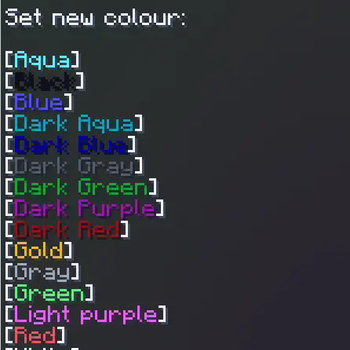
This Datapack/mod makes a Simple to use and functional Chat-based UI for changing your own team colour. You can access this menu by typing "/trigger colour_menu"
Operator Settings
Note: a value of 0 means false, a value of 1 means true
Enable/Disable a welcome message for players informing them of the datapacks presence, default: false/0
/scoreboard players set welcome_message oszu_gc 0
Disable the use of the colour menu for players, default: false/0
/scoreboard players set disable_menu oszu_gc 0
Enable/Disable random colour assignment for players on initial join of the world, default: false/0
/scoreboard players set random_colour oszu_gc 0
Enable/Disable random colour every time you join, default: false/0
/scoreboard players set random_colour_every_join oszu_gc 0
Re-roll
Re-roll a specific players random height
/execute as PLAYERNAME run function oszu_gc:colour_logic/randomise_colour
NOTE:
you can use @a as a playername, and it will re-roll the height for all players currently in the server
Notes:
Other:
You are free to use this pack in modpacks/youtube videos and many other forms of sharing
If you would like me to port this to any other Minecraft version, i would be more than happy to do so, please contact me! my details are below.
If you do find any issues/have any recommendations, suggestions for optimizations, improvements, or new features to add, feel free to contact me!
Discord
@oSzoukaua

Technical details:
Available Versions
How to Install oSzoukaua's: Glow-co on Your Server
Order Server
Order a Minecraft Java server with at least 3 GB RAM (4 GB recommended).
Set datapack Loader
In the panel under "Egg", select the datapack loader and matching Minecraft version (26.1.2).
Install Mod
Open the mod browser in the dashboard and search for "oSzoukaua's: Glow-co". Click "Install" – done! Alternatively, upload the .jar via SFTP to the /mods folder.
Compatibility
Mod Loaders
Minecraft Versions
26.1.2, 26.1.1, 26.1 (+5 more)
Server-side
✓ RequiredRecommended RAM
4 GB(min. 3 GB)Frequently Asked Questions
oSzoukaua's: Glow-co server crashes on startup – what to do?
Most common cause: wrong datapack version or insufficient RAM. Check the server log (latest.log) for "OutOfMemoryError" or "Mixin" errors. With Mado Hosting: ensure at least 3 GB RAM is allocated and the loader matches the mod version (26.1.2). You can switch loaders with one click in the panel.
Is oSzoukaua's: Glow-co compatible with datapack and fabric and forge and neoforge and quilt?
oSzoukaua's: Glow-co officially supports datapack, fabric, forge, neoforge, quilt for Minecraft 26.1.2, 26.1.1, 26.1. Note: Forge and Fabric mods are NOT cross-compatible – pick one loader and stick with it. The Mado dashboard automatically detects incompatible loader combinations.
Server lagging with oSzoukaua's: Glow-co – how to optimize performance?
Recommended RAM: 4 GB (per 8 players). Use /spark profiler to check if oSzoukaua's: Glow-co consumes the most tick time. Common fixes: reduce server view-distance to 8-10, install "performant" or "starlight" as supplementary mods on Forge. With Mado Hosting, your server runs on NVMe SSDs with dedicated CPU cores for minimal latency.
Similar Mods




Rent Modded Server
Install oSzoukaua's: Glow-co with just one click on your server.
Details
- License
- Creative Commons Attribution Non Commercial Share Alike 4.0 International
- Server-side
- Required