
Ouch!
Customisable, server side damage indicator! For Fabric
Screenshots
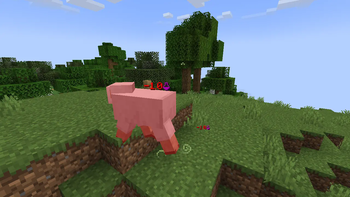
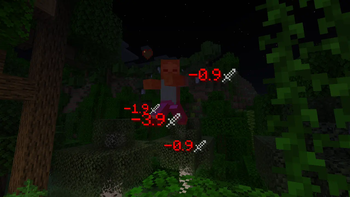
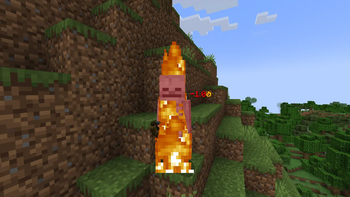
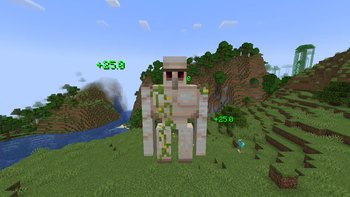
About this Mod
Ouch!
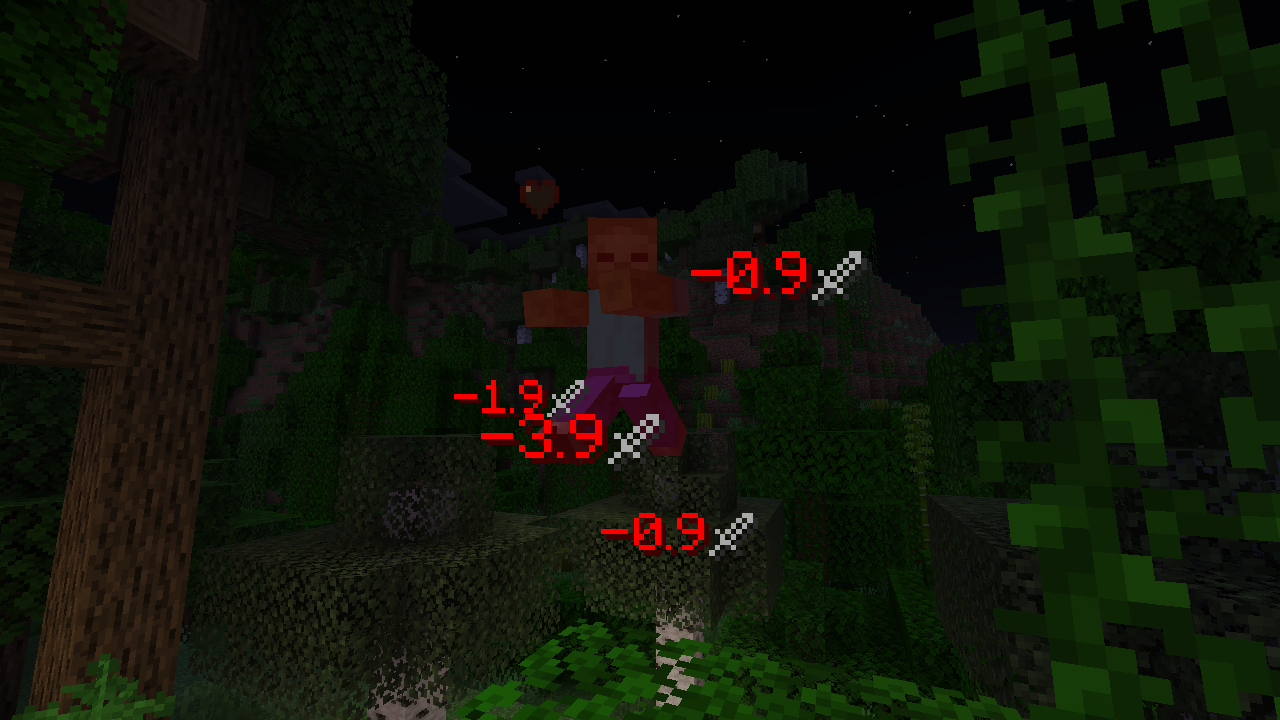
Tired of guessing how much damage entity you attacked took? Or maybe you just wanted to make fights look bit fancier?
Then this mod is for you!
Ouch! is Fabric (and Quilt) server side modification powered by
Polymer which adds number/text particle effect activated after
entity getting damaged, dying or getting healed (by default only damage/healing is visible)! This mod is also
fully configurable allowing to change the text (color and display), size, movement and visibility time, depending
on predicates testing for damage type, victim (damaged entity), source (attacker or projectile) and attacker (attacker).
It can also display multiple particles with different setting for same damage, allowing for extra fun messages and alike.
== Download on Modrinth ==
Configuration.
This mod config file is stored as ./config/ouch.json.
Preset selection config.
By default, config is in a format of preset selection, allowing you to choose default style/look that's built into the mod.
{
  "preset": "default"
}
Available presets: default, minimal
Full config.
This config allows you to change any text and it's behaviour. Can be used for advanced configuration.
Default values used by presets can be found here: https://github.com/Patbox/ouch/tree/master/preset
All custom text within it uses the QuickText format.
All predicates use are supplied by Predicate API, using this format.
Lines prefixed with // aren't part of real config and are here just to explain it.
{
  // All display values for damage.
  "damage": [
    // Top layer array defines lists in which text/settings will be found.
    // Only single definition from each included array is used. They are matched from top to bottom.
    [
      // Text/Display definition.
      {
        // [Optional] Matches damage by type, being either a single entry ("minecraft:generic")
        // a tag ("#minecraft:is_fire") or list of entries (["minecraft:mob_attack", "minecraft:player_attack"])
        // By default (not set), it matches everything.
        "type": "...",
        // [Optional] Predicate checking for victim (damaged entity).
        // By default, always succeeds.
        "victim": {
          "type": "..."
        },
        // [Optional] Predicate checking for attacker (entity which attacked entity).
        // By default, always succeeds.
        "attacker": {
          "type": "..."
        },
        // [Optional] Predicate checking for source (projectile or attacker).
        // By default, always succeeds.
        "source": {
          "type": "..."
        },
        // [Optional] A minimal amount of damage required for this to display.
        // By default, not set.
        "min_value": 0,
        // [Optional] A maximal amount of damage allowed for this to display.
        // By default, not set.
        "max_value": 999999,
        // [Optional] A floating point number from 0 to 1 (inclusive) describing change
        // this message is selected. 1 means it's always selected if other properties match,
        // 0.5 is 50% and 0 is never.
        // By default, it's set to 1.
        "chance": 1,
        // [Optional] Sets value velocity of particle is multiplied by every tick.
        // It needs to be a number between 0 and 1
        // Default value: 0.7
        "per_tick_velocity_multiplier": 0.7,
        // [Optional] Sets value of (downwards) gravity particle is effected by.
        // It needs to be a number between -1 and 1
        // Default value: 0.05
        "gravity": 0.05,
        // [Optional] Sets the time (in ticks, 20 ticks is a second), the particle is
        // visible for. It needs to be a number larger than 0.
        // Default value: 20
        "staying_time": 20,
        // [Optional] Sets the scale/size of the particle.
        // It needs to be a number between 0 and 5
        // Default value: 0.8
        "text_scale": 0.8,
        // [Optional] Overrides calculated velocity with a static one.
        // Default value: not set / uses calculated one.
        "velocity_override": [0, 2, 0],
        // Text used for damage particle. Has placeholders:
        // ${value} - shows rounded damage with 1 number as decimal part.
        // ${value_rounded} - shows rounded damage rounded to integer.
        // ${value_raw} - shows raw damage value.
        "text": "<red>-${value}"
      }
    ]
  ],
  // All display values for death text.
  "death": [
    // Top layer array defines lists in which text/settings will be found.
    // Only single definition from each included array is used. They are matched from top to bottom.
    [
      // Text/Display definition.
      {
        // [Optional] Matches damage by type, being either a single entry ("minecraft:generic")
        // a tag ("#minecraft:is_fire") or list of entries (["minecraft:mob_attack", "minecraft:player_attack"])
        // By default (not set), it matches everything.
        "type": "...",
        // [Optional] Predicate checking for victim (damaged entity).
        // By default, always succeeds.
        "victim": {
          "type": "..."
        },
        // [Optional] Predicate checking for attacker (entity which attacked entity).
        // By default, always succeeds.
        "attacker": {
          "type": "..."
        },
        // [Optional] Predicate checking for source (projectile or attacker).
        // By default, always succeeds.
        "source": {
          "type": "..."
        },
        // [Optional] A minimal amount of healing required for this to display.
        // By default, not set.
        "min_value": 0,
        // [Optional] A maximal amount of healing allowed for this to display.
        // By default, not set.
        "max_value": 999999,
        // [Optional] A floating point number from 0 to 1 (inclusive) describing change
        // this message is selected. 1 means it's always selected if other properties match,
        // 0.5 is 50% and 0 is never.
        // By default, it's set to 1.
        "chance": 1,
        // [Optional] Sets value velocity of particle is multiplied by every tick.
        // It needs to be a number between 0 and 1
        // Default value: 0.7
        "per_tick_velocity_multiplier": 0.7,
        // [Optional] Sets value of (downwards) gravity particle is effected by.
        // It needs to be a number between -1 and 1
        // Default value: 0.05
        "gravity": 0.05,
        // [Optional] Sets the time (in ticks, 20 ticks is a second), the particle is
        // visible for. It needs to be a number larger than 0.
        // Default value: 20
        "staying_time": 20,
        // [Optional] Sets the scale/size of the particle.
        // It needs to be a number between 0 and 5
        // Default value: 0.8
        "text_scale": 0.8,
        // [Optional] Overrides calculated velocity with a static one.
        // Default value: not set / uses calculated one.
        "velocity_override": [0, 2, 0],
        // Text used for damage particle. Has placeholders:
        // ${message} - death message used.
        // ${victim} - name of the victim.
        // ${attacker} - name of the attacker.
        "text": "<red>${message}"
      }
    ]
  ],
  // All display values for healing.
  "healing": [
    // Top layer array defines lists in which text/settings will be found.
    // Only single definition from each included array is used. They are matched from top to bottom.
    [
      // Text/Display definition.
      {
        // [Optional] Predicate checking for healed entity.
        // By default, always succeeds.
        "entity": {
          "type": "..."
        },
        // [Optional] A floating point number from 0 to 1 (inclusive) describing change
        // this message is selected. 1 means it's always selected if other properties match,
        // 0.5 is 50% and 0 is never.
        // By default, it's set to 1.
        "chance": 1,
        // [Optional] Sets value velocity of particle is multiplied by every tick.
        // It needs to be a number between 0 and 1
        // Default value: 0.7
        "per_tick_velocity_multiplier": 0.7,
        // [Optional] Sets value of (downwards) gravity particle is effected by.
        // It needs to be a number between -1 and 1
        // Default value: 0.05
        "gravity": 0.05,
        // [Optional] Sets the time (in ticks, 20 ticks is a second), the particle is
        // visible for. It needs to be a number larger than 0.
        // Default value: 20
        "staying_time": 20,
        // [Optional] Sets the scale/size of the particle.
        // It needs to be a number between 0 and 5
        // Default value: 0.8
        "text_scale": 0.8,
        // [Optional] Overrides calculated velocity with a static one.
        // Default value: not set / uses calculated one.
        "velocity_override": [0, 2, 0],
        // Text used for healing particle. Has placeholders:
        // ${value} - shows rounded healing amount with 1 number as decimal part.
        // ${value_rounded} - shows healing amount rounded to integer.
        // ${value_raw} - shows raw healing amount value.
        "text": "<green>+${value}"
      }
    ]
  ]
}
Available Versions
How to Install Ouch! on Your Server
Order Server
Order a Minecraft Java server with at least 3 GB RAM (4 GB recommended).
Set fabric Loader
In the panel under "Egg", select the fabric loader and matching Minecraft version (26.1.2).
Install Mod
Open the mod browser in the dashboard and search for "Ouch!". Click "Install" – done! Alternatively, upload the .jar via SFTP to the /mods folder.
Compatibility
Mod Loaders
Minecraft Versions
26.1.2, 26.1.1, 26.1 (+13 more)
Server-side
✓ RequiredRecommended RAM
4 GB(min. 3 GB)Frequently Asked Questions
Ouch! server crashes on startup – what to do?
Most common cause: wrong fabric version or insufficient RAM. Check the server log (latest.log) for "OutOfMemoryError" or "Mixin" errors. With Mado Hosting: ensure at least 3 GB RAM is allocated and the loader matches the mod version (26.1.2). You can switch loaders with one click in the panel.
Is Ouch! compatible with fabric and quilt?
Ouch! officially supports fabric, quilt for Minecraft 26.1.2, 26.1.1, 26.1. The Mado dashboard automatically detects incompatible loader combinations.
Server lagging with Ouch! – how to optimize performance?
Recommended RAM: 4 GB (per 8 players). Use /spark profiler to check if Ouch! consumes the most tick time. Common fixes: reduce server view-distance to 8-10, install "performant" or "starlight" as supplementary mods on Forge. With Mado Hosting, your server runs on NVMe SSDs with dedicated CPU cores for minimal latency.
Similar Mods




![[ETF] Entity Texture Features](https://cdn.modrinth.com/data/BVzZfTc1/af683d206d50b05258d865b0d6e4aa2f2cee12f2_96.webp)
![[EMF] Entity Model Features](https://cdn.modrinth.com/data/4I1XuqiY/6e5bbd0d06b1741bfdab6c0cfab6de8fdaf0064c_96.webp)
Rent Modded Server
Install Ouch! with just one click on your server.