
Painter Table
Add table to make map arts survival friendly
About this Mod
With this mod you can draw any image from the Internet on maps. Just copy link of an image and use it to make an art.
Mod Content
Dense Paper
New paper type added by this mod. It's using as base material for this mod.
Pencil
Instrument to draw a sketch. Hold pencil in one hand and dense paper in another and press RMB to create a sketch.
Sketch
Item that stores image URL and can be used in painter table to draw an image.
Sketchbook
Item to store and preview all your sketches. Combine sketchbook and sketch to put it in. You can name sketch book and sketches inside. All sketches inside shown in grayscale (because it sketches).
Painter Table
Main block of this mod. Put sketch ot sketch book with selected sketch inside to configure your art size. You can adjust height and width. One square is one map. Painter table can interact with hoppers to put dyes and dense paper and take map from output slot. Also you can select squares on preview to specify which maps you want to paint.
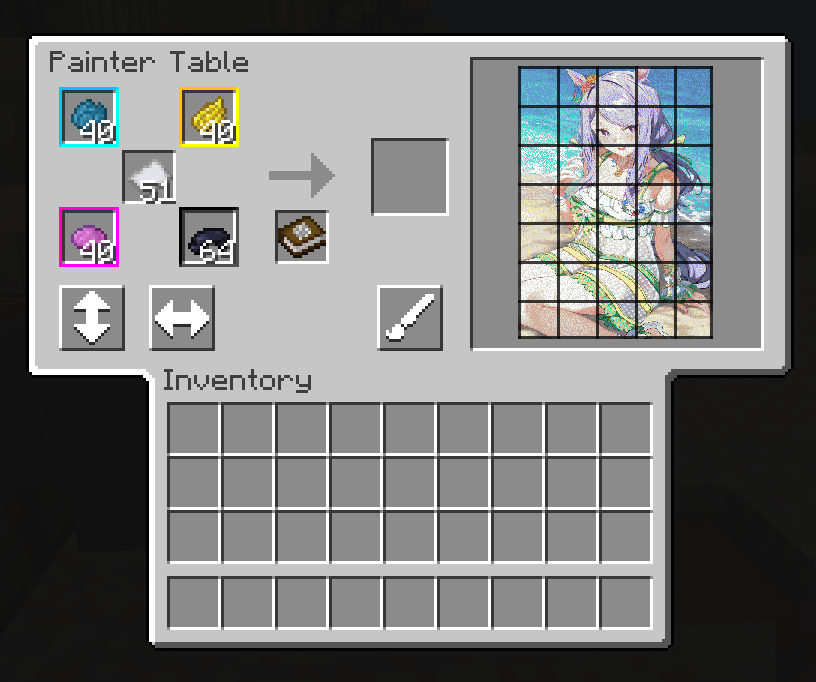
Usage
Note: sketch and sketchbook are replaceable in painter table.
- Craft sketch using dense paper and pencil.
- Put sketch in painter table
- Adjust art size
- Start painting
WIP
Mod in development stage if you want to help please use my GitHub repository. I will grad if some one draw better textures or give some cool ideas.
Available Versions
How to Install Painter Table on Your Server
Order Server
Order a Minecraft Java server with at least 3 GB RAM (4 GB recommended).
Set forge Loader
In the panel under "Egg", select the forge loader and matching Minecraft version (1.21.4).
Install Mod
Open the mod browser in the dashboard and search for "Painter Table". Click "Install" – done! Alternatively, upload the .jar via SFTP to the /mods folder.
Compatibility
Mod Loaders
Minecraft Versions
1.21.4, 1.21.1, 1.20.1
Server-side
✓ RequiredRecommended RAM
4 GB(min. 3 GB)Frequently Asked Questions
Painter Table server crashes on startup – what to do?
Most common cause: wrong forge version or insufficient RAM. Check the server log (latest.log) for "OutOfMemoryError" or "Mixin" errors. With Mado Hosting: ensure at least 3 GB RAM is allocated and the loader matches the mod version (1.21.4). You can switch loaders with one click in the panel.
Is Painter Table compatible with forge and neoforge?
Painter Table officially supports forge, neoforge for Minecraft 1.21.4, 1.21.1, 1.20.1. The Mado dashboard automatically detects incompatible loader combinations.
Server lagging with Painter Table – how to optimize performance?
Recommended RAM: 4 GB (per 8 players). Use /spark profiler to check if Painter Table consumes the most tick time. Common fixes: reduce server view-distance to 8-10, install "performant" or "starlight" as supplementary mods on Forge. With Mado Hosting, your server runs on NVMe SSDs with dedicated CPU cores for minimal latency.
Similar Mods

![[ETF] Entity Texture Features](https://cdn.modrinth.com/data/BVzZfTc1/af683d206d50b05258d865b0d6e4aa2f2cee12f2_96.webp)
![[EMF] Entity Model Features](https://cdn.modrinth.com/data/4I1XuqiY/6e5bbd0d06b1741bfdab6c0cfab6de8fdaf0064c_96.webp)



Rent Modded Server
Install Painter Table with just one click on your server.