
Palettinator
Browse, generate, preview & publish Minecraft block palettes in game. With a built-in GUI runs server-side, so even vanilla clients can use it.
Screenshots
About this Mod
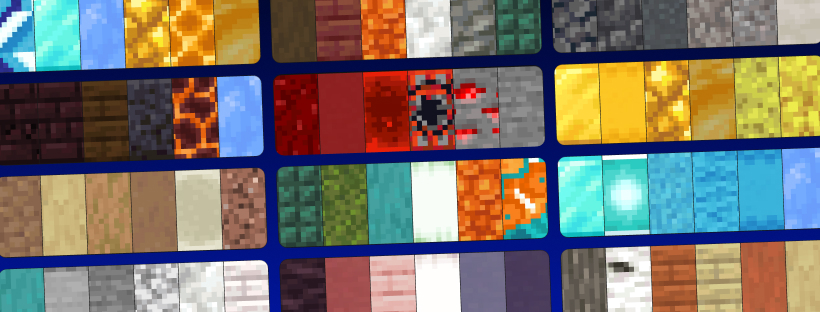
Find, generate, preview, and share Minecraft block palettes without leaving the game. Palettinator brings palettinator.com — the free, ad-free block & colour palette generator — straight into Minecraft, as both chat commands and a full in-game GUI.
Stuck on which blocks go together? Generate a palette, preview it right in the world, load it into your hotbar, and build. Made something great? Publish it to the site in one command.
⚠️ Alpha: early access and under active development. Most things work; a few are still missing (e.g. the very newest 26.2 blocks). Feedback welcome!
✨ Features
- 🎨 Generate palettes —
/palette generatemakes a fresh, colour-coordinated palette and loads it into your hotbar. Seed it from a colour (/palette generate blue) or from the block in your hand (/palette generate hand). - 🌈 Gradients —
/palette gradient white_concrete blue_concretebuilds a smooth colour ramp between two blocks. No args = a gradient between the blocks in your main hand and off-hand. - 🧱 In-world preview —
/palette build <#>places a palette as a temporary strip in front of you so you can see the blocks together; it auto-clears (or/palette clear). - 🔎 Search the community —
/palette search cozyfinds palettes by name, tag, creator, or number, with a colour preview right in chat — hover any square to see the block, click a line to load it. - 📥 Load into your hotbar —
/palette get 73286drops a palette's blocks into your hotbar. (In survival you get one of each; creative gets full stacks. Big palettes come as a bundle.) - 📤 Publish & update — arrange blocks in your hotbar, then
/palette publish "Cozy Cabin" medieval,oak A snug little build. It goes live on your palettinator.com profile with a clickable link./palette update 42refreshes an existing one. - ❤️ Browse, like & roll —
/palette browse top,/palette mine,/palette like 42,/palette rollfor instant inspiration.
🖥️ Built-in GUI (install client-side)
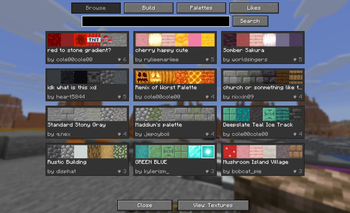
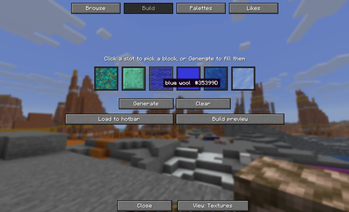
Press P in-game to open the Palettinator browser — a native UI that mirrors the website:
- Browse — searchable grid of palette cards with real block textures, author, and a clickable ❤ like button.
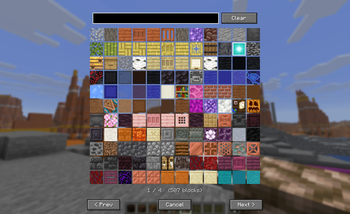
- Build — six slots you can fill by clicking (block picker with live search) or with Generate (watch the slots spin like a slot machine and land on a fresh palette). Then Load to hotbar or Build preview.
- Palettes — your own creations. Likes — everything you've hearted.
- Click any palette for a detail view with a big block grid, load/preview, like, and "Open on site".
The keybind is rebindable under Options → Controls → Palettinator.
🟢 Works on vanilla clients — no install required for players
Install it on your server and every player can use the commands, even on a completely vanilla client — it's all chat commands, clickable links, and colour swatches. No resource pack required. Installing it client-side additionally unlocks the GUI above. (Singleplayer: just install it normally.)
🛡️ For server admins
- Permissions (LuckPerms): every command has a node —
palettinator.command.build,palettinator.command.publish,palettinator.command.generate, etc. — so you can grant/deny per group. Without a permissions mod it falls back to sensible defaults (in-world build defaults to operators whenbuildRequiresOpis set). - Config (
config/palettinator.json): toggle commands on/off, require op for in-world building, set per-action cooldowns, and tune the preview's lifetime and block cap. - Survival-friendly: loading a palette gives one block each in survival (no free stacks), full stacks in creative.
🔗 Publishing to your account
Publishing/updating is tied to your Palettinator account. Run /palette link, click the link in chat, sign in, and approve — that's it. You can revoke access anytime in your account settings. Browsing, generating, previewing, and loading palettes need no account at all.
⌨️ Commands
| Command | What it does |
|---|---|
/palette search <query> |
Find palettes (name, tag, creator, or #id) |
/palette browse <top|new|old> [query] |
Browse palettes by sort |
/palette get <#> |
Load a palette into your hotbar |
/palette build <#> |
Preview a palette in the world (auto-clears) |
/palette clear |
Remove your in-world preview now |
/palette generate [colour] |
Generate a new palette (optionally from a colour) |
/palette generate hand |
Generate from the block you're holding |
/palette gradient [from] [to] |
Gradient between two blocks (no args = both hands) |
/palette roll |
Generate a random palette |
/palette mine |
Browse your own palettes |
/palette like <#> |
Like / unlike a palette |
/palette publish <title> [tags] [desc] |
Publish your hotbar as a new palette |
/palette update <#> |
Update one of your palettes |
/palette link |
Connect your Palettinator account |
/palette help |
Show all commands |
/palettinator works as the full command name too.
📦 Requirements
- Minecraft 26.1.2 or 26.2 (Fabric)
- Fabric Loader 0.19.0+
- Fabric API
- Java 25+ (required by Minecraft 26.x)
🧩 Install
Server: drop palettinator-0.1.0-alpha.jar and Fabric API into your server's mods/ folder and restart. Players need nothing (the GUI is optional, client-side).
Singleplayer / client: put both into your client mods/ folder, then press P in-game.
Made with ❤ for builders. Palettinator is free and ad-free.
Available Versions
How to Install Palettinator on Your Server
Order Server
Order a Minecraft Java server with at least 3 GB RAM (4 GB recommended).
Set fabric Loader
In the panel under "Egg", select the fabric loader and matching Minecraft version (26.2).
Install Mod
Open the mod browser in the dashboard and search for "Palettinator". Click "Install" – done! Alternatively, upload the .jar via SFTP to the /mods folder.
Compatibility
Mod Loaders
Minecraft Versions
26.2, 26.1.2
Server-side
~ OptionalRecommended RAM
4 GB(min. 3 GB)Frequently Asked Questions
Palettinator server crashes on startup – what to do?
Most common cause: wrong fabric version or insufficient RAM. Check the server log (latest.log) for "OutOfMemoryError" or "Mixin" errors. With Mado Hosting: ensure at least 3 GB RAM is allocated and the loader matches the mod version (26.2). You can switch loaders with one click in the panel.
Is Palettinator compatible with fabric?
Palettinator officially supports fabric for Minecraft 26.2, 26.1.2. The Mado dashboard automatically detects incompatible loader combinations.
Server lagging with Palettinator – how to optimize performance?
Recommended RAM: 4 GB (per 8 players). Use /spark profiler to check if Palettinator consumes the most tick time. Common fixes: reduce server view-distance to 8-10, install "performant" or "starlight" as supplementary mods on Forge. With Mado Hosting, your server runs on NVMe SSDs with dedicated CPU cores for minimal latency.
Similar Mods

![[ETF] Entity Texture Features](https://cdn.modrinth.com/data/BVzZfTc1/af683d206d50b05258d865b0d6e4aa2f2cee12f2_96.webp)
![[EMF] Entity Model Features](https://cdn.modrinth.com/data/4I1XuqiY/6e5bbd0d06b1741bfdab6c0cfab6de8fdaf0064c_96.webp)



Rent Modded Server
Install Palettinator with just one click on your server.