
Panadero Repair Stations
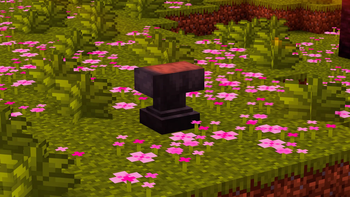
A repair station for Minecraft that behaves like an anvil, looks like an anvil, but doesn't need XP. It just wants your diamonds.
Screenshots
About this Mod
🛠️ Panadero Repair Stations
A repair station that behaves like an anvil, looks like an anvil, but doesn't need XP. It just wants your diamonds.
This mod adds a repair station block for Minecraft that allows you to repair tools and items using a custom currency (by default, diamonds), without relying on XP or traditional anvils.
Yes, it says stations, give me a break.
✨ Features
- 🔧 Repair items using materials instead of experience
- ⚙️ Fully configurable (cost, currency, break chance)
- 💥 Degrades over time and can break (like an anvil)
- 🎨 Visual state (chipped / damaged)
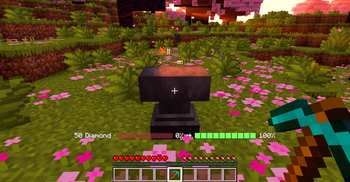
- 📊 Durability feedback with colored bars and percentages
- 🔊 Sound feedback based on condition
- ✨ Particles on use and destruction
- 🧾 Tooltip showing condition
⚙️ Configuration
Use in-game commands (OP only):
/repairstation config show
/repairstation config item <item>
/repairstation config maxcost <value>
/repairstation config breakchance <0-100>
Examples:
/repairstation config item minecraft:emerald
/repairstation config maxcost 50
/repairstation config breakchance 15
🎮 How it works
- Hold a damageable item
- Right-click the repair station
- The station consumes items from your inventory
- Repairs proportionally depending on how many items you have (up to max cost)
The station may degrade or break after use depending on configuration.
📦 Modpacks
You are free to include this mod in modpacks.
🤝 Contributing
Issues and pull requests are welcome, although the project is intentionally small and simple.
📜 License
This project is licensed under the MIT License.
You are free to use, modify and redistribute the code, as long as proper credit is given.
🧠 Notes
- As of now it is only designed for Fabric in mind
🥖 Why “Panadero”?
It's my nickname. It's a long story...
Available Versions
How to Install Panadero Repair Stations on Your Server
Order Server
Order a Minecraft Java server with at least 3 GB RAM (4 GB recommended).
Set fabric Loader
In the panel under "Egg", select the fabric loader and matching Minecraft version (1.21.1).
Install Mod
Open the mod browser in the dashboard and search for "Panadero Repair Stations". Click "Install" – done! Alternatively, upload the .jar via SFTP to the /mods folder.
Compatibility
Mod Loaders
Minecraft Versions
1.21.1
Server-side
✓ RequiredRecommended RAM
4 GB(min. 3 GB)Frequently Asked Questions
Panadero Repair Stations server crashes on startup – what to do?
Most common cause: wrong fabric version or insufficient RAM. Check the server log (latest.log) for "OutOfMemoryError" or "Mixin" errors. With Mado Hosting: ensure at least 3 GB RAM is allocated and the loader matches the mod version (1.21.1). You can switch loaders with one click in the panel.
Is Panadero Repair Stations compatible with fabric?
Panadero Repair Stations officially supports fabric for Minecraft 1.21.1. The Mado dashboard automatically detects incompatible loader combinations.
Server lagging with Panadero Repair Stations – how to optimize performance?
Recommended RAM: 4 GB (per 8 players). Use /spark profiler to check if Panadero Repair Stations consumes the most tick time. Common fixes: reduce server view-distance to 8-10, install "performant" or "starlight" as supplementary mods on Forge. With Mado Hosting, your server runs on NVMe SSDs with dedicated CPU cores for minimal latency.
Similar Mods




Rent Modded Server
Install Panadero Repair Stations with just one click on your server.