
Paojiao134's Catalyst
Improve the playing efficiency of players
About this Mod
Catalyst
Catalyst 是一个轻量级的 Minecraft 客户端辅助模组,提供了一系列实用的游戏增强功能,让你的游戏体验更加流畅便捷。
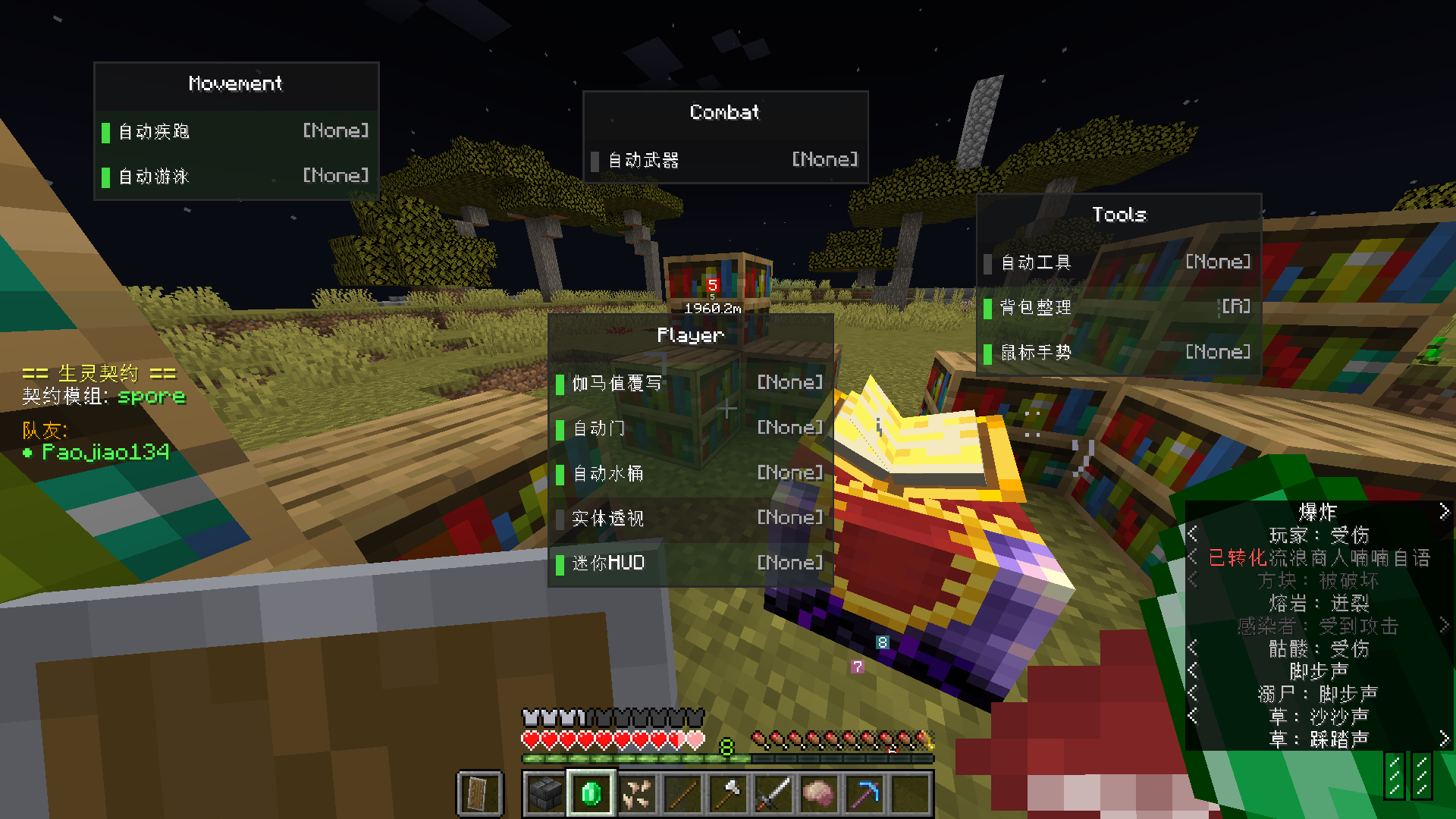
✨ 功能特性
🏃 自动疾跑
- 自动疾跑:移动时自动启用疾跑状态
- 自动游泳:在水中自动启用游泳姿态
🔦 视觉增强
- Gamma 覆盖:自定义游戏亮度(最高可达 10000),让黑暗无处遁形
- 夜视模式:一键开启完美夜视效果
- 实体透视:透视显示实体位置(默认关闭)
🛠️ 自动工具
- 自动工具选择:挖掘方块时自动切换到最合适的工具
- 自动武器选择:攻击实体时自动切换到最合适的武器
- 自动恢复:操作完成后自动恢复到原物品栏位
- 锁定槽位:可设置锁定的快捷栏槽位,避免自动切换干扰
🚪 便捷交互
- 自动开门:靠近门时自动开门
- 自动水桶:自动使用水桶处理岩浆等危险情况
📍 路标系统
- 创建和管理自定义路标
- 在游戏世界中显示路标指引
- 支持不同维度和颜色标记
- 显示到路标的距离和方向
📊 迷你 HUD
可在屏幕角落显示实用信息:
- 当前坐标
- 所在生物群系
- 游戏时间
- 天数计数
- 加载实体数量
📦 背包整理
- 自动整理:打开容器时自动整理物品
- 多种排序模式:支持按类型、名称、数量排序
- 灵活配置:可设置是否整理快捷栏、玩家背包等
🖱️ 鼠标增强
类似 Inventory Tweaks 的鼠标操作增强:
- 右键拖拽:快速分发物品到多个槽位
- 左键拖拽:快速合并相同物品
- 滚轮操作:滚轮移动物品进出容器
- Shift+拖拽:快速丢弃物品
⚙️ 配置
模组配置文件位于 config/catalyst.json,所有功能均可独立开关。
配置示例
{
  "autoSprintEnabled": true,
  "autoSwimEnabled": true,
  "gammaOverrideEnabled": true,
  "gammaValue": 100.0,
  "nightVisionMode": true,
  "autoToolEnabled": true,
  "autoWeaponEnabled": true,
  "entityXrayEnabled": false,
  "miniHudEnabled": true,
  "inventorySorterEnabled": true
}
🎮 快捷键
| 按键 | 功能 |
|---|---|
G |
打开配置界面 |
B |
添加路标 |
N |
打开路标列表 |
M |
切换迷你 HUD |
X |
切换实体透视 |
快捷键可在游戏控制设置中自定义
📥 支持版本
| Minecraft 版本 | 加载器 |
|---|---|
| 1.20.1 | Forge |
| 1.20.1 | Fabric |
| 1.21.1 | NeoForge |
| 1.21.1 | Fabric |
📋 依赖
Forge/NeoForge 版本
- Minecraft 1.20.1 / 1.21.1
- Fabric API (Forgified)
Fabric 版本
- Minecraft 1.20.1 / 1.21.1
- Fabric API
❓ 常见问题
Q: 这个模组可以在服务器使用吗?
A: 可以,但部分功能(如实体透视)可能在某些服务器被视为作弊,请遵守服务器规则。
Q: 配置文件在哪里?
A: 配置文件位于游戏目录下的 config/catalyst.json。
Q: 如何禁用某个功能?
A: 在配置文件中将对应选项设为 false,或在游戏内通过配置界面调整。
📜 许可证
本项目采用 MIT 许可证开源。
🙏 致谢
感谢所有使用和支持本模组的玩家!
Available Versions
How to Install Paojiao134's Catalyst on Your Server
Order Server
Order a Minecraft Java server with at least 3 GB RAM (4 GB recommended).
Set fabric Loader
In the panel under "Egg", select the fabric loader and matching Minecraft version (1.21.11).
Install Mod
Open the mod browser in the dashboard and search for "Paojiao134's Catalyst". Click "Install" – done! Alternatively, upload the .jar via SFTP to the /mods folder.
Compatibility
Mod Loaders
Minecraft Versions
1.21.11, 1.21.10, 1.21.9 (+15 more)
Server-side
✗ UnsupportedRecommended RAM
4 GB(min. 3 GB)Frequently Asked Questions
Paojiao134's Catalyst server crashes on startup – what to do?
Most common cause: wrong fabric version or insufficient RAM. Check the server log (latest.log) for "OutOfMemoryError" or "Mixin" errors. With Mado Hosting: ensure at least 3 GB RAM is allocated and the loader matches the mod version (1.21.11). You can switch loaders with one click in the panel.
Is Paojiao134's Catalyst compatible with fabric and forge and neoforge?
Paojiao134's Catalyst officially supports fabric, forge, neoforge for Minecraft 1.21.11, 1.21.10, 1.21.9. Note: Forge and Fabric mods are NOT cross-compatible – pick one loader and stick with it. The Mado dashboard automatically detects incompatible loader combinations.
Server lagging with Paojiao134's Catalyst – how to optimize performance?
Recommended RAM: 4 GB (per 8 players). Use /spark profiler to check if Paojiao134's Catalyst consumes the most tick time. Common fixes: reduce server view-distance to 8-10, install "performant" or "starlight" as supplementary mods on Forge. With Mado Hosting, your server runs on NVMe SSDs with dedicated CPU cores for minimal latency.
Similar Mods


Rent Modded Server
Install Paojiao134's Catalyst with just one click on your server.