
Paper Plane
Item-driven FTB Essentials teleport requests from craftable paper planes.
Screenshots
About this Mod
Paper Plane
Send FTB Essentials teleport requests from a small craftable paper plane.
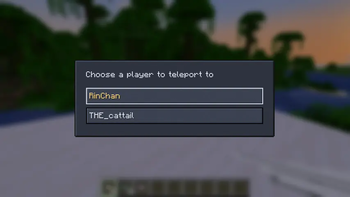
Paper Plane adds an item-driven player picker for /tpa without replacing FTB Essentials' own teleport flow. The sender chooses an online player from an FTB Library screen; FTB Essentials creates the actual request and shows its normal clickable accept/deny chat prompt to the target player.
What it does
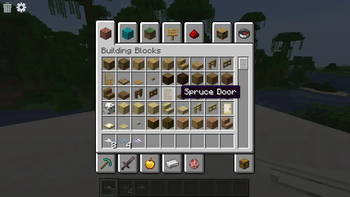
- Adds Paper Plane, Paper Plane That Can't Fly?, and Ender Paper Plane items.
- Right-click opens a simple FTB Library player picker.
- The selected target receives FTB Essentials' standard TPA request message.
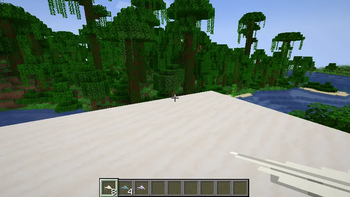
- Shift-right-click throws the paper plane as a slow arrow-like projectile.
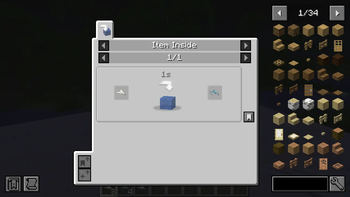
- Drop a Paper Plane into water to turn it into Paper Plane That Can't Fly? through a Lychee item-inside-liquid recipe.
- Ender Paper Plane can send requests without consuming the item.
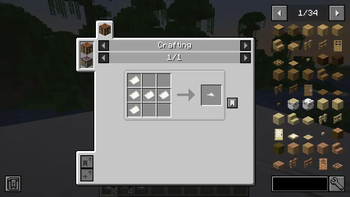
Paper Plane recipe
Craft a Paper Plane from five pieces of paper.
Normal paper planes and Paper Plane That Can't Fly? are consumed after the target accepts the FTB Essentials TPA request. FTB Essentials owns the accept, deny, warmup, cooldown, and final teleport behavior.
Ender Paper Plane recipe
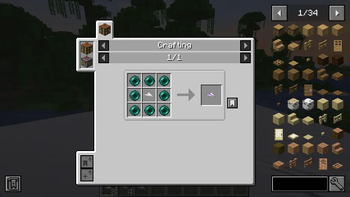
Craft an Ender Paper Plane with eight ender pearls around one Paper Plane.
The Ender Paper Plane is reusable, so it can send FTB Essentials TPA requests without being consumed.
Requirements
- Minecraft 1.21.1
- NeoForge
- FTB Essentials
- FTB Library
- Architectury API
- Lychee
- Kiwi
FTB Essentials, FTB Library, and Lychee are required on both client and server. Architectury API is required by FTB Library; Kiwi is required by Lychee. JEI is not required; it is used only for the recipe screenshots on this page.
Source and issues
Available Versions
How to Install Paper Plane on Your Server
Order Server
Order a Minecraft Java server with at least 3 GB RAM (4 GB recommended).
Set neoforge Loader
In the panel under "Egg", select the neoforge loader and matching Minecraft version (1.21.1).
Install Mod
Open the mod browser in the dashboard and search for "Paper Plane". Click "Install" – done! Alternatively, upload the .jar via SFTP to the /mods folder.
Compatibility
Mod Loaders
Minecraft Versions
1.21.1
Server-side
✓ RequiredRecommended RAM
4 GB(min. 3 GB)Frequently Asked Questions
Paper Plane server crashes on startup – what to do?
Most common cause: wrong neoforge version or insufficient RAM. Check the server log (latest.log) for "OutOfMemoryError" or "Mixin" errors. With Mado Hosting: ensure at least 3 GB RAM is allocated and the loader matches the mod version (1.21.1). You can switch loaders with one click in the panel.
Is Paper Plane compatible with neoforge?
Paper Plane officially supports neoforge for Minecraft 1.21.1. The Mado dashboard automatically detects incompatible loader combinations.
Server lagging with Paper Plane – how to optimize performance?
Recommended RAM: 4 GB (per 8 players). Use /spark profiler to check if Paper Plane consumes the most tick time. Common fixes: reduce server view-distance to 8-10, install "performant" or "starlight" as supplementary mods on Forge. With Mado Hosting, your server runs on NVMe SSDs with dedicated CPU cores for minimal latency.
Similar Mods




Rent Modded Server
Install Paper Plane with just one click on your server.