
Partial Keepinventory
Only drop a configured percentage of items or experience.
Screenshots
About this Mod
Partial Keepinventory
NOTE: This mod is still in alpha, and I am just one person. Bugs are bound to happen.
A fabric mod for changing the behaviour of keep inventory.
For more information on what I'm planning and working on see the Roadmap.
GUI
Open the GUI using /pki-gui. This requires you to have the mod installed on the client side.
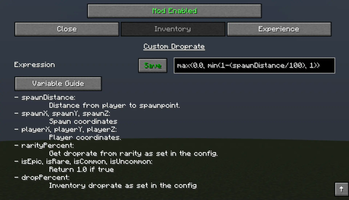
Expressions
Expressions are a way to dynamically change how items are dropped. This can be done with a simple formula that uses given variables. The value returned by the invExpression is clamped between 0 and 1.
A list of variables can be found in the provided table:
Base
| Variable | Meaning |
|---|---|
| spawnDistance | The distance from the player to their spawnpoint |
| spawnX, spawnY, spawnZ | The player's spawn position |
| playerX, playerY, playerZ | The player's position |
Inventory
| Variable | Meaning |
|---|---|
| isCommon, isUncommon, isRare, isEpic | Whether an item has a certain rarity, These are 1.0 when true and 0.0 when false. |
| rarityPercent | The configured droprate of the item's rarity. |
| dropPercent | The static inventory droprate |
Experience
| Variable | Meaning |
|---|---|
| xpPoints | Player's XP point amount. |
| xpLevel | Player's XP level. |
Expression presets:
Distance falloff
Change DISTANCE_IN_BLOCKS to the distance from spawn where you stop dropping items (the droprate decreases linearly).
abs(1-(spawnDistance/DISTANCE_IN_BLOCKS))
Commands
Enable/disable the mod
/pki [enable|disable]
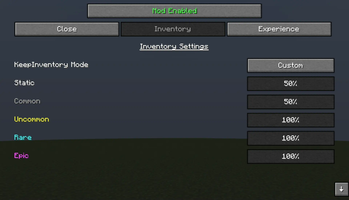
Set the drop behaviour
/pki inv mode [vanilla / static / rarity / custom]
Set droprate for the inventory/rarities (0-100)
/pki inv droprate [static / common / uncommon / rare / epic]
List players who will get the normal keepinventory behaviour
/pki inv savedPlayers list
Remove/add players who get normal keepinventory behaviour
/pki inv savedPlayers [add / remove]
Set the custom droprate formula
/pki inv invExpression set [invExpression]
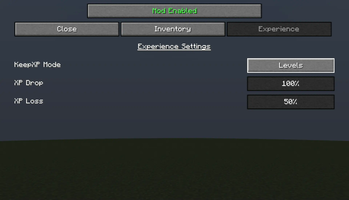
Experience Droprate
There's currently 2 variables that change how XP is dropped:
- Loss percentage (How much experience is lost)
- Drop percentage (How much of that experience is dropped)
/pki xp droprate [drop / loss]
There's also 2 "modes" in which these variables can operate.
- Based on levels
- Based on experience points
Levels take increasingly more experience to get, which makes that mode increasingly more punishing when you're on a higher level.
/pki xp mode [vanilla / static-level / static-points / custom-level / custom-points]
Available Versions
How to Install Partial Keepinventory on Your Server
Order Server
Order a Minecraft Java server with at least 3 GB RAM (4 GB recommended).
Set fabric Loader
In the panel under "Egg", select the fabric loader and matching Minecraft version (1.20.1).
Install Mod
Open the mod browser in the dashboard and search for "Partial Keepinventory". Click "Install" – done! Alternatively, upload the .jar via SFTP to the /mods folder.
Compatibility
Mod Loaders
Minecraft Versions
1.20.1, 1.20, 1.19.4 (+1 more)
Server-side
✓ RequiredRecommended RAM
4 GB(min. 3 GB)Frequently Asked Questions
Partial Keepinventory server crashes on startup – what to do?
Most common cause: wrong fabric version or insufficient RAM. Check the server log (latest.log) for "OutOfMemoryError" or "Mixin" errors. With Mado Hosting: ensure at least 3 GB RAM is allocated and the loader matches the mod version (1.20.1). You can switch loaders with one click in the panel.
Is Partial Keepinventory compatible with fabric?
Partial Keepinventory officially supports fabric for Minecraft 1.20.1, 1.20, 1.19.4. The Mado dashboard automatically detects incompatible loader combinations.
Server lagging with Partial Keepinventory – how to optimize performance?
Recommended RAM: 4 GB (per 8 players). Use /spark profiler to check if Partial Keepinventory consumes the most tick time. Common fixes: reduce server view-distance to 8-10, install "performant" or "starlight" as supplementary mods on Forge. With Mado Hosting, your server runs on NVMe SSDs with dedicated CPU cores for minimal latency.
Similar Mods




Rent Modded Server
Install Partial Keepinventory with just one click on your server.