
Particle Visor
Removes/fades particles based on distance
Screenshots

About this Mod
Particle Visor
Removes/fades particles based on distance
Features
- Hides particles very close to the camera (so potion particles won't get in your way in fights)
- Lots of customization
Configuration
Particle Visor uses ukulib for its configuration.
You can either:
- Go to the Options menu, click the small, square button to the right of Credits and Attribution, and go into Particle Visor.
- Open Mod Menu and open the configuration menu from there
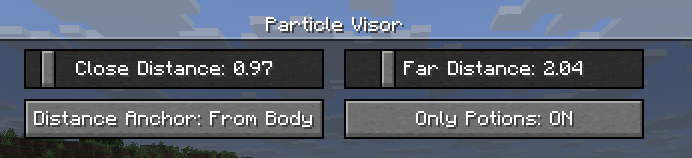
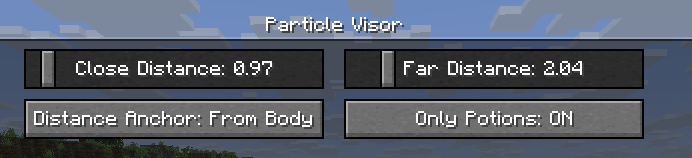
Close Distance: The farthest distance at which particles will still be visible. Anything closer than this won't render at all.Far Distance: The closest distance at which particles will be faded. Anything in between this value andClose Distancewill be faded. (you can set this to be the same asClose Distanceto make particles "pop in")Mod Enabled: General global toggle for the modDistance Anchor: The point on your player model where the distance will be determinedFrom Eyes: Distance determined from the "eye level"
From Body: Distance will be the same regardless of whether the particle is at your eyes or your feet, like a cylinder (though anything above or below that will be accounted for)
From Feet: Distance determined from the character's feet
On Camera: Distance determined from the actual camera position (so you can look through particles in third person)
Only Potions: Anything not considered a "spell particle" will be unaffected by the mod.Third Person Particles: If this is ON, the mod will do nothing in third person.
Compatibility
I've verified that the mod works with Sodium and Particle Core (and whatever else is in uku's pvp modpack), so I don't think there will be many incompatibilities. Feel free to make an issue if you find any!
License
This mod is under the MIT License. Feel free to include this mod in your modpack!
Available Versions
How to Install Particle Visor on Your Server
Order Server
Order a Minecraft Java server with at least 3 GB RAM (4 GB recommended).
Set fabric Loader
In the panel under "Egg", select the fabric loader and matching Minecraft version (26.1.2).
Install Mod
Open the mod browser in the dashboard and search for "Particle Visor". Click "Install" – done! Alternatively, upload the .jar via SFTP to the /mods folder.
Compatibility
Mod Loaders
Minecraft Versions
26.1.2, 26.1.1, 26.1 (+5 more)
Server-side
✗ UnsupportedRecommended RAM
4 GB(min. 3 GB)Frequently Asked Questions
Particle Visor server crashes on startup – what to do?
Most common cause: wrong fabric version or insufficient RAM. Check the server log (latest.log) for "OutOfMemoryError" or "Mixin" errors. With Mado Hosting: ensure at least 3 GB RAM is allocated and the loader matches the mod version (26.1.2). You can switch loaders with one click in the panel.
Is Particle Visor compatible with fabric?
Particle Visor officially supports fabric for Minecraft 26.1.2, 26.1.1, 26.1. The Mado dashboard automatically detects incompatible loader combinations.
Server lagging with Particle Visor – how to optimize performance?
Recommended RAM: 4 GB (per 8 players). Use /spark profiler to check if Particle Visor consumes the most tick time. Common fixes: reduce server view-distance to 8-10, install "performant" or "starlight" as supplementary mods on Forge. With Mado Hosting, your server runs on NVMe SSDs with dedicated CPU cores for minimal latency.
Similar Mods




Rent Modded Server
Install Particle Visor with just one click on your server.