
Pause Please
A fabric mod that makes sure you take breaks while playing Minecraft.
Screenshots
About this Mod
Pause Please
Pause Please is a client-side Minecraft mod that reminds you to take breaks during long playing sessions.
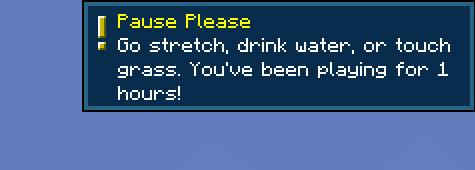
Minecraft is fun. Your eyes are not infinite. Pause Please politely tells you to pause every now and then and recommends a stretch, a swig of water, and maybe even a touch of grass, if you dare.
Features
Configurable reminder interval
In-game toast reminders during long playing sessions
Optional hard playtime limit
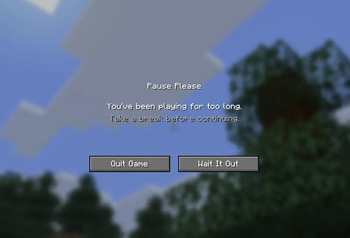
Forced breaks after the hard limit is reached
“Wait It Out” countdown screen before play can continue
Quit/relaunch protection so you didn't install the mod for nothin
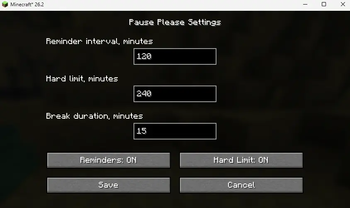
ModMenu support for configuration (works without ModMenu, if you want to edit a .json config directly)
Default Settings
By default, Pause Please uses:
Break reminder: 2 hours
Hard limit: 4 hours
Break lockout: 15 minutes
These can be changed through ModMenu or by editing the generated config file.
Configuration
The config file is generated at:
config/pause-please.json
Configurable options:
Reminder interval
Hard limit duration
Lockout/break duration
Reminder toggle
Hard limit toggle
Why?
Because sometimes you open Minecraft for just a little bit and suddenly you wasted several hours and received a breakup text.
Pause Please does not try to be serious or annoying. It just gives you a reminder that maybe, possibly, perhaps, you should pause, and get out of your sweat-stained chair.
Available Versions
How to Install Pause Please on Your Server
Order Server
Order a Minecraft Java server with at least 3 GB RAM (4 GB recommended).
Set fabric Loader
In the panel under "Egg", select the fabric loader and matching Minecraft version (26.2).
Install Mod
Open the mod browser in the dashboard and search for "Pause Please". Click "Install" – done! Alternatively, upload the .jar via SFTP to the /mods folder.
Compatibility
Mod Loaders
Minecraft Versions
26.2
Server-side
✗ UnsupportedRecommended RAM
4 GB(min. 3 GB)Frequently Asked Questions
Pause Please server crashes on startup – what to do?
Most common cause: wrong fabric version or insufficient RAM. Check the server log (latest.log) for "OutOfMemoryError" or "Mixin" errors. With Mado Hosting: ensure at least 3 GB RAM is allocated and the loader matches the mod version (26.2). You can switch loaders with one click in the panel.
Is Pause Please compatible with fabric?
Pause Please officially supports fabric for Minecraft 26.2. The Mado dashboard automatically detects incompatible loader combinations.
Server lagging with Pause Please – how to optimize performance?
Recommended RAM: 4 GB (per 8 players). Use /spark profiler to check if Pause Please consumes the most tick time. Common fixes: reduce server view-distance to 8-10, install "performant" or "starlight" as supplementary mods on Forge. With Mado Hosting, your server runs on NVMe SSDs with dedicated CPU cores for minimal latency.
Similar Mods




![[ETF] Entity Texture Features](https://cdn.modrinth.com/data/BVzZfTc1/af683d206d50b05258d865b0d6e4aa2f2cee12f2_96.webp)
![[EMF] Entity Model Features](https://cdn.modrinth.com/data/4I1XuqiY/6e5bbd0d06b1741bfdab6c0cfab6de8fdaf0064c_96.webp)
Rent Modded Server
Install Pause Please with just one click on your server.