
PeanutsChat
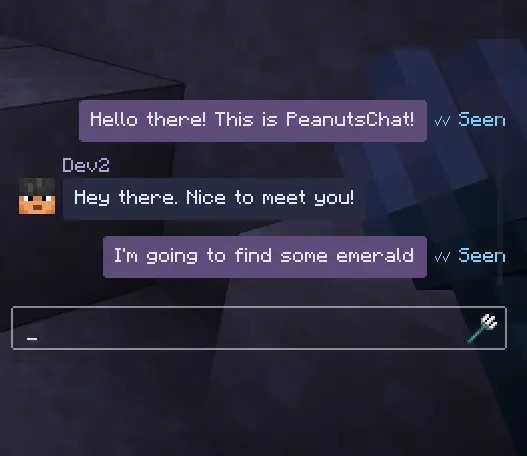
Direct message anyone on the server! You can even mine and walk while having chat open! Group DMs built-in!
Screenshots
About this Mod
Direct messaging someone has never been easier. Now that PeanutsChat is here, you don't have to share a small chat window with everyone else on the server anymore! You know what I'm talking about 😈
Never lose your chats in game again!
Features
1:1 DMs and Group DMs
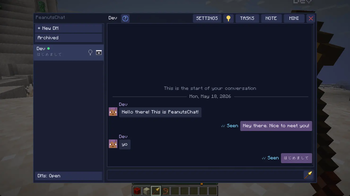
Full screen layout
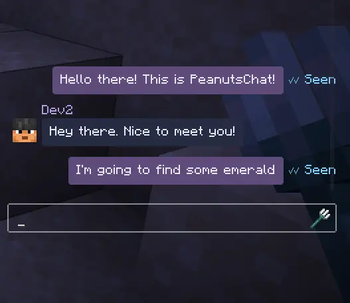
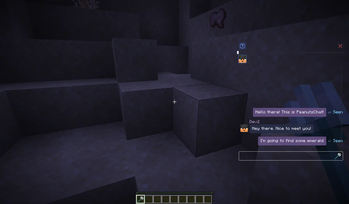
Mini docked layout, you can keep doing whatever you're doing while the chat is open! Press a key to focus on the chat and type. Switch between chats easily
*Layouts are saved for the next time you join the server againYou can drag the mini layout anywhere on the screen!
Click outside of mini chat or press Esc to defocus! Press a hotkey to focus on chat again!
Reply to someone in chat
Bookmark messages
Read receipts
Unsend messages within 5 minutes
Mention @name
Share your coordinates
Share held item, good for checking interest before trading!
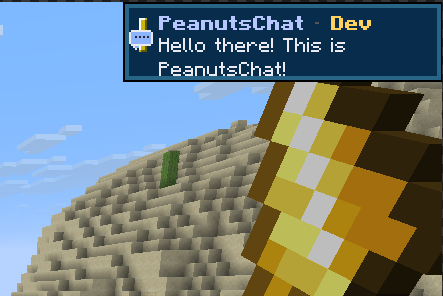
Push notifications as Toast so you know if someone messaged you even without having chat open
Highlight text in message input and cut copy paste.
Right click context menu to copy text in message bubble.
Pin, archive messages
Unread message count
/whisper someone in chat and it will be viewable in the DM UI
To-do list - You can write whatever you want
Rebindable hotkeys!
IME Support, type in Chinese, Japanese, Korean, whatever you want
OP Tools
/peanutschats commands for OPs
Report a user and it will be sent to server operators
Audit log
Security & Privacy
- End-to-end encryption - Your chats will never be seen by anyone else, even the admins of the server you're playing on.
- Your message history is saved locally on your own PC, not server-side.
AND MORE!
How to use
| Key | Action |
|---|---|
\\ (backslash) |
Open / close chat panel |
] (right bracket) |
Toggle full ↔ mini overlay |
| Esc (in mini mode) | Blur input — resume mining/moving |
| Enter | Send message |
| Ctrl+C / V / X / A | Standard clipboard + select all |
| Right-click bubble | Copy / Reply / Bookmark / Report / Unsend menu |
Requirements
Install on both the server and every client.
Should work with mods like Essential.
Feedback
Let me know via Discord if you have any feedback!
If you really like the mod and would like to donate, it would be greatly appreciated!
I prefer making mods that actually bring something new to the table rather than reskins of existing content in game, if that's up your alley, any donation would motivate me greatly to make more innovative mods/improve my released mods! If you aren't comfortable donating/can't afford to do so(which is completely fine), sharing and letting others know of the mods will help greatly as well! Cheers!
Available Versions
How to Install PeanutsChat on Your Server
Order Server
Order a Minecraft Java server with at least 3 GB RAM (4 GB recommended).
Set fabric Loader
In the panel under "Egg", select the fabric loader and matching Minecraft version (26.1.2).
Install Mod
Open the mod browser in the dashboard and search for "PeanutsChat". Click "Install" – done! Alternatively, upload the .jar via SFTP to the /mods folder.
Compatibility
Mod Loaders
Minecraft Versions
26.1.2
Server-side
✓ RequiredRecommended RAM
4 GB(min. 3 GB)Frequently Asked Questions
PeanutsChat server crashes on startup – what to do?
Most common cause: wrong fabric version or insufficient RAM. Check the server log (latest.log) for "OutOfMemoryError" or "Mixin" errors. With Mado Hosting: ensure at least 3 GB RAM is allocated and the loader matches the mod version (26.1.2). You can switch loaders with one click in the panel.
Is PeanutsChat compatible with fabric?
PeanutsChat officially supports fabric for Minecraft 26.1.2. The Mado dashboard automatically detects incompatible loader combinations.
Server lagging with PeanutsChat – how to optimize performance?
Recommended RAM: 4 GB (per 8 players). Use /spark profiler to check if PeanutsChat consumes the most tick time. Common fixes: reduce server view-distance to 8-10, install "performant" or "starlight" as supplementary mods on Forge. With Mado Hosting, your server runs on NVMe SSDs with dedicated CPU cores for minimal latency.
Similar Mods




Rent Modded Server
Install PeanutsChat with just one click on your server.