Pear Expansion
Pear Expansion is a small Minecraft mod that adds various features, blocks, items, and tweaks — just things I felt like adding.
Screenshots
About this Mod
⚠️ Mod in development — I add things when I feel like it. In other words: it’s not finished, and I don’t know when it will be.
🍐 Pear Expansion
Pear Expansion is a small Minecraft mod that adds all kinds of stuff — blocks, items, random features — just things I thought were fun to make. No special theme, just… pears, some chaos, and strange ideas.
🎯 Ideas and goals (list 100% subject to change):
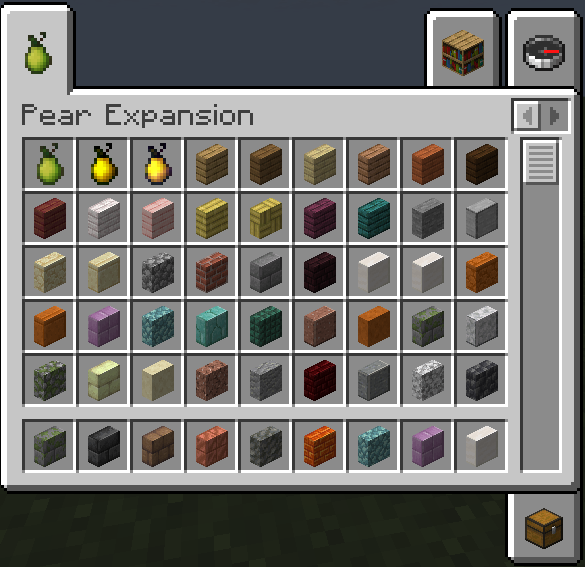
- Pears (normal, golden, enchanted golden… because why not?)
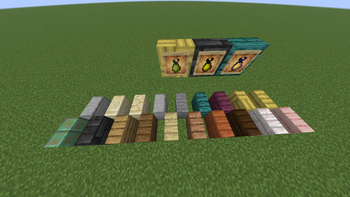
- Vertical slabs (with everything: fire, fuel, oxidation, textures, breakable… the full package)
- Magic potions to grow or shrink
- Boots (or maybe an enchantment?) to climb one block easily, like horses
- A wedding ring that gives a buff when your partner is close… but if one dies, both die 💔
- Works with Fabric AND NeoForge
- A quest/objective system to stop your survival world with friends from flopping after 2 weeks
- Maybe a new ore to craft really original stuff (still thinking…)
- And surely more weird ideas to come…
🌍 Languages available
- English
- French
- Esperanto
- German
- Spanish
- Italian
- Toki Pona (yes, really)
🔧 Compatibility
- Requires Fabric Loader + Fabric API
- Compatible with Minecraft 26.1.x
Available Versions
How to Install Pear Expansion on Your Server
Order Server
Order a Minecraft Java server with at least 3 GB RAM (4 GB recommended).
Set fabric Loader
In the panel under "Egg", select the fabric loader and matching Minecraft version (26.1.2).
Install Mod
Open the mod browser in the dashboard and search for "Pear Expansion". Click "Install" – done! Alternatively, upload the .jar via SFTP to the /mods folder.
Compatibility
Mod Loaders
Minecraft Versions
26.1.2, 26.1.1, 26.1 (+1 more)
Server-side
✓ RequiredRecommended RAM
4 GB(min. 3 GB)Frequently Asked Questions
Pear Expansion server crashes on startup – what to do?
Most common cause: wrong fabric version or insufficient RAM. Check the server log (latest.log) for "OutOfMemoryError" or "Mixin" errors. With Mado Hosting: ensure at least 3 GB RAM is allocated and the loader matches the mod version (26.1.2). You can switch loaders with one click in the panel.
Is Pear Expansion compatible with fabric?
Pear Expansion officially supports fabric for Minecraft 26.1.2, 26.1.1, 26.1. The Mado dashboard automatically detects incompatible loader combinations.
Server lagging with Pear Expansion – how to optimize performance?
Recommended RAM: 4 GB (per 8 players). Use /spark profiler to check if Pear Expansion consumes the most tick time. Common fixes: reduce server view-distance to 8-10, install "performant" or "starlight" as supplementary mods on Forge. With Mado Hosting, your server runs on NVMe SSDs with dedicated CPU cores for minimal latency.
Similar Mods

![[ETF] Entity Texture Features](https://cdn.modrinth.com/data/BVzZfTc1/af683d206d50b05258d865b0d6e4aa2f2cee12f2_96.webp)
![[EMF] Entity Model Features](https://cdn.modrinth.com/data/4I1XuqiY/6e5bbd0d06b1741bfdab6c0cfab6de8fdaf0064c_96.webp)



Rent Modded Server
Install Pear Expansion with just one click on your server.