
PearlOut
A client-side QoL mod that helps you escape PvP traps by automatically ignoring Sign and Armor Stand interactions when you are stuck, allowing you to use your items (like Ender Pearls) seamlessly.
Screenshots

About this Mod
🛡️ PearlOut
An essential Client-Side QoL mod for PvP and Anarchy players to effortlessly escape annoying Sign & Armor Stand traps!
⚠️ WARNING: Use at your own risk!
While this mod fixes annoying vanilla interaction mechanics, altering how your client interacts with blocks and entities can be considered an unfair advantage or cheat by some server anti-cheats and server rules. Depending on the server you play on, using this modification can lead to a ban. Always check the rules of the server before using it!
🛑 The Problem
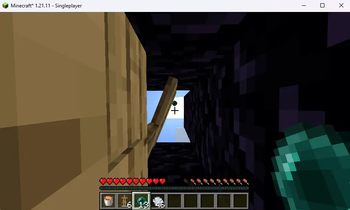
If you play PvP, Factions, or Anarchy servers, you've probably been trapped in a small space filled with Signs or Armor Stands. Normal Minecraft mechanics make it incredibly frustrating to escape:
Instead of throwing your Ender Pearl or drinking a potion, your clicks are absorbed by the Armor Stands or you accidentally open the Sign-Editing GUI instead. You are stuck and basically dead.
✅ The Solution
PearlOut fixes this completely on the client-side!
The mod intelligently detects when your character is stuck in a trap-like situation (standing exactly inside signs at your feet/head, or intersecting with an Armor Stand). When this happens, it automatically ignores block and entity interactions for Signs and Armor Stands.
Instead of opening a GUI or hitting an Armor Stand, your right-click will bypass them entirely and seamlessly use the item in your main hand (e.g., throwing an Ender Pearl, eating a Golden Apple, or drinking a Potion).
✨ Features
- Smart Detection: Only activates when you are actually trapped (intersecting an Armor Stand or standing inside Signs).
- Zero Disruption: Normal sign interactions and armor stand usage work perfectly fine 100% of the time when you aren't trapped!
- Item Priority: Forces item usage (Ender Pearls, Chorus Fruit) when clicking inside a trap.
- 100% Client-Side: You only need to install this on your client. It works on ANY Server (Vanilla, Paper, Spigot, Fabric).
⚙️ Installation
Just drop the .jar into your mods folder.
- Requirements: Fabric Loader & Fabric API
- Compatibility: Works on Vanilla Servers, works flawlessly alongside performance mods like Sodium/Iris and typical PVP-Clients.
Available Versions
How to Install PearlOut on Your Server
Order Server
Order a Minecraft Java server with at least 3 GB RAM (4 GB recommended).
Set fabric Loader
In the panel under "Egg", select the fabric loader and matching Minecraft version (1.21.11).
Install Mod
Open the mod browser in the dashboard and search for "PearlOut". Click "Install" – done! Alternatively, upload the .jar via SFTP to the /mods folder.
Compatibility
Mod Loaders
Minecraft Versions
1.21.11
Server-side
✗ UnsupportedRecommended RAM
4 GB(min. 3 GB)Frequently Asked Questions
PearlOut server crashes on startup – what to do?
Most common cause: wrong fabric version or insufficient RAM. Check the server log (latest.log) for "OutOfMemoryError" or "Mixin" errors. With Mado Hosting: ensure at least 3 GB RAM is allocated and the loader matches the mod version (1.21.11). You can switch loaders with one click in the panel.
Is PearlOut compatible with fabric?
PearlOut officially supports fabric for Minecraft 1.21.11. The Mado dashboard automatically detects incompatible loader combinations.
Server lagging with PearlOut – how to optimize performance?
Recommended RAM: 4 GB (per 8 players). Use /spark profiler to check if PearlOut consumes the most tick time. Common fixes: reduce server view-distance to 8-10, install "performant" or "starlight" as supplementary mods on Forge. With Mado Hosting, your server runs on NVMe SSDs with dedicated CPU cores for minimal latency.
Similar Mods




Rent Modded Server
Install PearlOut with just one click on your server.