
Pedestals - Display your items!
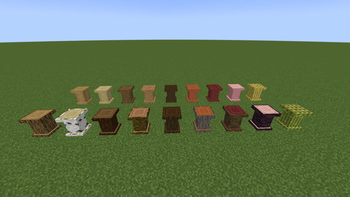
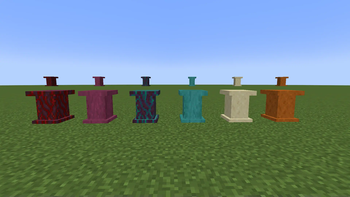
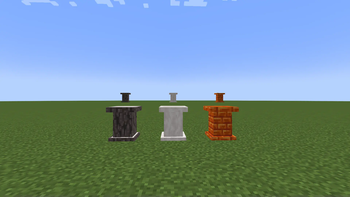
Craft pedestals out of any material you can find and use them to display items in your very own trophy room!
Screenshots
About this Mod
Pedestals – The Ultimate Trophy Display Mod!
Tired of boring old armor stands?
Is your Wind Burst III mace feeling way too cool for a mere glow item frame?
Look no further—Pedestals is here to elevate your item displays to a whole new level!
❓ Why use Pedestals?
Simple: If it’s a rock or log (or copper!), Pedestals has a pedestal for it!
With a wide variety of pedestal variants, there’s something to match every build style—whether you’re constructing a grand medieval hall, an arcane wizard’s study, or a sleek industrial base. Build a trophy room worthy of your adventures, display your prized loot in style, or just make your storage system look ridiculously fancy.
And for those who love a touch of realism, copper pedestals naturally oxidize over time—just like vanilla copper blocks! Want to keep them pristine? Wax them, and they’ll stay as shiny as the day they were crafted.
In the 1.0.1 update, we also added strippable wood pedestals! You can now craft pedestals from stripped wood logs, just like normal logs, or strip them as you would any other log, bringing even more variety and customization to your builds. Whether you prefer the raw texture of stripped logs or the timeless appeal of unstripped wood, there’s now a pedestal for every preference.
⚡ New in Version 1.1.0
Nether Wood Pedestals: Added nether wood pedestals and their stripped variants, expanding the range of wood options.
Smooth Sandstone and Smooth Red Santstone Pedestals: Give your base a touch of that desert feel with the new sandstone pedestal variants!
Pale Oak & Stripped Pale Oak Pedestals (1.21.4 port only): New additions that bring a lighter, elegant wood option to your builds.
Resin Brick Pedestals (1.21.4 port only): For an extra touch of style, resin brick pedestals are now available.
Optional Nemo's Woodcutter Compatibility: The 1.21.4 port now includes optional compatibility with Nemo's Woodcutter, allowing you to utilize woodcutting recipes that help you build in bulk!
Special thanks to NemoNotFound and pnku for their incredible help in implementing the Woodcutter compatibility. For more on Nemo's Woodcutter, check out the mod on Modrinth.
Also a masive thank you to pnku for designing the mod's logo! Check their work out here!
⚡ Redstone Functionality
Pedestals aren’t just for show—they come with a bit of redstone magic too!
Comparator Support – Pedestals emit a redstone signal when they contain an item, making them useful for display-based automation, storage detection, and more!
Observer Compatibility (Planned) – Future updates may add observer triggers, allowing for even more creative contraptions.
So whether you're a redstone engineer or just enjoy adding functional decor to your world, Pedestals has got you covered!
🛠️ Crafting Pedestals
The recipe is universal across all pedestals:
Place two of the pedestal’s corresponding blocks in a crafting grid like so, and voilà—you’ve got yourself a Pedestal!
Wait, two blocks for one Pedestal? In this economy?!
Astute observation, my financially savvy friend. Yes, two blocks for a single pedestal might seem like daylight robbery—but don’t worry, there’s a better deal!
If a block can be stonecut, it can also be directly crafted into its matching pedestal at a more efficient rate. That means no unnecessary waste—just clean, logical crafting. (For example, Stone can be stonecut into a Stone Brick Pedestal, following vanilla crafting logic.)
So whether you're using a crafting table or stonecutter, you'll always have an option that makes sense for your materials.
🎨 Customization & Aesthetic Variety
Love uniformity? Use pedestals that match your base’s flooring and walls for seamless integration.
Want to make a statement? Use contrasting pedestals to highlight your rarest loot!
Feeling extra fancy? Mix and match pedestal types to create custom museum displays!
From humble stone bricks to nether bricks, end stone, and even prismarine, there’s a pedestal for every type of builder.
⚡ Compatibility & Mod Support
Currently, Pedestals supports all vanilla-compatible stone blocks, wood logs, copper variants, and (as of 1.1.0) nether wood, pale oak, and resin brick variants, ensuring seamless integration with your world. Future updates may add support for modded stone and wood types as well—stay tuned!
Have a mod you’d like Pedestals to work with? Drop a suggestion, and it just might make it into a future update!
🛠️ Future Plans & Suggestions
This is just the beginning! Planned features include:
✅ Expanded material support (more stone types, additional wood variants)
✅ More display options (angled pedestals, stacked displays)
✅ Specialty pedestals (glowing, transparent, or more interactive ones)
✅ Observer support (for those redstone contraptions)
Got ideas? Let me know—I’d love to hear what features you’d like to see!
📦 Download & Installation
Pedestals is a Fabric mod for Minecraft 1.21. 💡 Make sure you have Fabric API installed!
📥 Download the latest version from the Files section. 🔧 Installation: Drop the .jar file into your mods folder, and you’re good to go!
📝 Final Notes
Pedestals is designed to be lightweight, aesthetic-focused, and seamlessly integrated into the game. Whether you're showcasing your most prized items, adding decorative accents to your base, or just making your storage system look way cooler—Pedestals has got you covered.
Try it out and let me know what you think!
Available Versions
How to Install Pedestals - Display your items! on Your Server
Order Server
Order a Minecraft Java server with at least 3 GB RAM (4 GB recommended).
Set fabric Loader
In the panel under "Egg", select the fabric loader and matching Minecraft version (1.21.11).
Install Mod
Open the mod browser in the dashboard and search for "Pedestals - Display your items!". Click "Install" – done! Alternatively, upload the .jar via SFTP to the /mods folder.
Compatibility
Mod Loaders
Minecraft Versions
1.21.11, 1.21.5, 1.21.4 (+2 more)
Server-side
✓ RequiredRecommended RAM
4 GB(min. 3 GB)Frequently Asked Questions
Pedestals - Display your items! server crashes on startup – what to do?
Most common cause: wrong fabric version or insufficient RAM. Check the server log (latest.log) for "OutOfMemoryError" or "Mixin" errors. With Mado Hosting: ensure at least 3 GB RAM is allocated and the loader matches the mod version (1.21.11). You can switch loaders with one click in the panel.
Is Pedestals - Display your items! compatible with fabric?
Pedestals - Display your items! officially supports fabric for Minecraft 1.21.11, 1.21.5, 1.21.4. The Mado dashboard automatically detects incompatible loader combinations.
Server lagging with Pedestals - Display your items! – how to optimize performance?
Recommended RAM: 4 GB (per 8 players). Use /spark profiler to check if Pedestals - Display your items! consumes the most tick time. Common fixes: reduce server view-distance to 8-10, install "performant" or "starlight" as supplementary mods on Forge. With Mado Hosting, your server runs on NVMe SSDs with dedicated CPU cores for minimal latency.
Similar Mods

![[ETF] Entity Texture Features](https://cdn.modrinth.com/data/BVzZfTc1/af683d206d50b05258d865b0d6e4aa2f2cee12f2_96.webp)
![[EMF] Entity Model Features](https://cdn.modrinth.com/data/4I1XuqiY/6e5bbd0d06b1741bfdab6c0cfab6de8fdaf0064c_96.webp)



Rent Modded Server
Install Pedestals - Display your items! with just one click on your server.