
PEMusix
Press keyboard keys to click slots in server-side music chests — instant keyboard playback for "Musix" / "악기" GUIs. Auto-detects slot layout, separate drum/instrument presets, per-note usage counter.
Screenshots
About this Mod
Musix
⚠ Server-specific mod — only works on PlanetEarth Server (
planetearth.kr). Has no effect on any other server.
⚠ 서버 전용 모드 — PlanetEarth Server (
planetearth.kr) 에서만 작동합니다. 다른 서버에서는 아무 기능도 작동하지 않습니다.





English
Musix is a client-side Fabric mod that lets you play PlanetEarth's chest-GUI based instruments (악기 - 하프, 악기 - 베이스(드럼), ...) with your keyboard or a MIDI device. Press a key — the mod clicks the corresponding slot — the server plugin plays the note.
Features
- Keyboard input → slot click — auto-activates when the chest title starts with
음악or악기 - MIDI input support (v4.0.0) — connect any USB MIDI keyboard / pad device and play notes directly
- Statistics screen (v4.1.0) — live line chart of notes-per-minute (last 60 min), TOP 5 most-played notes, common vs drum preset ratio, session timer & total count
- Two presets, auto-selected by chest title
common— 49 notes (F#2 ~ F#6) for melodic instrumentsdrum— 12 notes (bass / hi-hat / snare / cymbal × low/mid/high) for(드럼)chests
- Auto-mapping — open a chest once, click "자동 매핑" in the menu → slots align to that chest's actual layout (item-name matching, falls back to index)
- Space + key modifier (v3.12.0) — natural notes on plain keys, sharps/flats on
Space + key(mirrors the user-exported default pattern) - In-game key rebinding — left-click row to capture next key, right-click to clear, ESC to restore default. Shift / Alt / Space combos supported
- Conflict detection with red flash on duplicates
- Key auto-repeat protection (v4.0.3) — holding a key only triggers one click, not a stream
- Persistent H2 storage — settings survive restarts, shaded into the jar so it works under Lunar Client / Ichor
- Korean + English locale
Usage
- Install the jar in your
mods/folder (Fabric 1.20.1 + Fabric API required) - Join PlanetEarth Server (
planetearth.kr) - Open a music chest (e.g.
악기 - 하프) — the mod silently caches its slot layout - Press
\(backslash, default menu key) — opens the Musix menu - Click "자동 매핑" → slots align to the current chest
- Reopen the chest and play with the default key layout (or rebind via left-click on any row)
- For statistics: menu → "통계" button. For MIDI: menu → "고급 설정" → "MIDI 입력"
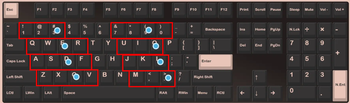
Default key layout (common preset, 49 notes — natural + sharp)
| Row | Keys | Natural notes | Sharps (with Space) |
|---|---|---|---|
| 1 row | ` 1 2 3 |
G2 → B2 | F#2, G#2, A#2 |
| Q row | Q W E R U I O |
C3 → B3 | C#3, D#3, F#3, G#3, A#3 |
| A row | A S D F J K L |
C4 → B4 | C#4, D#4, F#4, G#4, A#4 |
| Z row | Z X C V M , . |
C5 → B5 | C#5, D#5, F#5, G#5, A#5 |
| extra | 7 8 9 0 |
C6 → F6 | C#6, D#6, F#6 |
Sharps and flats are played with
Space + key. Defaults follow the community export pattern; everything is rebindable in the menu.
Drum preset (auto when title contains (드럼))
12 notes / 4 rows. Slots auto-aligned on chest open via item-name matching.
1 2 3→ bass low / mid / highQ W E→ hi-hat low / mid / high (well, the row 2 keys — see in-game menu for the exact layout)A S D→ snare low / mid / highZ X C→ cymbal low / mid / high
Blocked slots (never mapped): 6, 19, 45, 53 — server GUI navigation slots.
MIDI input (v4.0.0+)
- Menu → 고급 설정 → MIDI 입력 — scans connected MIDI devices, click to connect
- Auto-reconnects on next launch if the device is still plugged in
- Async device scan / connection — won't freeze the client while LUA / scanners are slow
- Works alongside keyboard input — both feed the same slot-click pipeline
Statistics screen (v4.1.0+)
- Session info — start time, elapsed, total notes, average per minute, current-minute rate, last note played
- Line chart — notes-per-minute over the last 60 minutes (auto-scaling Y axis)
- TOP 5 notes — horizontal bar chart of your most-played notes
- Preset ratio — common vs drum percentage and absolute counts
- Reset button — clears all counters and restarts the session timer
Compatibility
- Minecraft 1.20.1 · Fabric Loader 0.15+ · Fabric API
- Lunar Client (Ichor) verified — H2 DB shaded into the jar to bypass ClassLoader isolation
- License: CC-BY-NC-SA-4.0
Source & Issues
- GitHub: https://github.com/cerbagge/Mod-Musix
- Issues / suggestions: please file on GitHub
한국어
Musix 는 PlanetEarth 서버의 상자 GUI 기반 악기 (악기 - 하프, 악기 - 베이스(드럼) 등) 를 키보드 또는 MIDI 장치 로 연주할 수 있게 해주는 클라이언트용 Fabric 모드입니다. 키를 누르면 모드가 해당 슬롯을 클릭하고, 서버 플러그인이 음을 재생합니다.
주요 기능
- 키 입력 → 슬롯 클릭 — 상자 제목이
음악또는악기로 시작하면 자동 작동 - MIDI 입력 지원 (v4.0.0) — USB MIDI 키보드 / 패드 장치를 연결해서 직접 연주 가능
- 통계 화면 (v4.1.0) — 분당 입력 꺾은선 그래프 (최근 60분), TOP 5 음, common vs drum preset 비율, 세션 타이머 및 총 입력 수
- 2 개 preset, 상자 제목에 따라 자동 선택
공통— 49 음 (F#2 ~ F#6) — 일반 멜로디 악기용드럼— 12 음 (베이스 / 하이햇 / 스네어 / 심벌 × 상중하) —(드럼)상자용
- 자동 매핑 — 상자 한 번 열고 메뉴에서 "자동 매핑" 클릭 → 해당 상자의 실제 슬롯 배치에 맞게 자동 정렬 (아이템 이름 매칭, 실패 시 인덱스 기반 폴백)
- Space + 키 조합 modifier (v3.12.0) — 흰건반은 키 단독, 검은건반은
Space + 같은 키(사용자 export default 패턴) - 인게임 키 재설정 — 좌클릭으로 변경, 우클릭으로 미설정, ESC 로 기본값 복원. Shift / Alt / Space 조합 모두 지원
- 충돌 검사 + 빨간 강조 (중복 키 거부)
- 키 자동 반복 방지 (v4.0.3) — 꾹 눌러도 1번만 클릭
- H2 영속 저장 — 설정 자동 보존, jar 에 shade 처리로 Lunar Client / Ichor 호환
- 한국어 + 영어 지원
사용 방법
mods/폴더에 jar 설치 (Fabric 1.20.1 + Fabric API 필수)- PlanetEarth 서버 접속 (
planetearth.kr) - 음악 상자 (예:
악기 - 하프) 열기 → 모드가 슬롯 자동 캐시 \(backslash, 메뉴 기본 키) 누르기 → Musix 메뉴 열림- "자동 매핑" 클릭 → 현재 상자에 맞게 슬롯 정렬
- 다시 상자 열고 기본 키 배치로 연주 (메뉴에서 좌클릭으로 키 재설정 가능)
- 통계 보려면 메뉴 → "통계" 버튼. MIDI 설정은 메뉴 → "고급 설정" → "MIDI 입력"
기본 키 배치 (공통 preset, 49 음 — 본음 + 반음)
| 줄 | 키 | 본음 (단독) | 반음 (Space + 키) |
|---|---|---|---|
| 1 줄 | ` 1 2 3 |
G2 → B2 | F#2, G#2, A#2 |
| Q 줄 | Q W E R U I O |
C3 → B3 | C#3, D#3, F#3, G#3, A#3 |
| A 줄 | A S D F J K L |
C4 → B4 | C#4, D#4, F#4, G#4, A#4 |
| Z 줄 | Z X C V M , . |
C5 → B5 | C#5, D#5, F#5, G#5, A#5 |
| 추가 | 7 8 9 0 |
C6 → F6 | C#6, D#6, F#6 |
반음 (
#) 은Space + 같은 키조합으로 재생됩니다. 모두 메뉴에서 자유롭게 재설정 가능합니다.
드럼 preset (제목에 (드럼) 포함 시 자동 활성)
12 음 / 4 행. 상자 열림 시 아이템 이름 매칭으로 슬롯 자동 정렬.
1 2 3→ 베이스 낮은음 / 중간음 / 높은음Q W E→ 하이햇 낮은음 / 중간음 / 높은음 (자세한 배치는 인게임 메뉴 참고)A S D→ 스네어 낮은음 / 중간음 / 높은음Z X C→ 심벌 낮은음 / 중간음 / 높은음
차단 슬롯 (매핑 X): 6, 19, 45, 53 — 서버 GUI 네비게이션 슬롯.
MIDI 입력 (v4.0.0+)
- 메뉴 → 고급 설정 → MIDI 입력 — 연결된 MIDI 장치 목록 스캔, 클릭으로 연결
- 다음 실행 시 장치가 연결되어 있으면 자동 재연결
- 장치 스캔 / 연결 비동기 처리 — 느린 LUA / 스캐너에서 클라이언트 멈춤 방지
- 키보드 입력과 병행 사용 가능 — 둘 다 동일한 슬롯 클릭 파이프라인 사용
통계 화면 (v4.1.0+)
- 세션 정보 — 시작 시각, 경과 시간, 총 음 입력, 분당 평균, 현재 분 입력 수, 마지막 음
- 꺾은선 그래프 — 최근 60 분 분당 입력 추이 (Y 축 자동 스케일)
- TOP 5 음 — 가장 많이 누른 음 5 개의 막대 차트
- Preset 비율 — common vs drum 백분율 및 절대 수
- 초기화 버튼 — 모든 카운터를 리셋하고 세션 타이머를 재시작
호환
- Minecraft 1.20.1 · Fabric Loader 0.15+ · Fabric API
- Lunar Client (Ichor) 검증 완료 — H2 DB shade 처리로 ClassLoader 격리 회피
- 라이센스: CC-BY-NC-SA-4.0
소스 및 이슈
- GitHub: https://github.com/cerbagge/Mod-Musix
- 이슈 / 건의: GitHub Issues 로 부탁드립니다
License
This work is licensed under CC BY-NC-SA 4.0.
이 작업물은 CC BY-NC-SA 4.0 라이센스를 따릅니다.
Available Versions
How to Install PEMusix on Your Server
Order Server
Order a Minecraft Java server with at least 3 GB RAM (4 GB recommended).
Set fabric Loader
In the panel under "Egg", select the fabric loader and matching Minecraft version (1.21.1).
Install Mod
Open the mod browser in the dashboard and search for "PEMusix". Click "Install" – done! Alternatively, upload the .jar via SFTP to the /mods folder.
Compatibility
Mod Loaders
Minecraft Versions
1.21.1, 1.21, 1.20.6 (+6 more)
Server-side
✗ UnsupportedRecommended RAM
4 GB(min. 3 GB)Frequently Asked Questions
PEMusix server crashes on startup – what to do?
Most common cause: wrong fabric version or insufficient RAM. Check the server log (latest.log) for "OutOfMemoryError" or "Mixin" errors. With Mado Hosting: ensure at least 3 GB RAM is allocated and the loader matches the mod version (1.21.1). You can switch loaders with one click in the panel.
Is PEMusix compatible with fabric?
PEMusix officially supports fabric for Minecraft 1.21.1, 1.21, 1.20.6. The Mado dashboard automatically detects incompatible loader combinations.
Server lagging with PEMusix – how to optimize performance?
Recommended RAM: 4 GB (per 8 players). Use /spark profiler to check if PEMusix consumes the most tick time. Common fixes: reduce server view-distance to 8-10, install "performant" or "starlight" as supplementary mods on Forge. With Mado Hosting, your server runs on NVMe SSDs with dedicated CPU cores for minimal latency.
Similar Mods




Rent Modded Server
Install PEMusix with just one click on your server.
Details
- License
- Creative Commons Attribution Non Commercial Share Alike 4.0 International
- Server-side
- Unsupported