
Permanent Status Effect
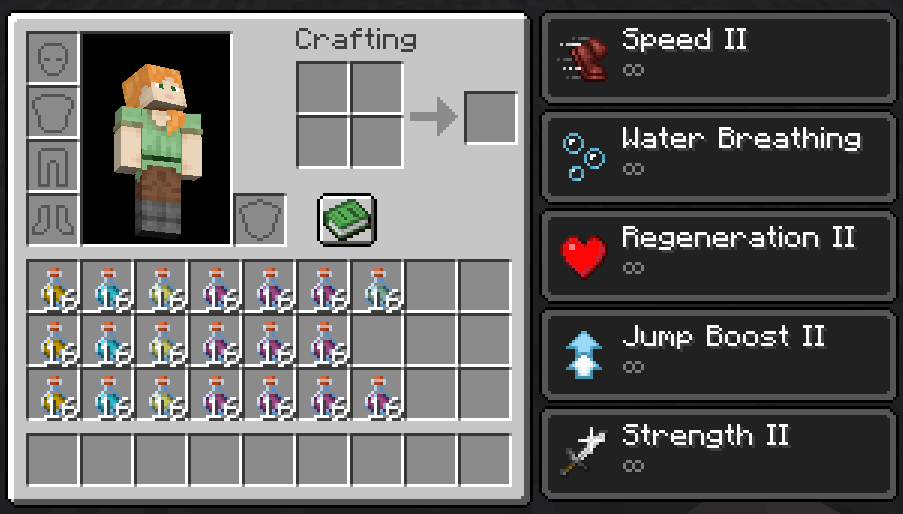
30 bottles of potions = infinity!
Screenshots
About this Mod


Synopsis
- Get infinite status effect in survival.
- Change the max stack count of potion.
Profile
The duration of status effects of foods and potions in player's inventory are added up. Provide infinite duration of effect for those whose duration are greater than one hour. If food has a probability of providing status effects, calculate its expected (probability) × duration. The duration threshold can be configured.
Supports the Ender chest, Traveler's Backpack (must be worn), Shulker Box, and Potion Bag of Extra Alchemy (everywhere).
Run command /permanent_status_effect enable|disable <status effect ID> can disable or enable a specific permanent state effect for yourself.
This mod can be added or deleted anytime, which won't damage saves.
This mod can be installed only at server side, but if client side doesn't install it and max stack count is modified, it might cause a few sync issues.
Trivia
This mod is inspired by classic utility mods of Terraria, LuiAFK and Fargo's Mutant. In these mods, if players carry 30 bottles of potiont, they get infinite buff.
Available Versions
How to Install Permanent Status Effect on Your Server
Order Server
Order a Minecraft Java server with at least 3 GB RAM (4 GB recommended).
Set fabric Loader
In the panel under "Egg", select the fabric loader and matching Minecraft version (1.20.1).
Install Mod
Open the mod browser in the dashboard and search for "Permanent Status Effect". Click "Install" – done! Alternatively, upload the .jar via SFTP to the /mods folder.
Compatibility
Mod Loaders
Minecraft Versions
1.20.1, 1.20
Server-side
✓ RequiredRecommended RAM
4 GB(min. 3 GB)Frequently Asked Questions
Permanent Status Effect server crashes on startup – what to do?
Most common cause: wrong fabric version or insufficient RAM. Check the server log (latest.log) for "OutOfMemoryError" or "Mixin" errors. With Mado Hosting: ensure at least 3 GB RAM is allocated and the loader matches the mod version (1.20.1). You can switch loaders with one click in the panel.
Is Permanent Status Effect compatible with fabric?
Permanent Status Effect officially supports fabric for Minecraft 1.20.1, 1.20. The Mado dashboard automatically detects incompatible loader combinations.
Server lagging with Permanent Status Effect – how to optimize performance?
Recommended RAM: 4 GB (per 8 players). Use /spark profiler to check if Permanent Status Effect consumes the most tick time. Common fixes: reduce server view-distance to 8-10, install "performant" or "starlight" as supplementary mods on Forge. With Mado Hosting, your server runs on NVMe SSDs with dedicated CPU cores for minimal latency.
Similar Mods




![[ETF] Entity Texture Features](https://cdn.modrinth.com/data/BVzZfTc1/af683d206d50b05258d865b0d6e4aa2f2cee12f2_96.webp)
![[EMF] Entity Model Features](https://cdn.modrinth.com/data/4I1XuqiY/6e5bbd0d06b1741bfdab6c0cfab6de8fdaf0064c_96.webp)
Rent Modded Server
Install Permanent Status Effect with just one click on your server.