
Personality
Personality is a Utility Mod for people who want to Role Play and have integration within the game.
Screenshots
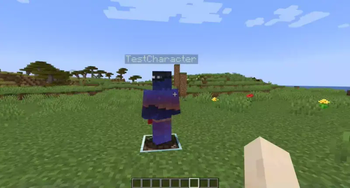
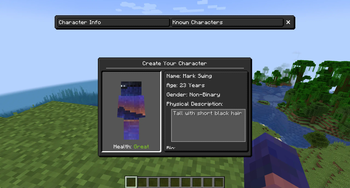
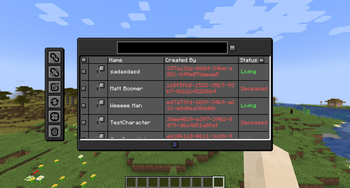
About this Mod

Have you ever wanted to Role Play Characters within Minecraft but find it difficult to manage an easy way of sharing your Character's Information? Well, this mod may be the one for you as it attempts to fix this problem and more! Personality is a Mod designed around making Role Playing in Minecraft easier.

Info Reveal System:
Built-in system to restrict characters' knowledge about another character allowing for searching for people and gaining trust to know more about a person. Included is the ability to have Datapacks to change what information is given for each Info Level for server customizability.
Ingame Obsurcuring of Character names based on info level and an Ingame Description viewer to show what a character looks like with more detail!
Addon Compatibility:
API was developed to add support for characters to have custom features with the base mod including both Origins and Pehkui support. Such includes Java Documentation within the Source code and future hope for Code docs within the wiki.
Admin Commands / GUI:
Built In permission Role system for moderating and administrating Characters thru commands and a custom GUI with support for searching and managing characters. More information can be found on the Wiki going over the various commands and their actions.
Aging Effects:
All characters are age-based in real-world time with such brings various changes to the character that will affect how you live your life with differences like faster healing to possibly needing glasses to reverse your bad eyesight.
Feedback
Any issues with the mod or think of new features or changes that can make it better, I am always willing to listen! Use the Issues above and Ill try to get back to you in a timely manor.
Available Versions
How to Install Personality on Your Server
Order Server
Order a Minecraft Java server with at least 3 GB RAM (4 GB recommended).
Set fabric Loader
In the panel under "Egg", select the fabric loader and matching Minecraft version (1.19.2).
Install Mod
Open the mod browser in the dashboard and search for "Personality". Click "Install" – done! Alternatively, upload the .jar via SFTP to the /mods folder.
Compatibility
Mod Loaders
Minecraft Versions
1.19.2
Server-side
✓ RequiredRecommended RAM
4 GB(min. 3 GB)Frequently Asked Questions
Personality server crashes on startup – what to do?
Most common cause: wrong fabric version or insufficient RAM. Check the server log (latest.log) for "OutOfMemoryError" or "Mixin" errors. With Mado Hosting: ensure at least 3 GB RAM is allocated and the loader matches the mod version (1.19.2). You can switch loaders with one click in the panel.
Is Personality compatible with fabric?
Personality officially supports fabric for Minecraft 1.19.2. The Mado dashboard automatically detects incompatible loader combinations.
Server lagging with Personality – how to optimize performance?
Recommended RAM: 4 GB (per 8 players). Use /spark profiler to check if Personality consumes the most tick time. Common fixes: reduce server view-distance to 8-10, install "performant" or "starlight" as supplementary mods on Forge. With Mado Hosting, your server runs on NVMe SSDs with dedicated CPU cores for minimal latency.
Similar Mods




![[ETF] Entity Texture Features](https://cdn.modrinth.com/data/BVzZfTc1/af683d206d50b05258d865b0d6e4aa2f2cee12f2_96.webp)
![[EMF] Entity Model Features](https://cdn.modrinth.com/data/4I1XuqiY/6e5bbd0d06b1741bfdab6c0cfab6de8fdaf0064c_96.webp)
Rent Modded Server
Install Personality with just one click on your server.