
Pigmentum API
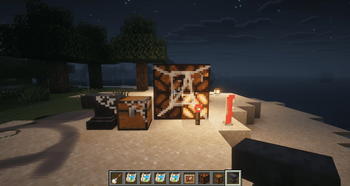
Painter is a mod build on neoforge 1.21.1, allows player to paint on almost every block.
Screenshots
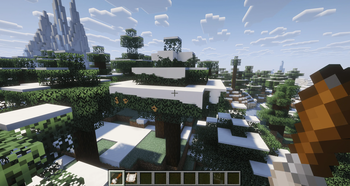
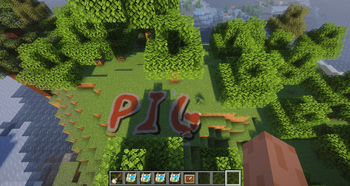
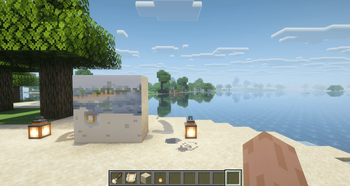
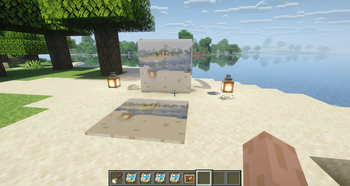
About this Mod
🎨 Pigmentum - Minecraft Canvas API
Turn every block surface into your personal canvas. Paint pixel by pixel on any surface in Minecraft.
Pigmentum is a low-level canvas API for NeoForge mod developers.
Out-of-the-box painting features (brushes, GUI, blend modes) will be developed separately at Fresco.
Pigmentum focuses on providing the core canvas infrastructure and extension API.
✨ Features
🖌️ Canvas System
- Any Block as Canvas: Right-click any block surface with a paintbrush to turn it into a canvas that blends seamlessly with the block.
- Pixel-Level Drawing: Hold right-click and drag to draw smooth, continuous lines—no gaps even at high speed.
- Multi-Face Canvases: Paint independently on each face of a block—top, bottom, and all four sides.
- Irregular Block Support: Stairs, slabs, fences, and other shaped blocks can be painted with pixel-perfect precision.
- Brush Configuration Menu: Right-click the air with a paintbrush to adjust brush size, feathering, blend mode, and drawing interval.
🎯 Paintbrush System
- Color Picker: Press the
Rkey to sample the color of the pixel under your crosshair. - Multiple Blend Modes: Choose from Overwrite, Additive, Multiply, and Erase.
📦 Canvas Extraction & Display
- Canvas Sheet Item: Sneak-right-click a painted block to copy one face onto a Canvas Sheet without removing the original.
- Item Frame Display: Place a Canvas Sheet in an item frame to display your artwork like a map.
🧩 Extension API
- Custom Image Providers (
CanvasImageProvider) — register custom texture generation from pixel data - Custom Renderers (
CanvasPixelRenderer) — control how canvas faces are rendered - Per-Pixel Effect Layers — attach arbitrary byte data per pixel (e.g. glow intensity, roughness)
- Custom Blend Functions (
BlendFunction) — full control over pixel color and effect compositing - Custom Paint Brushes (
IPaintProvider) — register any item as a brush with custom behavior
🎮 Getting Started
- Obtain a paintbrush from the creative inventory.
- Right-click any block surface to create a canvas.
- Hold right-click and drag to paint pixels.
- Press the
Rkey to pick a color from the world. - Right-click the air to adjust your brush settings.
- Use a Canvas Sheet to extract and display your artwork in item frames.
Pigmentum - Every face is a canvas.
Available Versions
How to Install Pigmentum API on Your Server
Order Server
Order a Minecraft Java server with at least 3 GB RAM (4 GB recommended).
Set neoforge Loader
In the panel under "Egg", select the neoforge loader and matching Minecraft version (1.21.1).
Install Mod
Open the mod browser in the dashboard and search for "Pigmentum API". Click "Install" – done! Alternatively, upload the .jar via SFTP to the /mods folder.
Compatibility
Mod Loaders
Minecraft Versions
1.21.1
Server-side
✓ RequiredRecommended RAM
4 GB(min. 3 GB)Frequently Asked Questions
Pigmentum API server crashes on startup – what to do?
Most common cause: wrong neoforge version or insufficient RAM. Check the server log (latest.log) for "OutOfMemoryError" or "Mixin" errors. With Mado Hosting: ensure at least 3 GB RAM is allocated and the loader matches the mod version (1.21.1). You can switch loaders with one click in the panel.
Is Pigmentum API compatible with neoforge?
Pigmentum API officially supports neoforge for Minecraft 1.21.1. The Mado dashboard automatically detects incompatible loader combinations.
Server lagging with Pigmentum API – how to optimize performance?
Recommended RAM: 4 GB (per 8 players). Use /spark profiler to check if Pigmentum API consumes the most tick time. Common fixes: reduce server view-distance to 8-10, install "performant" or "starlight" as supplementary mods on Forge. With Mado Hosting, your server runs on NVMe SSDs with dedicated CPU cores for minimal latency.
Similar Mods

![[ETF] Entity Texture Features](https://cdn.modrinth.com/data/BVzZfTc1/af683d206d50b05258d865b0d6e4aa2f2cee12f2_96.webp)
![[EMF] Entity Model Features](https://cdn.modrinth.com/data/4I1XuqiY/6e5bbd0d06b1741bfdab6c0cfab6de8fdaf0064c_96.webp)



Rent Modded Server
Install Pigmentum API with just one click on your server.