
ping-offset-miner
visual indicator for mining in hypixel skyblock
Screenshots

About this Mod

Ping Offset Miner
The ping gliding mod


About POM
Mining with high or unstable ping in Hypixel Skyblock can decrease efficiency by a severe amount. Though, with proper skill and knowledge, it is still possible to mitigate this with ping gliding.
The problem is ping gliding can be inconsistent, even for the most skilled miners out there. With POM, you don't have to guess.
By measuring user's ping, tps and Mining Speed to estimate when a block is registered as broken on the server, POM provides visual / auditory feedback to the user when it is safe to start mining another block.
This means that the user is able to greatly increase their efficiency by knowing exactly when to ping glide, not having to rely on muscle memory or pure luck.
Getting started with POM
Frequently Asked Questions
Is POM safe?
Yes. POM does not break any TOS of the Hypixel Network. POM does not automate any task for the user, it only provides information that the user can then react upon. This mod is not and wil never be unsafe to use.
Furthermore, the project will always remain open-sourced, meaning anyone is able to freely look through the code at any time.
Lorem ipsum
- Dolor sit amet
Lorem ipsum
- Dolor sit amet
Dependencies
These mods are required for POM to function correctly, be sure to download them alongside POM
- YACL (Yet Another Config Library) : Configuration
- ModMenu : Mod Screen
Installation
It is recommended to use the Modrinth App
To download POM itself, head to the Modrinth page and download the latest mod version compatible with your minecraft version
Usage
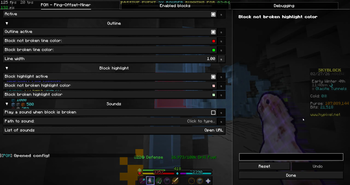
Using Pom is very simple. The mod makes a default Configuration for the user with pre-defined settings, letting users to plug-and-play.
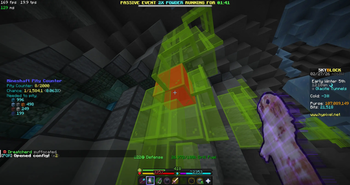
POM will add a highlighting box over the block the user is looking at. When mining, the overlay changes color to indicate that the block is broken, and the user can safely start mining another block.
Contact
To talk to me, join the Mining Cult Discord and chat in the POM discussion channel
Acknowledgments
Developing this mod was not easy. I have never before programmed in Java and thus required tons of help to reach this state with my mod.
- Odin Mod: showed me how to read networking statistics
- NoFrills: Amazing Skyblock mod, a lot of inspiration taken
- Orbit Event System: A blazingly fast Event Handler used all throughout the mod
- Momen: Designed the mod logo
Available Versions
How to Install ping-offset-miner on Your Server
Order Server
Order a Minecraft Java server with at least 3 GB RAM (4 GB recommended).
Set fabric Loader
In the panel under "Egg", select the fabric loader and matching Minecraft version (1.21.11).
Install Mod
Open the mod browser in the dashboard and search for "ping-offset-miner". Click "Install" – done! Alternatively, upload the .jar via SFTP to the /mods folder.
Compatibility
Mod Loaders
Minecraft Versions
1.21.11, 1.21.10
Server-side
✗ UnsupportedRecommended RAM
4 GB(min. 3 GB)Frequently Asked Questions
ping-offset-miner server crashes on startup – what to do?
Most common cause: wrong fabric version or insufficient RAM. Check the server log (latest.log) for "OutOfMemoryError" or "Mixin" errors. With Mado Hosting: ensure at least 3 GB RAM is allocated and the loader matches the mod version (1.21.11). You can switch loaders with one click in the panel.
Is ping-offset-miner compatible with fabric?
ping-offset-miner officially supports fabric for Minecraft 1.21.11, 1.21.10. The Mado dashboard automatically detects incompatible loader combinations.
Server lagging with ping-offset-miner – how to optimize performance?
Recommended RAM: 4 GB (per 8 players). Use /spark profiler to check if ping-offset-miner consumes the most tick time. Common fixes: reduce server view-distance to 8-10, install "performant" or "starlight" as supplementary mods on Forge. With Mado Hosting, your server runs on NVMe SSDs with dedicated CPU cores for minimal latency.
Similar Mods




![[ETF] Entity Texture Features](https://cdn.modrinth.com/data/BVzZfTc1/af683d206d50b05258d865b0d6e4aa2f2cee12f2_96.webp)
![[EMF] Entity Model Features](https://cdn.modrinth.com/data/4I1XuqiY/6e5bbd0d06b1741bfdab6c0cfab6de8fdaf0064c_96.webp)
Rent Modded Server
Install ping-offset-miner with just one click on your server.