
PinkCabbageTransparentBetterScreen
Optimize screen and control transparency(屏幕优化和控制透明度)
Screenshots
About this Mod
PinkCabbage, also known as Pink Bag, is developed by XuanTian Studio, led by its creator.
Contact (QQ/Email): [email protected]
XuanTian Studio QQ Group: 774718671
Mod Discussion QQ Group: 671389632
This mod is open-source and includes many comments in the code, making it suitable for learners interested in Minecraft mod development:
https://github.com/BigPinkCabbage/PinkCabbage-Transparent-BetterScreen/
However, it is licensed under CC BY-NC 4.0, which prohibits any commercial use or monetization of modified versions.
You are free to share or repost this work on short video platforms, but please include proper credit.
License info: https://creativecommons.org/licenses/by-nc/4.0/
Mod Features:
- Bubble Particles in Water: players emit bubbles while moving underwater (feature removed; see UnderwaterBubblesHandler class).
- Durability Display: tool durability is shown below item names and also triggered on left-click, even without hitting anything.
- On-Screen Info: coordinates and server ping are shown on screen corners; durability, arrow count, and food value are shown on hotbar.
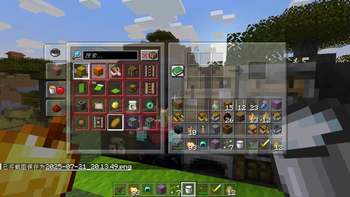
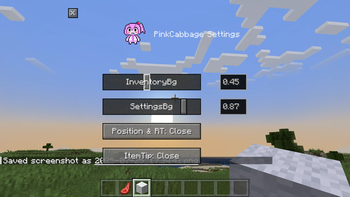
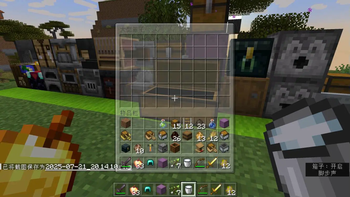
- Adjustable UI Transparency: inventory and container UI backgrounds can be made transparent via settings (default key: J).
- Configurable UI: toggle features in the settings menu. Keybinding path: Options -> Controls -> Key Bindings -> “PinkCabbage Keys”.
- Help Command: type /CabbageMod help for in-game mod tips and key info.
- Chat Commands: set transparency using /CabbageMod InventoryAlpha 1.0 (range: 0.0 ~ 1.0, but SettingScreenAlpha: 0.1 ~ 1.0).
- Config File: settings also saved in config/PinkCabbage_settings.json. Be careful editing it manually.
- Ongoing Updates: future versions will be posted to platforms like Bilibili — search for 粉红大包菜.
粉红大包菜(PinkCabbage),又名粉红大包,是轩天工作室负责人
QQ_Email:[email protected],
轩天工作室交流QQ群:774718671,
作者的模组交流QQ群:671389632,
本模组的代码是开源的并且我还写了很多注释比较适合模组学习者:
https://github.com/BigPinkCabbage/PinkCabbage-Transparent-BetterScreen/
但是本模组用的是CC BY-NC 4.0协议,禁止修改者商业化使用,
你可以转载我的作品到短视频平台分享,但是要标注出处,
以下是CC BY-NC 4.0协议的基本要求↓↓↓
https://creativecommons.org/licenses/by-nc/4.0/
模组功能:
1.玩家在水中移动时会有泡泡粒子特效,(不太完善的功能所以被作者删去了,可以在源码的UnderwaterBubblesHandler类找到)
2.玩家手持物品切换到工具时该工具的耐久度会在原版游戏的工具名称悬浮文本下方显示,玩家手持工具点击左键时可以再次显示耐久度(无需攻击到实体也能显示)
3.玩家的坐标和服务器延迟时间(ms)的数据分别在屏幕左上角和右下角显示,玩家的装备耐久度和背包里面弓箭的数量以及手持食物的饥饿度会在快捷栏显示
4.模组还可以通过设置菜单里面的滑轮来调节玩家物品栏和快捷栏以及一些容器方块的UI背景的透明度(打开菜单的默认按键为J)
5.是否显示以上功能都可以在菜单修改,更改模组默认按键的路径为:游戏选项->按键控制->按键绑定->最后找到“粉红大包菜的按键”
6./CabbageMod help 这个命令会有模组按键和命令相关的文字提示
7.模组添加的透明度参数也支持玩家在聊天栏使用命令修改,例如/CabbageMod InventoryAlpha 1.0 (这里的参数可以写0.0到1.0范围中的小数,但是SettingScreenAlpha的范围是0.1 ~ 1.0)
8.模组菜单内的一些参数还可以通过版本文件夹内config文件夹里面的"PinkCabbage_settings.json"进行修改,但是请不要改错,因为这样可能会让游戏出现异常
9.模组后续还会继续优化和更新,内容如有更新也会发布在哔哩哔哩等短视频平台,搜粉红大包菜即可
Available Versions
How to Install PinkCabbageTransparentBetterScreen on Your Server
Order Server
Order a Minecraft Java server with at least 3 GB RAM (4 GB recommended).
Set forge Loader
In the panel under "Egg", select the forge loader and matching Minecraft version (1.21.5).
Install Mod
Open the mod browser in the dashboard and search for "PinkCabbageTransparentBetterScreen". Click "Install" – done! Alternatively, upload the .jar via SFTP to the /mods folder.
Compatibility
Mod Loaders
Minecraft Versions
1.21.5, 1.21.4, 1.21.1
Server-side
✗ UnsupportedRecommended RAM
4 GB(min. 3 GB)Frequently Asked Questions
PinkCabbageTransparentBetterScreen server crashes on startup – what to do?
Most common cause: wrong forge version or insufficient RAM. Check the server log (latest.log) for "OutOfMemoryError" or "Mixin" errors. With Mado Hosting: ensure at least 3 GB RAM is allocated and the loader matches the mod version (1.21.5). You can switch loaders with one click in the panel.
Is PinkCabbageTransparentBetterScreen compatible with forge and neoforge?
PinkCabbageTransparentBetterScreen officially supports forge, neoforge for Minecraft 1.21.5, 1.21.4, 1.21.1. The Mado dashboard automatically detects incompatible loader combinations.
Server lagging with PinkCabbageTransparentBetterScreen – how to optimize performance?
Recommended RAM: 4 GB (per 8 players). Use /spark profiler to check if PinkCabbageTransparentBetterScreen consumes the most tick time. Common fixes: reduce server view-distance to 8-10, install "performant" or "starlight" as supplementary mods on Forge. With Mado Hosting, your server runs on NVMe SSDs with dedicated CPU cores for minimal latency.
Similar Mods


Rent Modded Server
Install PinkCabbageTransparentBetterScreen with just one click on your server.
Details
- License
- Creative Commons Attribution Non Commercial 4.0 International
- Server-side
- Unsupported