
PipeCraft
adds viaducts and (pipes WIP) to minecraft
Screenshots



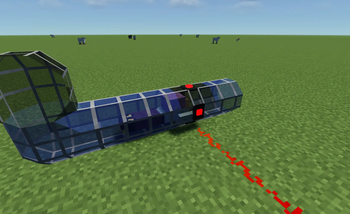
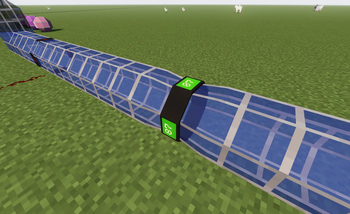
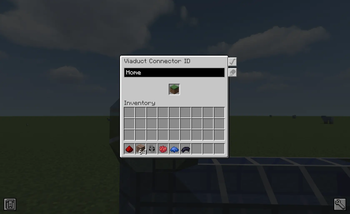
About this Mod
Attention!
This mod is not finished, missing some content and contain bugs.
Make sure to Backup your world!

This mod adds Viaduct pipes, inspired by the old Thermal mods.
Normal item and fluid pipes may be available in a future update.
You can place the viaducts to create a network to connect them using Viaduct Connectors, which act as start and goal points.

You can change the travel speed with Viaduct Boosters and detect players using Detectors.

Viaducts can be colored with dyes, have their light level adjusted with Glowstone Dust (only for normal Viaducts, removable with a brush), and be made solid or transparent using wool or glass.

In the menu, you can sort your connections, click on them, and travel through the network.
Shift + Right-click on a connector to open the ID screen, where you can change its ID and name.
With the booster, you can adjust the speed by right-clicking and scrolling up or down.
If you hold an item and Shift + Right-click, you can assign it to the booster so that all boosters with the same ID change speed together.
Available Versions
How to Install PipeCraft on Your Server
Order Server
Order a Minecraft Java server with at least 3 GB RAM (4 GB recommended).
Set neoforge Loader
In the panel under "Egg", select the neoforge loader and matching Minecraft version (1.21.1).
Install Mod
Open the mod browser in the dashboard and search for "PipeCraft". Click "Install" – done! Alternatively, upload the .jar via SFTP to the /mods folder.
Compatibility
Mod Loaders
Minecraft Versions
1.21.1
Server-side
✓ RequiredRecommended RAM
4 GB(min. 3 GB)Frequently Asked Questions
PipeCraft server crashes on startup – what to do?
Most common cause: wrong neoforge version or insufficient RAM. Check the server log (latest.log) for "OutOfMemoryError" or "Mixin" errors. With Mado Hosting: ensure at least 3 GB RAM is allocated and the loader matches the mod version (1.21.1). You can switch loaders with one click in the panel.
Is PipeCraft compatible with neoforge?
PipeCraft officially supports neoforge for Minecraft 1.21.1. The Mado dashboard automatically detects incompatible loader combinations.
Server lagging with PipeCraft – how to optimize performance?
Recommended RAM: 4 GB (per 8 players). Use /spark profiler to check if PipeCraft consumes the most tick time. Common fixes: reduce server view-distance to 8-10, install "performant" or "starlight" as supplementary mods on Forge. With Mado Hosting, your server runs on NVMe SSDs with dedicated CPU cores for minimal latency.
Similar Mods

![[ETF] Entity Texture Features](https://cdn.modrinth.com/data/BVzZfTc1/af683d206d50b05258d865b0d6e4aa2f2cee12f2_96.webp)
![[EMF] Entity Model Features](https://cdn.modrinth.com/data/4I1XuqiY/6e5bbd0d06b1741bfdab6c0cfab6de8fdaf0064c_96.webp)



Rent Modded Server
Install PipeCraft with just one click on your server.