
PIxel Painter - Decals
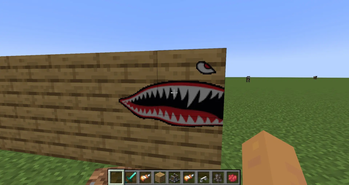
A Pixel Painter addon that allows you to place premade low res images in the world.
Screenshots
About this Mod
Pixel Painter Decals is an add-on for Pixel Painter that lets you stamp custom PNG images directly into the world as Pixel Painter paint. Drop decal images into the decals folder, pick one from an in-game menu, preview it as a ghost image, then place it across blocks like a sticker.
Once stamped, decals become normal Pixel Painter paint data. They are saved, synced, and handled by Pixel Painter’s existing paint system instead of remaining separate image objects.
Features
Load PNG decals from config/pixelpainter/decals/
Select decals in-game with a Book and Quill in your offhand
Open the decal folder from the selection screen
Reload decals without restarting
Ghost preview before placement
Rotate decals in 90 degree steps
Flip decals horizontally
Stamp decals across multiple blocks
Wrap decals around corners
Supports square and rectangular decals up to 256x256 pixels
Works with Pixel Painter paint storage and networking
Multiplayer/server compatible
Experimental support for Copycat blocks, slopes, assembled contraptions, and physics bodies
How To Use
Install Pixel Painter and Pixel Painter Decals on the client and server.
Put PNG files in config/pixelpainter/decals/.
Hold a Book and Quill in your offhand.
Sneak + right-click to open the decal picker.
Select a decal, aim at a surface, rotate or mirror if needed, then right-click to stamp it.
Default Controls
Rotate left/right: < and >
Mirror horizontally: ;
Open decal picker: Sneak + right-click with Book and Quill in offhand
Available Versions
How to Install PIxel Painter - Decals on Your Server
Order Server
Order a Minecraft Java server with at least 3 GB RAM (4 GB recommended).
Set neoforge Loader
In the panel under "Egg", select the neoforge loader and matching Minecraft version (1.21.1).
Install Mod
Open the mod browser in the dashboard and search for "PIxel Painter - Decals". Click "Install" – done! Alternatively, upload the .jar via SFTP to the /mods folder.
Compatibility
Mod Loaders
Minecraft Versions
1.21.1
Server-side
✓ RequiredRecommended RAM
4 GB(min. 3 GB)Frequently Asked Questions
PIxel Painter - Decals server crashes on startup – what to do?
Most common cause: wrong neoforge version or insufficient RAM. Check the server log (latest.log) for "OutOfMemoryError" or "Mixin" errors. With Mado Hosting: ensure at least 3 GB RAM is allocated and the loader matches the mod version (1.21.1). You can switch loaders with one click in the panel.
Is PIxel Painter - Decals compatible with neoforge?
PIxel Painter - Decals officially supports neoforge for Minecraft 1.21.1. The Mado dashboard automatically detects incompatible loader combinations.
Server lagging with PIxel Painter - Decals – how to optimize performance?
Recommended RAM: 4 GB (per 8 players). Use /spark profiler to check if PIxel Painter - Decals consumes the most tick time. Common fixes: reduce server view-distance to 8-10, install "performant" or "starlight" as supplementary mods on Forge. With Mado Hosting, your server runs on NVMe SSDs with dedicated CPU cores for minimal latency.
Similar Mods

![[ETF] Entity Texture Features](https://cdn.modrinth.com/data/BVzZfTc1/af683d206d50b05258d865b0d6e4aa2f2cee12f2_96.webp)
![[EMF] Entity Model Features](https://cdn.modrinth.com/data/4I1XuqiY/6e5bbd0d06b1741bfdab6c0cfab6de8fdaf0064c_96.webp)



Rent Modded Server
Install PIxel Painter - Decals with just one click on your server.