
像素化-城建 PLUC
The ultimate mod for authentic Chinese-style city roads.
Screenshots

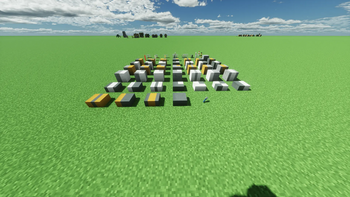


About this Mod
"Pixelated Urban Construction" is a comprehensive city-building mod that includes various blocks commonly found in real-life cities: road blocks, road markings, road signs, guardrails, traffic lights, and more.
Road Blocks: Using the vanilla "Cyan Terracotta" as the main road surface and "Yellow Terracotta" along with "Smooth Quartz Block" for markings, a series of road blocks have been created, significantly enhancing aesthetics. Additionally, in accordance with design standards, a double-block width has been adopted as the standard.
Road Markings: Using the marking blocks provided by this mod, players can freely construct various national-standard guide markings, offering strong expandability.
Road Signs: A series of signs have been designed with reference to the "JTG B01-2014" standard, allowing players to easily choose the most suitable signs for their needs.
Guardrails: Modeled after examples from cities like Changsha and Huaihua in Hunan Province, these guardrails are designed to closely resemble real-life counterparts.
For more details about this mod, please visit the MC ModWiki. It supports the Fabric version and is also compatible with the Forge version when used with "Xunya Link". The mod is released under the MIT License, and redistribution must comply with the license terms. You are welcome to join the Tencent QQ Group 605694633 for discussions. You can also report issues in the QQ group.
Available Versions
How to Install 像素化-城建 PLUC on Your Server
Order Server
Order a Minecraft Java server with at least 3 GB RAM (4 GB recommended).
Set fabric Loader
In the panel under "Egg", select the fabric loader and matching Minecraft version (1.20.1).
Install Mod
Open the mod browser in the dashboard and search for "像素化-城建 PLUC". Click "Install" – done! Alternatively, upload the .jar via SFTP to the /mods folder.
Compatibility
Mod Loaders
Minecraft Versions
1.20.1
Server-side
✓ RequiredRecommended RAM
4 GB(min. 3 GB)Frequently Asked Questions
像素化-城建 PLUC server crashes on startup – what to do?
Most common cause: wrong fabric version or insufficient RAM. Check the server log (latest.log) for "OutOfMemoryError" or "Mixin" errors. With Mado Hosting: ensure at least 3 GB RAM is allocated and the loader matches the mod version (1.20.1). You can switch loaders with one click in the panel.
Is 像素化-城建 PLUC compatible with fabric?
像素化-城建 PLUC officially supports fabric for Minecraft 1.20.1. The Mado dashboard automatically detects incompatible loader combinations.
Server lagging with 像素化-城建 PLUC – how to optimize performance?
Recommended RAM: 4 GB (per 8 players). Use /spark profiler to check if 像素化-城建 PLUC consumes the most tick time. Common fixes: reduce server view-distance to 8-10, install "performant" or "starlight" as supplementary mods on Forge. With Mado Hosting, your server runs on NVMe SSDs with dedicated CPU cores for minimal latency.
Similar Mods

![[ETF] Entity Texture Features](https://cdn.modrinth.com/data/BVzZfTc1/af683d206d50b05258d865b0d6e4aa2f2cee12f2_96.webp)
![[EMF] Entity Model Features](https://cdn.modrinth.com/data/4I1XuqiY/6e5bbd0d06b1741bfdab6c0cfab6de8fdaf0064c_96.webp)



Rent Modded Server
Install 像素化-城建 PLUC with just one click on your server.