PixelBeat
PixelBeat is a music mod. It scans a local music directory, plays your tracks as in-game background music, reads matching lyric files, and renders a lightweight pixel-style HUD in the top-left corner of the screen.
Screenshots

About this Mod
PixelBeat
PixelBeat is a client-side Fabric music mod for Minecraft 1.20.
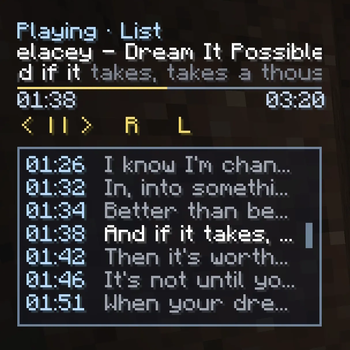
It scans a local music directory, plays your tracks as in-game background music, reads matching .lrc lyric files, and renders a lightweight pixel-style HUD in the top-left corner of the screen.
Highlights
- Plays local music files from
pixelbeat_music/or a custom configured directory - Supports subdirectories when scanning music files
- Reads same-name
.lrclyric files from the same folder as each track - Shows a compact pixel-style HUD with track title, lyric line, progress bar, time labels, and playback controls
- Supports previous / pause / next / reload / play-mode switching
- Lets you click the progress bar to seek
- Lets you drag the HUD and saves the HUD position back to config
- The HUD is auto-hidden when no music files are available
- Supports lyric expansion by double-clicking the lyric line
- Expanded lyric panel supports mouse wheel scrolling and double-click seek
- Supports
LIST_LOOP,SINGLE_LOOP, andSHUFFLEplay-modes - Follows Minecraft
RECORDSvolume - Provides file-based configuration for music directory, HUD layout, and theme colors
Music And Lyrics
- Supported file extensions currently scanned by the mod:
mp3,ogg,wav,flac,aiff,au - For best compatibility,
wavandoggare recommended - Lyrics should be stored as a same-name
.lrcfile next to the music file
Example:
.minecraft/
  pixelbeat_music/
    song-a.mp3
    song-a.lrc
    subfolder/
      song-b.ogg
      song-b.lrc
Configuration
After first launch, the mod creates:
.minecraft/config/pixelbeat.json
You can customize:
- Music directory
- Rescan interval
- Default play mode
- HUD position
- HUD row offsets and widths
- Button layout
- Time / status / lyric visibility
- Dragging behavior
- Expanded lyric panel size
- HUD and lyric panel theme colors
- HUD background color and transparency
- Expanded lyric panel background color and transparency
Available Versions
How to Install PixelBeat on Your Server
Order Server
Order a Minecraft Java server with at least 3 GB RAM (4 GB recommended).
Set fabric Loader
In the panel under "Egg", select the fabric loader and matching Minecraft version (1.20.6).
Install Mod
Open the mod browser in the dashboard and search for "PixelBeat". Click "Install" – done! Alternatively, upload the .jar via SFTP to the /mods folder.
Compatibility
Mod Loaders
Minecraft Versions
1.20.6, 1.20.5, 1.20.4 (+3 more)
Server-side
✗ UnsupportedRecommended RAM
4 GB(min. 3 GB)Frequently Asked Questions
PixelBeat server crashes on startup – what to do?
Most common cause: wrong fabric version or insufficient RAM. Check the server log (latest.log) for "OutOfMemoryError" or "Mixin" errors. With Mado Hosting: ensure at least 3 GB RAM is allocated and the loader matches the mod version (1.20.6). You can switch loaders with one click in the panel.
Is PixelBeat compatible with fabric?
PixelBeat officially supports fabric for Minecraft 1.20.6, 1.20.5, 1.20.4. The Mado dashboard automatically detects incompatible loader combinations.
Server lagging with PixelBeat – how to optimize performance?
Recommended RAM: 4 GB (per 8 players). Use /spark profiler to check if PixelBeat consumes the most tick time. Common fixes: reduce server view-distance to 8-10, install "performant" or "starlight" as supplementary mods on Forge. With Mado Hosting, your server runs on NVMe SSDs with dedicated CPU cores for minimal latency.
Similar Mods




Rent Modded Server
Install PixelBeat with just one click on your server.