
Pixelmon Controlify Bridge
Adds controller-friendly keybinds so Controlify can trigger Pixelmon actions.
Screenshots
About this Mod
Pixelmon Controlify Bridge is a small client-side NeoForge compatibility mod that lets Controlify trigger Pixelmon actions reliably from a controller.
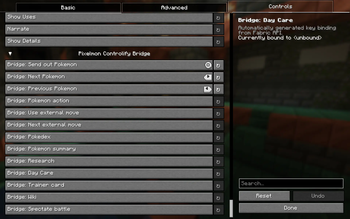
Pixelmon keybinds can appear in Controlify, but binding those native actions directly may not trigger the expected Pixelmon behavior from a controller. This mod adds a separate set of bridge keybinds that Controlify can bind normally. When one of those bridge keybinds is pressed, the mod calls the matching Pixelmon action directly.
Features
- Send out / recall a Pixelmon party member
- Select the next or previous party member
- Trigger the Pixelmon party action
- Use and cycle external moves
- Open Pixelmon screens such as Pokedex, summary, Research, Day Care, Trainer Card, and Wiki
- Trigger Pixelmon's battle spectate action
How to use
Install this mod alongside Pixelmon and Controlify on a NeoForge Minecraft 1.21.1 client.
Then open the controls screen and bind the entries under the Pixelmon Controlify Bridge category. Use those bridge entries instead of binding Pixelmon's native keybinds directly through Controlify.
Compatibility
Version 1.0.0 is tested with:
- Minecraft 1.21.1
- NeoForge 21.1.234
- Pixelmon 9.3.16
- Controlify 3.0.0+lts
Notes
This is a client-side compatibility mod. It does not include or redistribute Pixelmon or Controlify.
This is an unofficial compatibility project and is not affiliated with, endorsed by, or supported by Pixelmon or Controlify.
Available Versions
How to Install Pixelmon Controlify Bridge on Your Server
Order Server
Order a Minecraft Java server with at least 3 GB RAM (4 GB recommended).
Set neoforge Loader
In the panel under "Egg", select the neoforge loader and matching Minecraft version (1.21.1).
Install Mod
Open the mod browser in the dashboard and search for "Pixelmon Controlify Bridge". Click "Install" – done! Alternatively, upload the .jar via SFTP to the /mods folder.
Compatibility
Mod Loaders
Minecraft Versions
1.21.1
Server-side
✗ UnsupportedRecommended RAM
4 GB(min. 3 GB)Frequently Asked Questions
Pixelmon Controlify Bridge server crashes on startup – what to do?
Most common cause: wrong neoforge version or insufficient RAM. Check the server log (latest.log) for "OutOfMemoryError" or "Mixin" errors. With Mado Hosting: ensure at least 3 GB RAM is allocated and the loader matches the mod version (1.21.1). You can switch loaders with one click in the panel.
Is Pixelmon Controlify Bridge compatible with neoforge?
Pixelmon Controlify Bridge officially supports neoforge for Minecraft 1.21.1. The Mado dashboard automatically detects incompatible loader combinations.
Server lagging with Pixelmon Controlify Bridge – how to optimize performance?
Recommended RAM: 4 GB (per 8 players). Use /spark profiler to check if Pixelmon Controlify Bridge consumes the most tick time. Common fixes: reduce server view-distance to 8-10, install "performant" or "starlight" as supplementary mods on Forge. With Mado Hosting, your server runs on NVMe SSDs with dedicated CPU cores for minimal latency.
Similar Mods




![[ETF] Entity Texture Features](https://cdn.modrinth.com/data/BVzZfTc1/af683d206d50b05258d865b0d6e4aa2f2cee12f2_96.webp)

Rent Modded Server
Install Pixelmon Controlify Bridge with just one click on your server.