
PixelPanel
A very customizable and helpful HUD mod!
Screenshots

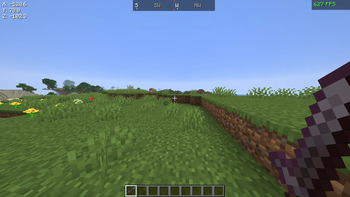
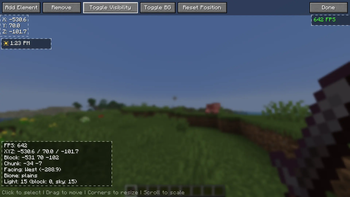
About this Mod
PixelPanel
Your screen, your way.
PixelPanel is a lightweight, client-side HUD customization mod for Fabric that lets you add, move, resize, and style overlay elements anywhere on your screen.
Features
- Drag-and-drop editor — Press H to open the HUD editor. Click to select, drag to move, scroll to scale, and grab corners to resize.
- 8 HUD elements to choose from:
- Coordinates — Live X/Y/Z position
- FPS Counter — Color-coded (green/yellow/red) performance display
- Compass — Dynamic direction strip with cardinal and intercardinal headings
- Time of Day — In-game clock with sun/moon icons
- Tool Durability — Held item icon with durability bar and numbers
- Armor Durability — All 4 armor slots with individual durability bars
- Minimap — Real-time top-down map with 32-block radius
- Debug Info — Compact F3 replacement (FPS, position, chunk, biome, light levels)
- Toggle backgrounds — Switch between solid and transparent element backgrounds
- Toggle visibility — Hide elements without removing them
- Resolution-independent — Positions are stored as screen anchors, so your layout adapts to any window size
- Auto-saving config — Your layout persists in
config/pixelpanel.json
Details
| Minecraft | 1.21.11 |
| Mod Loader | Fabric |
| Environment | Client-side only |
| Dependencies | Fabric API |
| License | MIT |
Available Versions
How to Install PixelPanel on Your Server
Order Server
Order a Minecraft Java server with at least 3 GB RAM (4 GB recommended).
Set fabric Loader
In the panel under "Egg", select the fabric loader and matching Minecraft version (26.1).
Install Mod
Open the mod browser in the dashboard and search for "PixelPanel". Click "Install" – done! Alternatively, upload the .jar via SFTP to the /mods folder.
Compatibility
Mod Loaders
Minecraft Versions
26.1, 1.21.11
Server-side
✗ UnsupportedRecommended RAM
4 GB(min. 3 GB)Frequently Asked Questions
PixelPanel server crashes on startup – what to do?
Most common cause: wrong fabric version or insufficient RAM. Check the server log (latest.log) for "OutOfMemoryError" or "Mixin" errors. With Mado Hosting: ensure at least 3 GB RAM is allocated and the loader matches the mod version (26.1). You can switch loaders with one click in the panel.
Is PixelPanel compatible with fabric?
PixelPanel officially supports fabric for Minecraft 26.1, 1.21.11. The Mado dashboard automatically detects incompatible loader combinations.
Server lagging with PixelPanel – how to optimize performance?
Recommended RAM: 4 GB (per 8 players). Use /spark profiler to check if PixelPanel consumes the most tick time. Common fixes: reduce server view-distance to 8-10, install "performant" or "starlight" as supplementary mods on Forge. With Mado Hosting, your server runs on NVMe SSDs with dedicated CPU cores for minimal latency.
Similar Mods




![[ETF] Entity Texture Features](https://cdn.modrinth.com/data/BVzZfTc1/af683d206d50b05258d865b0d6e4aa2f2cee12f2_96.webp)

Rent Modded Server
Install PixelPanel with just one click on your server.