
Parkour Utility
A bunch of stuff to help make parkour courses!
Screenshots
About this Mod






Adds a bunch of items to aid in making parkour courses!
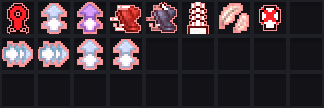
All of the following items & blocks can be found in the creative inventory! Simply just search the name of the item to find it!
(Note, they will appear as enchanted books, as that is how I implemented it. Don't worry, as soon as you hold any of the items, the will be replaced with their actual item!)
Blocks
NOTE: By "next to [block]", you have to be within 0.1 blocks of the targeted block, meaning if you walk right into the block or stand on top, you will be "next to" the block.
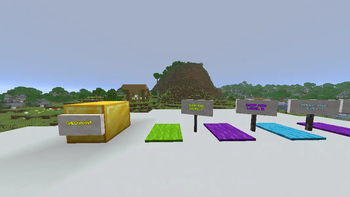
- Checkpoint
- Will become the spawnpoint of any player that steps on top of it.
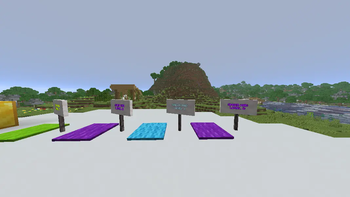
- Jump Pad (Level 1)
- Gives any player on top Jump Boost 5 for 3 seconds. (approx. jump 5~6 blocks)
- Jump Pad (Level 2)
- Gives any player on top Jump Boost 10 for 3 seconds. (approx. jump 10~11 blocks)
- Speed Pad (Level 1)
- Gives any player on top Speed 5 for 3 seconds. (approx. 12~14 blocks/sec)
- Speed Pad (Level 2)
- Gives any player on top Speed 10 for 3 seconds. (approx. 18~20 blocks/sec)
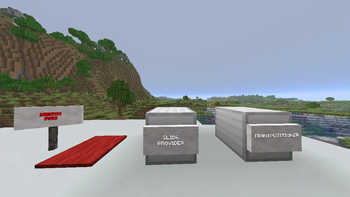
- Transpositioner
- Gives any player next to it (not including below) Levitation 7 for 1 second. (approx. fly 7.5 blocks)
- Glide Provider
- Gives any player next to it (not including below) Levitation 15 for 7 seconds.
- Death Pad
- Instantly kills any player next to it.
Items (Abilities)
NOTE: Creative mode versions of each ability can be found ONLY in the creative inventory. These versions have no cooldown.
To use any ability, simply right click it.
- Dash
- Dashes 10 blocks in front of you.
- Boost
- Freezes you for 1 second.
- Gives you Speed 5 for 15 seconds.
MORE INFINI-PROJECTS

Available Versions
How to Install Parkour Utility on Your Server
Order Server
Order a Minecraft Java server with at least 3 GB RAM (4 GB recommended).
Set datapack Loader
In the panel under "Egg", select the datapack loader and matching Minecraft version (1.21.10).
Install Mod
Open the mod browser in the dashboard and search for "Parkour Utility". Click "Install" – done! Alternatively, upload the .jar via SFTP to the /mods folder.
Compatibility
Mod Loaders
Minecraft Versions
1.21.10, 1.21.9, 1.21.8 (+2 more)
Server-side
✓ RequiredRecommended RAM
4 GB(min. 3 GB)Frequently Asked Questions
Parkour Utility server crashes on startup – what to do?
Most common cause: wrong datapack version or insufficient RAM. Check the server log (latest.log) for "OutOfMemoryError" or "Mixin" errors. With Mado Hosting: ensure at least 3 GB RAM is allocated and the loader matches the mod version (1.21.10). You can switch loaders with one click in the panel.
Is Parkour Utility compatible with datapack and fabric and forge and neoforge and quilt?
Parkour Utility officially supports datapack, fabric, forge, neoforge, quilt for Minecraft 1.21.10, 1.21.9, 1.21.8. Note: Forge and Fabric mods are NOT cross-compatible – pick one loader and stick with it. The Mado dashboard automatically detects incompatible loader combinations.
Server lagging with Parkour Utility – how to optimize performance?
Recommended RAM: 4 GB (per 8 players). Use /spark profiler to check if Parkour Utility consumes the most tick time. Common fixes: reduce server view-distance to 8-10, install "performant" or "starlight" as supplementary mods on Forge. With Mado Hosting, your server runs on NVMe SSDs with dedicated CPU cores for minimal latency.
Similar Mods




Rent Modded Server
Install Parkour Utility with just one click on your server.
Details
- License
- Creative Commons Attribution Share Alike 4.0 International
- Server-side
- Required