
PlasmoWords
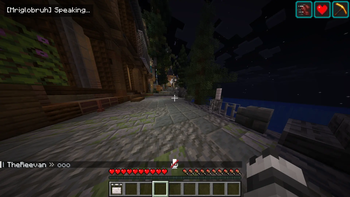
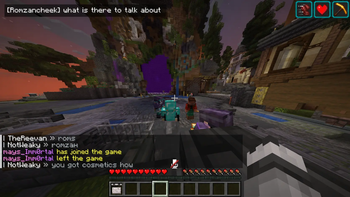
Read Plasmo Voice as live in-game subtitles.
Screenshots

About this Mod
🎤 Plasmowords
What if Minecraft voice chat had subtitles?
PlasmoWords turns Plasmo Voice speech into live on-screen subtitles inside Minecraft, letting you read what nearby players are saying in near real time.
No more asking “what?” every 10 seconds.
No more missing important callouts in fights, caves, or chaotic co-op sessions.
If someone says it in voice chat, PlasmoWords helps you see it.
✨ Features
- Live subtitles for Plasmo Voice
- Detects which player is speaking
- Updates subtitle lines while players are still talking
- Works offline with a local speech recognition model
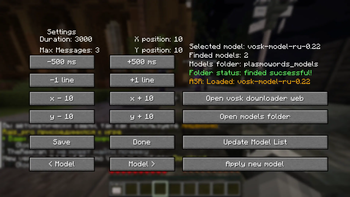
- In-game settings screen
- Model selection menu
🎮 Why use it?
Voice chat is great until:
- someone has a terrible mic
- multiple people talk at once
- background noise ruins everything
- you miss a callout and instantly regret it
PlasmoWords makes voice chat easier to follow by turning speech into readable subtitle lines прямо on your HUD.
It is especially useful for:
- survival co-op
- PvP callouts
- roleplay servers
- streams and recordings
- accessibility and general voice chat clarity
🧩 How it works
When a player speaks through Plasmo Voice, PlasmoWords:
- receives the voice audio,
- detects the speaking player,
- transcribes the speech locally,
- shows the result as subtitles on your screen.
You’ll see lines like:
[Steve] let's go deeper
[Alex] creeper behind you
[NoobMaster] where are you guys
✅ Requirements
PlasmoWords requires:
- Plasmo Voice
- A manually installed Vosk model
📦 Installation
- Install Fabric
- Install Plasmo Voice
- Put PlasmoWords into your mods folder
- Download a compatible Vosk speech model
- Extract the model into the plasmowords_models folder
- Open the mod settings in-game
- Select the model and apply it
📁 Model setup
Speech recognition models are not bundled with the mod.
You need to download a Vosk model manually and place it in:
.minecraft/plasmowords_models
Then open the PlasmoWords settings screen, refresh the model list, select your installed model, and apply it.
⚠️ Important notes
- This mod does not use online/cloud transcription
- Subtitle quality depends on microphone quality, background noise, and the selected model
- Models must be installed manually
- The mod is designed as a real-time subtitle overlay, not as a perfect full transcript syste
🛠️ Current status
PlasmoWords is fully usable, but it should still be treated as an actively evolving project.
If you run into edge cases, weird recognition results, or compatibility issues, feedback is welcome.
💬 Why this mod exists
Because once you try voice chat with subtitles, it feels like one of those features that should have been there from the start.
Minecraft voice chat is a lot more useful when you can hear it and read it at the same time.
Optional FAQ
Can I use different languages?
Yes, as long as you install a compatible Vosk model for that language.
Does it work on servers automatically?
It works client-side with Plasmo Voice, but each player who wants subtitles needs the mod and a model installed locally.
Available Versions
How to Install PlasmoWords on Your Server
Order Server
Order a Minecraft Java server with at least 3 GB RAM (4 GB recommended).
Set fabric Loader
In the panel under "Egg", select the fabric loader and matching Minecraft version (1.21.8).
Install Mod
Open the mod browser in the dashboard and search for "PlasmoWords". Click "Install" – done! Alternatively, upload the .jar via SFTP to the /mods folder.
Compatibility
Mod Loaders
Minecraft Versions
1.21.8
Server-side
✗ UnsupportedRecommended RAM
4 GB(min. 3 GB)Frequently Asked Questions
PlasmoWords server crashes on startup – what to do?
Most common cause: wrong fabric version or insufficient RAM. Check the server log (latest.log) for "OutOfMemoryError" or "Mixin" errors. With Mado Hosting: ensure at least 3 GB RAM is allocated and the loader matches the mod version (1.21.8). You can switch loaders with one click in the panel.
Is PlasmoWords compatible with fabric?
PlasmoWords officially supports fabric for Minecraft 1.21.8. The Mado dashboard automatically detects incompatible loader combinations.
Server lagging with PlasmoWords – how to optimize performance?
Recommended RAM: 4 GB (per 8 players). Use /spark profiler to check if PlasmoWords consumes the most tick time. Common fixes: reduce server view-distance to 8-10, install "performant" or "starlight" as supplementary mods on Forge. With Mado Hosting, your server runs on NVMe SSDs with dedicated CPU cores for minimal latency.
Similar Mods




Rent Modded Server
Install PlasmoWords with just one click on your server.