
Plaster Up!
A small mod that will allow you to put plaster on cobblestone blocks.
Screenshots
About this Mod
Don't know what to do with all the cobblestone you've gathered during your mining expeditions?
Want bright, stark white walls to make your base truly pop, but you're tired of gathering gravel and sand for concrete?
This mod will help you solve exactly these issues!
Introducing:
Plaster Up!
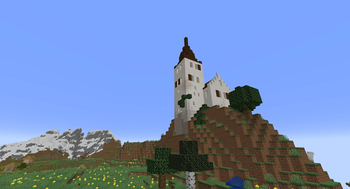
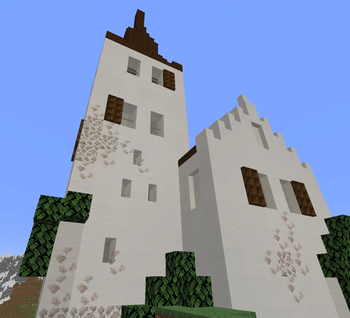
A small mod introducing the star of medieval construction: whitewash. Now you can rid yourself of dingy cobblestone keeps in favour of lush, clean and fresh white walls!
What does this mod do?
The core mechanic of this mod is the new Whitewash Paste item. It can be made using one block sand, one block bone or calcite, and one bucket of water.

Once you've prepared your Whitewash Paste, you can start plastering up all the cobblestone blocks you want.
Walk up to the bare cobblestone and right click it while holding Whitewash Paste in your main hand. You've successfully whitewashed your cobblestone!
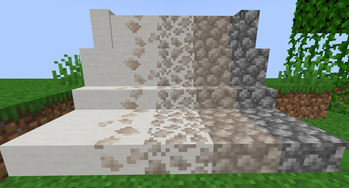
Whitewashing comes in four stages:
- Barely Whitewashed
- Slightly Whitewashed
- Half Whitewashed
- Whitewashed
For increasing the amount of whitewash on your blocks, simply continue right clicking them with Whitewash Paste in your main hand until you're satisfied.
Like I mentioned before, this can be applied to all types of cobblestone blocks: regular blocks, stairs, slabs, and walls.

Whitewashed blocks are slightly more durable than bare cobblestone.
Currently the only available colour is white. I might introduce some other earth colours later, like a couple reds, yellows, greens and browns. I might also not do that. All is subject to change.
Thank you for listening to this Public Service Announcement.
Available Versions
How to Install Plaster Up! on Your Server
Order Server
Order a Minecraft Java server with at least 3 GB RAM (4 GB recommended).
Set neoforge Loader
In the panel under "Egg", select the neoforge loader and matching Minecraft version (26.1.2).
Install Mod
Open the mod browser in the dashboard and search for "Plaster Up!". Click "Install" – done! Alternatively, upload the .jar via SFTP to the /mods folder.
Compatibility
Mod Loaders
Minecraft Versions
26.1.2, 1.21.11, 1.21.10 (+9 more)
Server-side
✓ RequiredRecommended RAM
4 GB(min. 3 GB)Frequently Asked Questions
Plaster Up! server crashes on startup – what to do?
Most common cause: wrong neoforge version or insufficient RAM. Check the server log (latest.log) for "OutOfMemoryError" or "Mixin" errors. With Mado Hosting: ensure at least 3 GB RAM is allocated and the loader matches the mod version (26.1.2). You can switch loaders with one click in the panel.
Is Plaster Up! compatible with neoforge?
Plaster Up! officially supports neoforge for Minecraft 26.1.2, 1.21.11, 1.21.10. The Mado dashboard automatically detects incompatible loader combinations.
Server lagging with Plaster Up! – how to optimize performance?
Recommended RAM: 4 GB (per 8 players). Use /spark profiler to check if Plaster Up! consumes the most tick time. Common fixes: reduce server view-distance to 8-10, install "performant" or "starlight" as supplementary mods on Forge. With Mado Hosting, your server runs on NVMe SSDs with dedicated CPU cores for minimal latency.
Similar Mods

![[ETF] Entity Texture Features](https://cdn.modrinth.com/data/BVzZfTc1/af683d206d50b05258d865b0d6e4aa2f2cee12f2_96.webp)
![[EMF] Entity Model Features](https://cdn.modrinth.com/data/4I1XuqiY/6e5bbd0d06b1741bfdab6c0cfab6de8fdaf0064c_96.webp)



Rent Modded Server
Install Plaster Up! with just one click on your server.