
Simple Revive
Get Downed instead of Dying so your friends can Revive you!
Screenshots


About this Mod
You get Downed instead of Dying and other players can Revive you by Sneaking
In Game Config Menu (for v2.0+)
/function hexrev:admin/config to access the Config Menu
Config (for v1.9 and below)
/function hexrev:admin/config to access the Config Menu/scoreboard objectives setdisplay sidebar to hide current settings
Downed Duration: Maximum amount of time a player can stay downed before dyingCooldown: Amount of time that needs to pass after getting downed to get downed againRevive Time: Amount of time it takes to revive a playerReviver Hunger Consumption: Amount of hunger it takes to revive a playerDowned Hunger Consumption: Amount of hunger it takes to get revived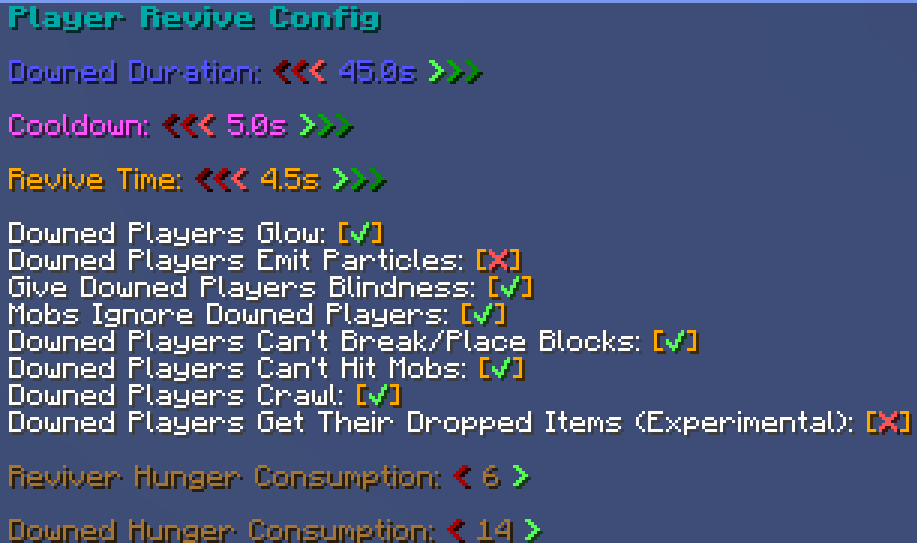
Troubleshooting
If you are having issues with the datapack, try doing these(not all of them at the same time)
- Try running
/reload - Try running
/function hexrev:load - Try running
/function hexrev:setup(this resets the config, only for v1.9 and below) - Make sure you have the file on the proper directory:
[world name]/datapacks/[.zip goes here]for the datapack andmods/[.jar goes here]for the mod version (the jar file having "+Datapack" at the end does not mean that it's a datapack) - The Essentials plugin might be messing with the datapack as it usually does
- Try restarting the server
Compatibility
- Compatible with Vanilla Tweaks Graves Datapack
- For v1.9 and below: Might have issues with other datapacks using
/team, DisableMobs Ignore Downed Playersin the Config if you are running into issues with this
For Devs and Admins
- If you want to make a player unable to get downed, give them the tag
hexrev.custom_disable
Known Bugs
- Getting downed will still consume your Respawn Anchor charge
- Players can momentarily see tp to players' and see their locations as they are in spectator mode when downed
Contact me on Discord for any issues! @hexasan
Available Versions
How to Install Simple Revive on Your Server
Order Server
Order a Minecraft Java server with at least 3 GB RAM (4 GB recommended).
Set datapack Loader
In the panel under "Egg", select the datapack loader and matching Minecraft version (26.1.2).
Install Mod
Open the mod browser in the dashboard and search for "Simple Revive". Click "Install" – done! Alternatively, upload the .jar via SFTP to the /mods folder.
Compatibility
Mod Loaders
Minecraft Versions
26.1.2, 26.1.1, 26.1 (+12 more)
Server-side
✓ RequiredRecommended RAM
4 GB(min. 3 GB)Frequently Asked Questions
Simple Revive server crashes on startup – what to do?
Most common cause: wrong datapack version or insufficient RAM. Check the server log (latest.log) for "OutOfMemoryError" or "Mixin" errors. With Mado Hosting: ensure at least 3 GB RAM is allocated and the loader matches the mod version (26.1.2). You can switch loaders with one click in the panel.
Is Simple Revive compatible with datapack and fabric and forge and neoforge and quilt?
Simple Revive officially supports datapack, fabric, forge, neoforge, quilt for Minecraft 26.1.2, 26.1.1, 26.1. Note: Forge and Fabric mods are NOT cross-compatible – pick one loader and stick with it. The Mado dashboard automatically detects incompatible loader combinations.
Server lagging with Simple Revive – how to optimize performance?
Recommended RAM: 4 GB (per 8 players). Use /spark profiler to check if Simple Revive consumes the most tick time. Common fixes: reduce server view-distance to 8-10, install "performant" or "starlight" as supplementary mods on Forge. With Mado Hosting, your server runs on NVMe SSDs with dedicated CPU cores for minimal latency.
Similar Mods




Rent Modded Server
Install Simple Revive with just one click on your server.